Social engineering attacks your judgment, usually at the exact moment you feel rushed or afraid. Flattery can also lower your guard. The same technique lands on a retiree answering a phone call and on a controller approving a wire. According to the 2025 annual report from the Federal Bureau of Investigation (FBI) Internet Crime Complaint Center (IC3), victims filed 1,008,597 complaints in 2025, the first year the total passed one million, and reported $20.877 billion in losses.
This guide walks through how these attacks work, the cues that give them away, and the practical habits that stop them before money or access leaves your hands. The stakes keep climbing as attackers borrow more convincing identities and faster channels, so knowing what to look for is the difference between a close call and a costly one.
Key Takeaways
Social engineering combines a believable pretext with emotional pressure, and the same manipulation appears in email, phone calls, text messages, video, and in-person encounters.
Urgency and claimed authority are early warning signs. Manufactured familiarity can also appear before any technical clue.
Independent verification through a channel the requester did not supply is the most reliable defense against impersonation, including AI-generated voice and video.
Phishing-resistant authentication, a smaller public footprint, and prompt reporting limit the damage when persuasion succeeds anyway.
What Is Social Engineering and How Does It Work?
Social engineering uses a credible identity and emotional pressure to frame a harmful request that manipulates a person into revealing information, granting access, transferring money, or taking another harmful action. It can succeed without a flaw in code by exploiting a person who trusts the wrong message at the wrong moment.
Attackers research the target first. They collect names and roles, along with vendor relationships. Sources include social media and company websites; calls to customer-service lines provide more information. They then establish trust or authority by posing as a boss, a supplier, a bank, or the information technology (IT) help desk.
Emotional pressure follows: a deadline, a threat, a secret, or a windfall. Only then does the request arrive, framed as routine. Once the target complies, the attacker drains an account or uses one employee's access to reach colleagues with more privileges. Believing you are immune removes the one habit that would have saved you: pausing to check.
Common Psychological Warning Signs Behind Social Engineering
Suspicious requests announce themselves through predictable influence cues long before a misspelled domain or broken link appears. Time pressure, social compliance, herd behavior, authority, reciprocity, and scarcity repeatedly shape scam attempts. These cues affect your thinking in several ways:
Time Pressure and Scarcity: Deadlines, expiring offers, threats of arrest or account closure, and emotional escalation about a relative or a windfall push you into fast, intuitive processing, where a story's plausibility counts for more than its evidence.
Authority: Attackers borrow the credibility of a chief executive officer (CEO), a bank, a government agency, a police officer, or IT support because people are trained not to challenge those roles.
Reciprocity: A small favor creates an obligation to reciprocate.
Social Compliance and Herd Behavior: A colleague who "already approved" supplies social proof that makes the request feel routine.
Liking: A personalized, friendly tone invites trust.
Consistency: A minor request granted early makes an escalated one feel consistent with what you already agreed to.
Each cue works by short-circuiting deliberate evaluation, which is why pausing before responding is the throughline of every defense that follows.
How to Protect Yourself from Social Engineering
Recognize the pressure, pause, verify through a channel you control, harden the accounts an attacker would want, and report anything that got through.
1. Watch for Emotional Pressure Cues
Urgency, fear, secrecy, or excitement in an unexpected message are the earliest signal that someone is trying to short-circuit your judgment. Legitimate businesses generally allow time for verification and rarely demand a decision inside a few minutes. When a message pushes you to act now, treat that pressure itself as the warning, not the details of the story.
For example, an email claiming your account will be locked in fifteen minutes unless you confirm a code is engineered to bypass reflection. A real institution would give you a window to call back on a number you already trust.
2. Compare Requests Against Normal Patterns
Every request has a sender, a situation, and a normal process, and comparing all three can expose inconsistencies a lookalike design would otherwise hide. A CEO texting from a personal number, a vendor changing bank accounts mid-invoice, or a bank asking for a one-time code all fall outside how those relationships usually work.
If a supplier you have paid the same way for two years suddenly asks you to route payment to a new account through a different channel, that mismatch is the story. Confirm the change against the process you already know before you act on the message in front of you.
3. Inspect Sender Addresses and Links
Reviewing sender addresses and hovering over links can reveal impersonation before you click. Added, dropped, or swapped domain characters signal a lookalike, and caller claims deserve the same scrutiny when the display name does not match the underlying address.
A padlock or https:// prefix means only that the connection is encrypted; phishing sites routinely have valid certificates. So a "secure" login page at a domain like paypa1-security.com is still a fake, no matter how polished it looks.
4. Refuse to Share Passwords or Codes
Requests for passwords, MFA codes, personal data, or remote device access are warning signs regardless of who appears to be asking. Legitimate organizations do not need a user's password, and one-time codes should not be shared in response to an unsolicited request, even when the caller already seems to know account details.
If someone claiming to be from your bank's fraud team asks you to read back a code they just sent, they are asking you to approve their login, not yours. End the call and dial the number on the back of your card.
5. Pause on Unusual Payment Requests
Unusual payment methods and confidential transfer requests should trigger a pause and independent verification every time. The Federal Trade Commission (FTC) offers blunt guidance: "No real business or government agency will ever tell you to buy a gift card to pay them."
Cryptocurrency, wire transfers to new accounts, and payment apps deserve the same scrutiny, because each moves money in ways that are hard to reverse. A "manager" asking a new employee to buy gift cards for client rewards during a busy afternoon is a scam that has landed in thousands of inboxes.
6. Call Back on a Number You Control
Using a saved contact or the number on the back of a card removes the attacker from the loop entirely. Typing an official address into a browser provides another independent route to the same institution, since contact details in the suspicious message may be attacker-controlled and should not be trusted.
The person on the other end of the original call may sound patient, professional, and eager to help, and that is exactly the point. A two-minute callback to a number you already know is the cheapest defense you have.
7. Use a Code Word for High-Risk Requests
For high-risk requests and possible deepfakes, a pre-agreed code word or a question only the real person is likely to answer adds another identity check, though it is not infallible. Families and executive teams can decide on a phrase in advance and use it whenever a call involves money, credentials, or an unusual instruction.
In a July 2024 attempt, an executive asked a cloned "CEO" voice for the title of a book the real CEO had recommended days earlier, and the caller hung up. The check took seconds and shut the attack down before any decision was made.
8. Limit Your Public Footprint
Limiting what is public about you shrinks the attacker's research phase and removes the raw material for a convincing pretext. Job titles, travel plans, birthdays, and especially recordings of your face and voice all feed pretexts and clones, and private accounts with followers you actually know cut off that supply.
An executive posting a keynote video on Monday and an out-of-office notice on Tuesday hands attackers both a voice sample and a window when nobody can verify a "quick favor" request in person.
9. Turn On Phishing-Resistant MFA
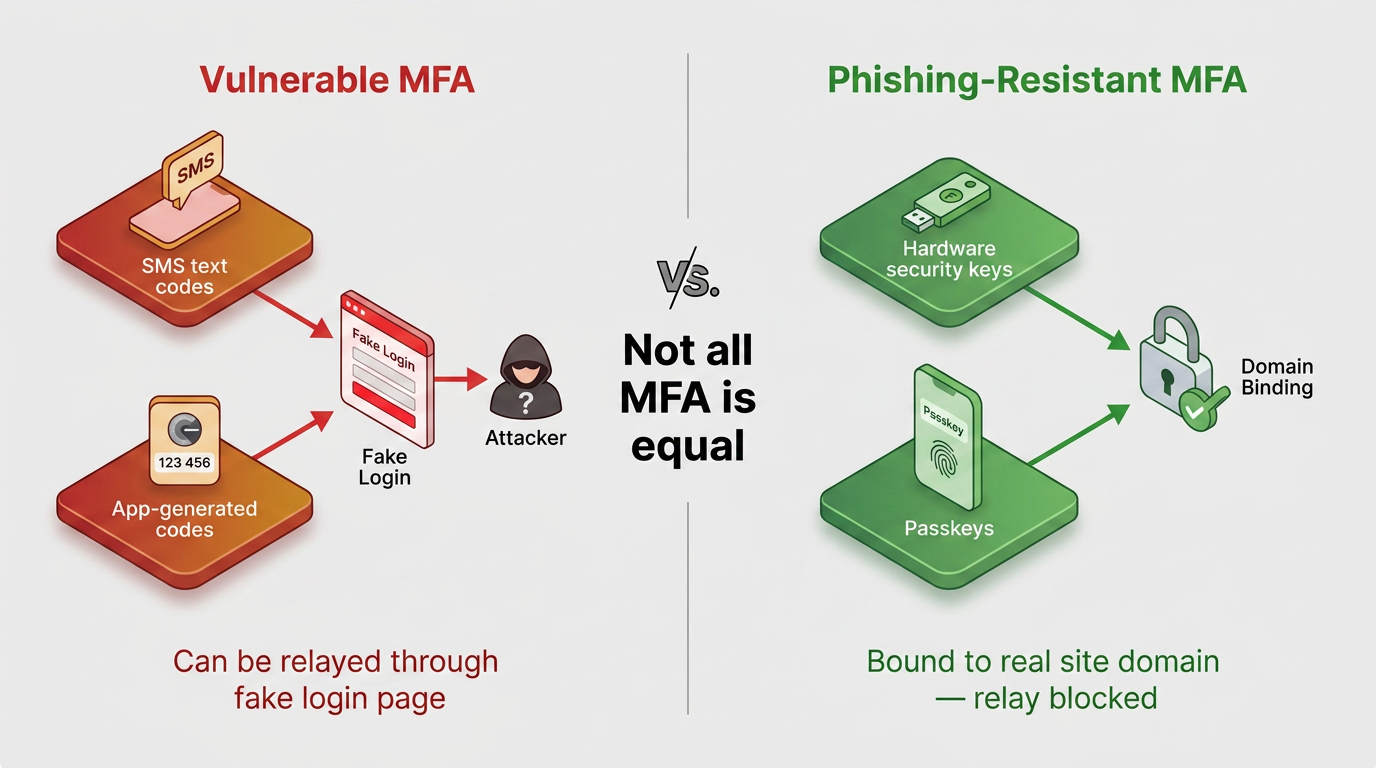
Phishing-resistant MFA limits what a stolen password or a relayed code can unlock, so persuasion that succeeds against you still fails against your accounts. Passkeys and hardware security keys bind the login to the real site's domain, which blocks the attempt when an attacker tricks you into logging in at a lookalike page.
Text codes and app-generated codes can be relayed in real time by a fake login page, but a passkey simply will not authenticate against a domain it does not recognize. Turning one on for your email and bank accounts closes the highest-value doors first.
10. Report Every Suspicious Message
Reporting a suspicious message, or a mistake already made, limits the harm and is far safer than hiding it. A report lets a security team warn colleagues, a bank freeze a transfer, and investigators connect your case to others already under review.
Even a delayed report is useful, since attackers often reuse infrastructure across many victims. Forwarding a phishing email to your IT team or filing a complaint with the FBI's IC3 turns a private near-miss into a shared defense.
What to Do After a Social Engineering Attack
The first hour after a suspected compromise decides how much damage the attacker gets to keep, so the response order matters as much as the actions themselves. Working through containment, account recovery, and reporting in sequence prevents a bad click from turning into drained accounts or lateral movement across your other services.
The following steps outline that sequence in the order they should be taken:
Isolate the Affected Device: If you clicked a link or opened an attachment, disconnecting the affected device from networks limits further activity. Begin account recovery promptly from a known-clean device. Do not wait for a scan.
Secure Compromised Accounts: Change the exposed password and every account that shared it, sign out of all active sessions, remove unrecognized third-party app access, and enable phishing-resistant MFA.
Update and Scan the Device: The affected device can then be updated and fully scanned or rebuilt before reuse.
Contact Your Bank and File Reports: When money is at risk, the originating bank should be contacted immediately and asked for a recall or reversal. The FBI's fund-recovery process applies only to wires sent within the previous 72 hours.
Notify Security and File Follow-Up Reports: Notifying the security or IT team helps it monitor follow-on activity, while the FTC's recovery guidance for exposed personal data produces a step-by-step plan. A fraud alert with one credit bureau rounds out the response.
Each of these steps closes a door the attacker is still counting on staying open, whether that is a reused password, a lingering session token, or a wire that has not yet cleared. Moving quickly and reporting honestly, even when the mistake feels embarrassing, is what turns a successful attack into a recoverable one.
Make Verification the Default
Pause when pressure arrives and check through a channel you chose. Use accounts that fail safely when a password leaks. Agree on a family code word and save your bank's real number. Turn on a passkey tonight so the next convincing story meets a routine instead of a reflex.
Frequently Asked Questions
What Is the Best Defense Against Social Engineering?
Verify any unexpected request for money through a channel you already trust, such as a saved number or an official website. Use the same process for requests involving credentials or access. This independent check defeats most impersonation attempts, however convincing the message, voice, or video.
How Can You Tell Whether a Message Is a Social Engineering Attack?
The emotional pressure gives it away. Urgency, secrecy, a claimed authority, and a request that sits outside normal process are the earliest signals. Lookalike addresses and mismatched links confirm the suspicion, as do demands for codes or unusual payment methods.
Can Multi-Factor Authentication Stop Social Engineering?
Only some forms of multi-factor authentication stop it. Codes that arrive by text or come from an app can pass through a fake login page when an attacker relays them, and people can approve push prompts by mistake. Passkeys and hardware security keys bind the login to the real site and block the relay.
How Can You Verify a Voice or Video Deepfake?
Ending the call and dialing the person back on a known number is the reliable test. A pre-agreed code word or a question the real person is likely to answer provides an additional check, but it should not replace independent verification.
What Should You Do if You Shared Information with a Scammer?
Using a known-clean device to change exposed and reused passwords and revoke active sessions should happen promptly while the affected device is isolated and examined. Immediate contact with a bank when money is at risk can limit the damage and improve the odds of recovery. Notification to workplace security and official fraud channels should follow.