An email-enabled security group can simplify communication and resource access, but combining both responsibilities introduces administrative tradeoffs. One membership list may reduce complexity, but group changes can expose risks that previously remained hidden. Understanding where that overlap helps, and where it quietly creates risk, determines whether this group type is the right structural choice for a given team.
Key Takeaways
An email-enabled security group distributes mail and assigns resource permissions through the same static membership list.
The group fits when the email and access populations align without dynamic or device membership.
Creation and editing requirements depend on the directory and messaging deployment.
Safe operation requires controlled ownership, delivery restrictions, membership reviews, and documented manual remediation.
What Is an Email-Enabled Security Group?
An email-enabled security group, also called a mail-enabled security group, combines a security principal with an email distribution target. Administrators can use its static membership list for both communication and supported resource permissions.
One Membership Object for Permissions and Email
Every member who is a security principal, typically a user account, inherits the permissions that administrators assign to the group. Messages sent to the group address reach those same members, so one list drives both access and communication.
That alignment creates the primary benefit and operational risk. Adding someone so that they receive a message can also grant access, while removing someone to revoke access can stop communications they still need. The group therefore works best when the two populations are intentionally identical rather than merely similar. If reviewers, stakeholders, or announcement recipients need email without access, separate groups model the requirements more accurately.
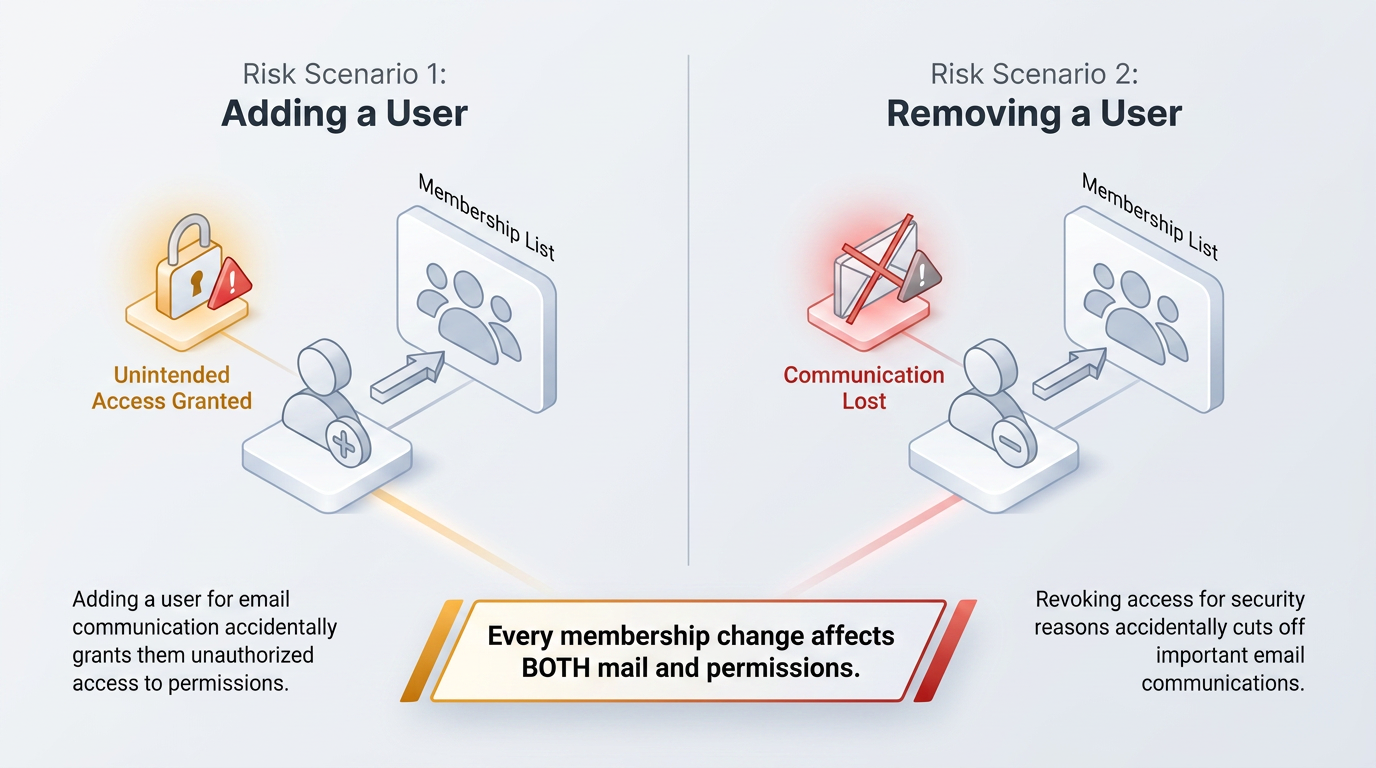
The shared list also affects lifecycle management. Owners need to evaluate every membership change against both purposes, and reviewers should compare the current list with the approved access and communication populations. When those populations begin to diverge, one object adds administrative complexity by concealing two requirements inside a single membership decision. Accountable ownership and clear membership criteria help prevent routine mailing-list changes from becoming unreviewed access changes.
Security Principal Status as the Core Distinction
Administrators attach permissions to securable objects and grant them to security principals such as users or groups, the same principals that any access management model relies on to control who can reach a resource. An ordinary distribution group routes messages rather than receiving access rights, while a mail-enabled security group combines a mail address with security principal status. This status allows the group to participate in permission assignments when the resource and directory support it.
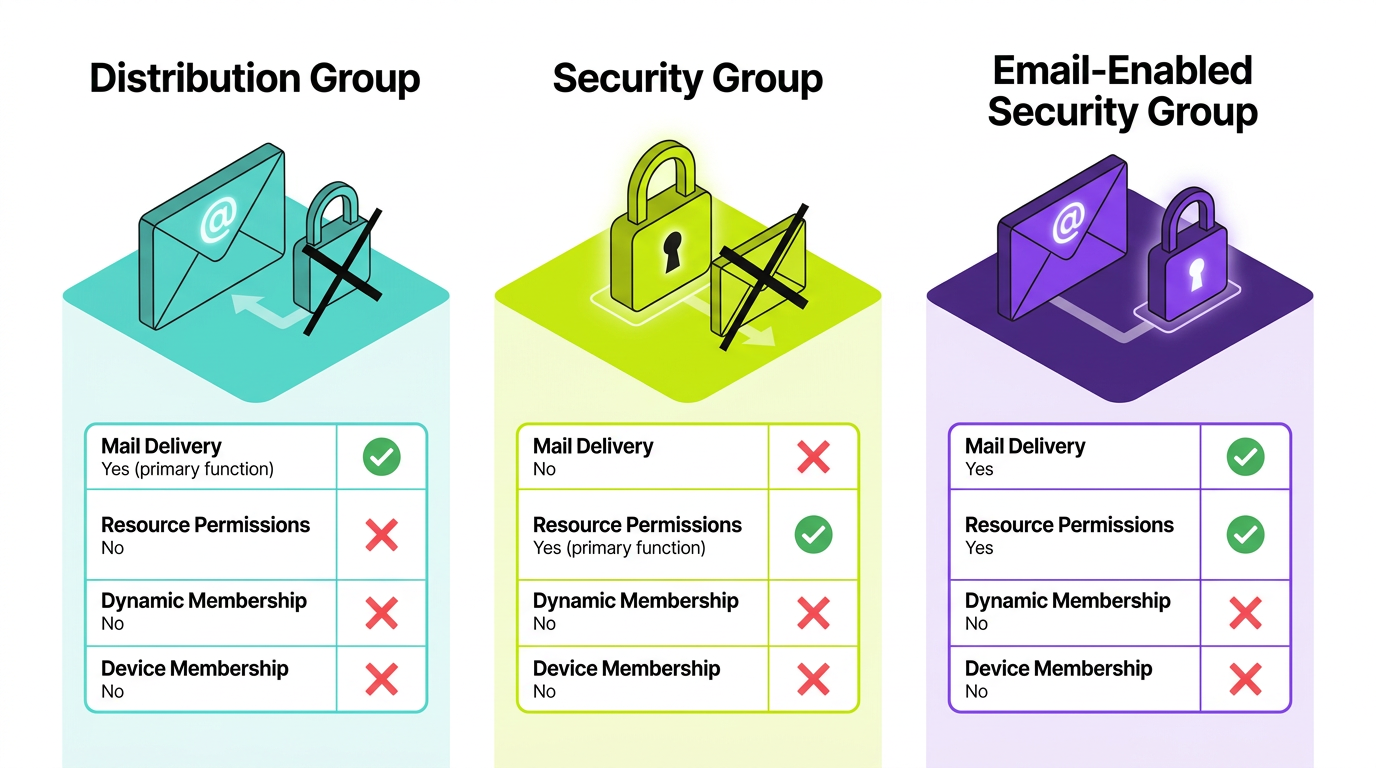
Administrators should verify the object type before assigning access. A similarly named distribution group can deliver messages successfully while remaining unsuitable for permissions. A standard security group can hold permissions without offering a shared mail address. Labels and capabilities differ across deployments, so successful message delivery does not prove that the object has the intended security role.
The directory must recognize the group as a security principal, and the target resource must accept that principal. Both conditions matter. Email capability addresses communication, while security principal status addresses authorization. The dual-purpose design works only when the surrounding systems support both functions. Administrators must check object type and resource compatibility before relying on the group for access control.
When an Email-Enabled Security Group Is the Best Choice
This group type fits when the same stable user population needs resource access and email distribution without dynamic or device-based membership.
Aligned Access and Communication Requirements
The same people must need both capabilities. If the audiences differ by even one person, two groups model the requirement more accurately. Administrators must also be able to manage membership by hand when the deployment does not offer attribute-based rules. Deployments that exclude devices cannot satisfy a device-membership requirement.
Failing any test points to a different object type:
Announcements Only: A team that only needs announcements is better served by a standard distribution group, which grants no permissions.
Permissions Without Shared Mail: A population that needs permissions but no shared address belongs in a standard security group, which can support dynamic user or device membership, with group-based licensing depending on the platform.
Shared Workspace Needs: A team that wants a shared inbox, files, calendar, and chat needs a collaboration workspace.
Each alternative solves one half of the dual-purpose problem without introducing the shared-list risk described above.
The comparison should also account for group variants. A standard distribution group typically uses directly managed membership, while a dynamic distribution variant can calculate recipients without becoming a security principal. Dynamic message routing does not make that object suitable for resource access. The email-enabled security group fits stable populations whose communication and access needs align, without unsupported automation requirements.
Static Document Library Access with Group Notifications
An internal policy team of a dozen people might need read access to a document library and an announcement whenever a policy changes. Administrators can compare everyone who needs access with everyone who should receive notifications. If the lists match exactly, the pattern fits. If reviewers or stakeholders need updates without access, a security group for permissions and a separate distribution group for mail represent the requirements more accurately.
Two disqualifiers deserve attention even when the lists match. In some document library and directory deployments, external users in a mail-enabled security group do not reliably receive permissions when administrators use the group for sharing. External participation therefore requires platform-specific verification and can point to a plain security group instead. A deployment limited to static membership also rules out this group type when membership should follow an attribute such as department.
The group needs an accountable owner because membership controls access as well as communication. The owner should know the protected resource and the membership criteria, including the event that triggers removal. Without that context, a routine mailing-list update can become an unreviewed access change that persists until someone performs a later membership review.
How to Set Up an Email-Enabled Security Group
Administrators should use the administrative interface or command-line tools that their directory and messaging deployment supports for this group type.
Prerequisites and Messaging Admin Center Creation
The account performing the work needs appropriate permissions to manage mail recipients and security-capable groups. Exact role names and management locations vary, so administrators should identify the authoritative interface before setup. Creation typically starts with a group name, email address, description, and accountable owner. The selected type matters most because it determines the object's messaging capability and security principal status, including whether it performs both functions.
Conversion behavior also depends on the deployment. Some cloud deployments do not allow administrators to convert an ordinary security group into a mail-enabled one later. Some on-premises messaging deployments let administrators mail-enable an existing compatible security group. Confirming that behavior before creation prevents a team from relying on an in-place change that the platform does not support.
In the supported interface, administrators enter the display name and description, assign owners, add members, and set the group's email address. They can then review the summary, create the group, and confirm how broader directory views display it. Even when an identity interface shows the object, the deployment can still require administrators to route later edits through messaging administration.
Command-Line Creation and Post-Creation Verification
Where supported, messaging command-line tools can create the same object by setting its name and alias, then selecting the security-capable group type. Selecting a distribution-only type instead creates a mail-only group that cannot hold permissions. Command-line tools support standardized, reviewable scripts for bulk changes, although available parameters and resulting behavior depend on the deployment.
Administrators should complete these checks before assigning permissions:
Listing: The group should appear in the mail-enabled security inventory rather than among plain distribution groups, and its reported type should confirm its security capability. Owners and members should match the approved list exactly before the group receives access.
Address and Delivery: The primary email address should match the plan and use the intended domain. A test message should arrive under the selected sender restrictions.
Testing each function independently makes troubleshooting easier and prevents a working email address from serving as false proof that permissions are configured correctly. Administrators should also confirm that the target resource recognizes the group before treating creation as complete.
Limitations of Email-Enabled Security Groups to Consider
The dual-purpose design can exclude identity management and governance capabilities, so administrators should evaluate deployment-specific constraints before creating the group.
Identity Platform, Directory API, Membership, and Licensing Restrictions
In some deployments, the identity interface and directory API provide read-only access to an email-enabled security group. Inventory and reporting scripts can read it, but provisioning automation cannot create or modify it. Tooling that writes group changes through a directory API therefore needs a messaging-side or manual exception when that restriction applies.
The membership model can be equally fixed. Common limitations include unsupported dynamic membership rules and an inability to add devices. Group-based licensing or sensitivity labels may also be unavailable. Administrators should verify these capabilities because support varies by deployment. Assuming support can leave a team with an object that cannot satisfy its original requirement.
A standard security group can cover attribute-driven membership and device targeting. It can also support license assignment, while a collaboration group can support teams that need a shared workspace along with mail. Required functions determine the selected group type; extra features are irrelevant to that decision. Choosing a dual-purpose group despite an unsupported requirement usually creates a manual workaround that becomes harder to govern over time. Teams should account for that operational cost during design rather than after the group enters production.
Nesting, Hybrid Authority, and Conversion Constraints
Some cloud deployments do not support adding standard security groups as members of an email-enabled security group. Where that restriction applies, administrators must flatten role-group nesting into direct user membership. Teams that normally model access through nested groups then need to manage individual users directly. This increases the number of membership changes they must review.
Hybrid deployments add a source-of-authority complication. Administrators may need to edit a synchronized mail-enabled security group only in the on-premises directory because the cloud copy remains read-only. Synchronization can also depend on required attributes, including a populated display name, so administrators should verify both the source object and the synchronized result.
Changing direction later can require replacement rather than conversion. Some deployments provide no direct route from a mail-enabled security group to a dynamic group or from a synchronized group to a fully cloud-managed one. In that case, administrators need to create the replacement, copy membership, re-create permissions and delivery settings, and retire the original. Documenting which deployment capabilities or business changes would trigger that migration helps teams plan the transition before unsupported requirements create an urgent governance problem.
Security and Lifecycle Governance for This Group Type
Safe operation requires compensating manual controls whenever automated governance processes cannot fully update membership for this group type. The central risk is quiet scope growth: an owner can add someone for mail and unintentionally grant access. These controls mirror the broader discipline of data governance, where oversight of who can reach sensitive resources never fully delegates to automation.
Practices worth building into the lifecycle include:
Ownership Approval: Organizations should treat access-group owners as privileged because they control who gains access.
Least-Privilege Membership: People should join for the access they genuinely need, not for mailing convenience.
Delivery Restrictions: Sender restrictions should reflect membership sensitivity and available platform controls.
Recurring Membership Reviews: Review cadence should match resource sensitivity, with teams auditing change logs between cycles.
Remediation Tracking: An owner may need to remove rejected members manually through the authoritative interface, so teams should track each removal to completion.
Retirement Criteria: Defined end conditions should cover resource decommissioning or divergence between the email and access audiences.
Make Dual-Purpose Membership a Deliberate Choice
One email-enabled security group works when the mail and access populations remain identical and the organization can carry the manual governance load. Teams should revisit that choice when requirements or lifecycle controls change, since a group that once fit may eventually require a split design or a different group type.
Frequently Asked Questions
Can You Create an Email-Enabled Security Group in the Identity Admin Center?
That depends on which interface owns mail-enabled objects. Administrators should verify where test changes can be made and whether they persist in the authoritative directory.
Can an Existing Security Group Be Mail-Enabled Later?
Conversion depends on the deployment. A pre-change inventory of memberships, permissions, owners, and dependencies supports safe replacement and rollback when in-place conversion is unavailable.
Can an Email-Enabled Security Group Use Dynamic Membership?
Some deployments support only direct membership. When membership follows attributes such as department or location, separate dynamic access and communication groups can be easier to govern.
What Is the Difference Between a Distribution Group and an Email-Enabled Security Group?
A distribution group routes messages without granting access. An email-enabled security group supports both communication and permissions when the target resource recognizes it as a security principal.