Key Insights
Verizon's 2024 Data Breach Investigations Report found that 68% of breaches involved a non-malicious human element: a careless click, a reused password, a screen left in plain view. Shoulder surfing is that last category stripped to its simplest form, with no malware, no exploit, and no log entry to trace it back by.
Shoulder surfing social engineering collects private information by watching someone's screen or hands on a keypad. Because it can resemble ordinary behavior in a shared space, the exposure may pass unnoticed. Shared-space device use can expose information to anyone with a clear sightline. Casual observation may not look threatening.
The gap between how routine a glance feels and how useful the resulting fragments are to an attacker is where the real risk sits. This article compares shoulder surfing against adjacent tactics, maps where exposure happens and what gets captured, traces how observed fragments become the opening move in pretexting and account takeover, and lays out the layered physical, behavioral, and policy controls that hold up against both direct observation and newer technology-assisted methods.
Key Takeaways
Shoulder surfing covers both direct and technology-assisted observation of information that a device displays or a user enters.
Everyday environments and trusted proximity create exposure without any obviously malicious behavior from the person watching.
Information picked up by observation often becomes the first step in a longer social engineering or account-compromise sequence.
Layered physical, behavioral, technical, and policy controls protect far better than any single measure applied on its own.
What Is Shoulder Surfing Social Engineering?
Shoulder surfing is the use of visual observation to obtain private information from a screen, keypad, or document, and whether it belongs under the heading of social engineering depends on which security taxonomy you consult.
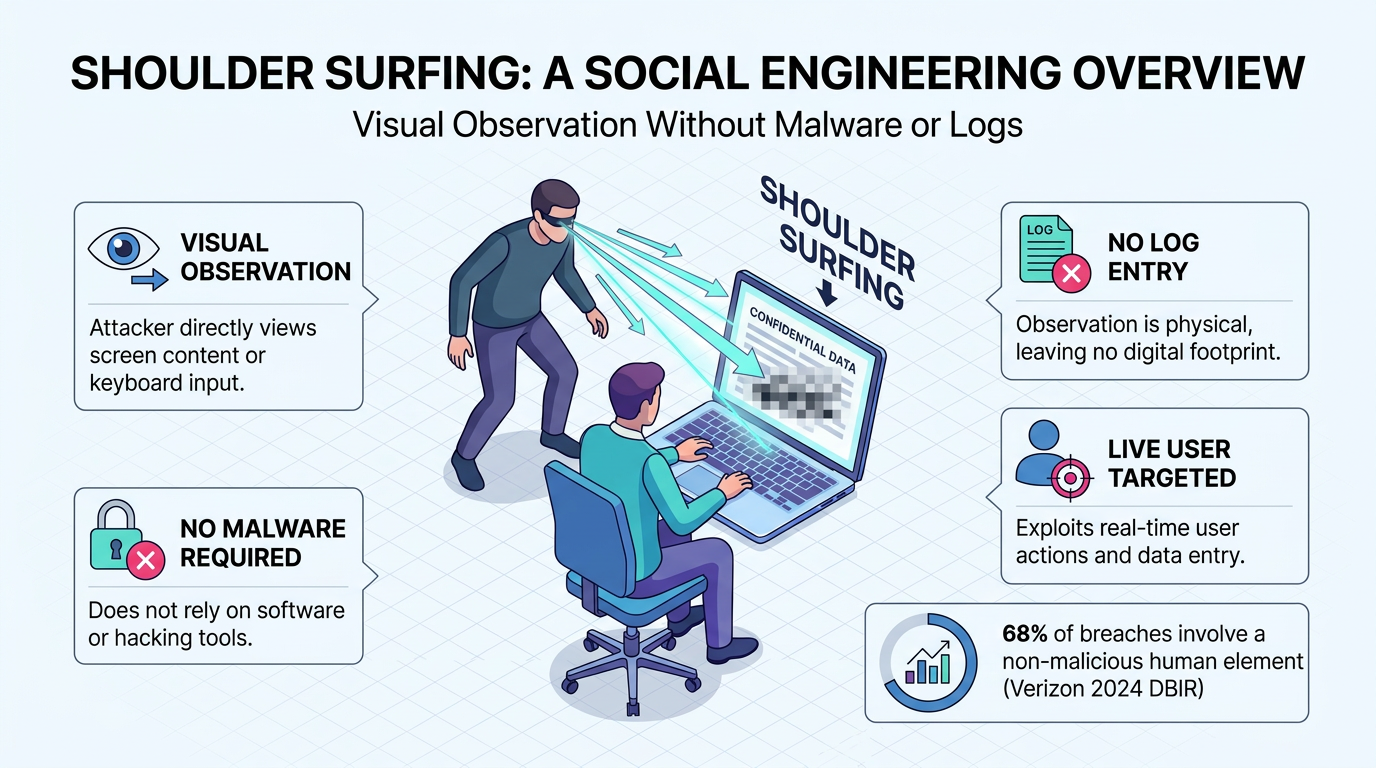
Direct Observation Turns Ordinary Proximity into Information Access
Ordinary proximity is often all it takes: an observer might glance at a laptop on a train or watch fingers move across an ATM keypad. A text message that lights up on a phone left on a conference table can be just as visible. The information at stake is anything a screen or keypad exposes: passwords and PINs during entry, card numbers at checkout, private messages, and customer records open in a support tool.
Cameras, binoculars, or mirrors can expose information to someone seated across an aisle, someone recording a screen from a few rows back, or someone reading mirrored text. The threat is greater on large desktop and notebook monitors than on small mobile screens. Even brief visibility can disclose context beyond credentials, including who the user communicates with, what service is open, and which task is underway. That context may later support impersonation, a convincing pretext, or account takeover fraud.
Related Tactics Differ by What the Attacker Observes or Accesses
Several tactics related to shoulder surfing also happen in physical space:
Eavesdropping: Overhearing calls or spoken passwords.
Tailgating: Following an authorized person through a controlled door.
Dumpster Diving: Retrieving discarded documents or media.
Device Snooping: Handling an unlocked, unattended device.
Visual Hacking: An informal umbrella term for shoulder surfing.
Shoulder surfing differs from these adjacent tactics because it captures information from a live user who is actively displaying or entering it. That distinction centers on the access method rather than the sensitivity of the information or the observer's relationship to the user.
Shoulder surfing may be treated separately from phishing, pretexting, impersonation, baiting, quid pro quo, and tailgating as a physical threat to authentication. It may also be grouped with dumpster diving and eavesdropping as direct human interaction. Shoulder surfing feeds the same chain that phishing attack techniques and pretexting depend on.
A common misconception is that every incident involves a professional after a password. Friends and other trusted people may observe screens out of curiosity or boredom without having a plan, though the exposure matters just as much to the person whose screen the observer read.
How Shoulder Surfing Social Engineering Works
Shoulder surfing works because screens and input gestures reveal information continuously. Task-focused users rarely monitor every person, camera, or reflection around them.
Opportunistic Observation Begins with Visibility and Low Awareness
Two conditions have to coincide: a screen or keypad in someone's field of view, and a user too absorbed to notice. Both commonly occur in crowded places. Someone typing an email on a train is concentrating on the email; the passenger beside them may be bored, and the display is where their eyes land. A screen that remains in someone's line of sight during ordinary activities can invite casual observation without drawing attention.
A family member sharing the couch normalizes close proximity. Social relationships can make the sightline harder to police, as when a friend leans in to show you something or a colleague pairs on a document. Friends, strangers, and family members can all become observers when a visible screen attracts their attention.
Deliberate observers move from idling to positioning to watching, and they choose an angle because a view from behind or above is clearer than one from the front. Repeated viewing raises success sharply compared with a single glance. An initially casual view can become more revealing when the user remains in the same position or repeats the same input.
Captured Information Can Feed a Longer Attack Chain
Social engineering attacks move through information gathering, trust building, exploitation, and exit, and shoulder surfing belongs to the first phase. A glance can yield fragments: an employer's name in an email header, a manager's name in a chat window, a home address on a map, or a partial password. Fragments become a pretext. An attacker who knows which vendor an accounts-payable clerk emails can call as that vendor.
The hotel and casino intrusions documented in an official 2024 incident report, in which attackers talked IT help desk staff into resetting passwords and multi-factor authentication protections (MFA) tokens, show how far a pretexting call travels once the caller sounds legitimate. Behavioral AI is designed to flag the account takeover and MFA-reset activity that follows a successful pretexting call, even when the shoulder surfing that supplied the pretext happened off-screen entirely. The glance over someone's shoulder is not something email or identity security can observe; the account activity it enables usually is.
Outcomes include account takeover fraud and payment fraud schemes as well as identity theft, stalking, and blackmail. Participants in a follow-up survey study feared stalking and blackmail. That concern echoes an account from earlier research, in which a participant described worrying about being followed after a bystander read the address on her map.
Whether MFA helps depends on what the observer sees. A reusable password stays valid until the user changes it, so one clear view is enough.
Under WebAuthn authentication, a user enters a PIN to authorize use of a hardware key or passkey-protected authenticator, which uses a device-bound credential rather than exposing a reusable password. WebAuthn is widely available as phishing-resistant authentication, and its device-bound design also means an observed PIN is useless on its own.
Where Shoulder Surfing Happens and What It Can Expose
Shoulder surfing risk follows any visible screen or keypad used near strangers, coworkers, household members, cameras, or shared digital audiences, and what gets exposed ranges from a single PIN to an ongoing view of someone's accounts and conversations.
Public, Workplace, and Home Environments Create Different Sightlines
Public spaces, workplaces, and homes each create a different sightline problem, from strangers on a train to colleagues at a shared desk to family members on the same couch:
Public Environments: On public transit, a seated passenger's phone may be visible to the standing rider above them for the length of the trip. Airports and hotel environments mix long waits with laptops opened on knees. Cafés and coworking spaces put a stranger's screen one table away for hours. ATMs and point-of-sale terminals expose a keypad rather than a display, so the information at risk is a PIN entered in a few seconds and later used in payment fraud schemes.
Workplace Environments: Workplaces change the observer from a stranger to a peer. Tighter offices let nearby colleagues watch passwords being typed or read sensitive screens, which increases insider threat risks.
Home Environments: Home creates its own exposure. During remote work, family members could shoulder surf work information when they were unfamiliar with workplace security expectations. Visitors, shared kitchen-table desks, and a laptop facing a hallway all count. A screen facing a doorway or shared walkway can remain visible to people moving through the space. Controlled information handled at home still needs the same protection as in the office, and close relationships can make people less likely to recognize or question an exposed sightline.
Across all three environments, managing sightlines reduces the opportunity for observation.
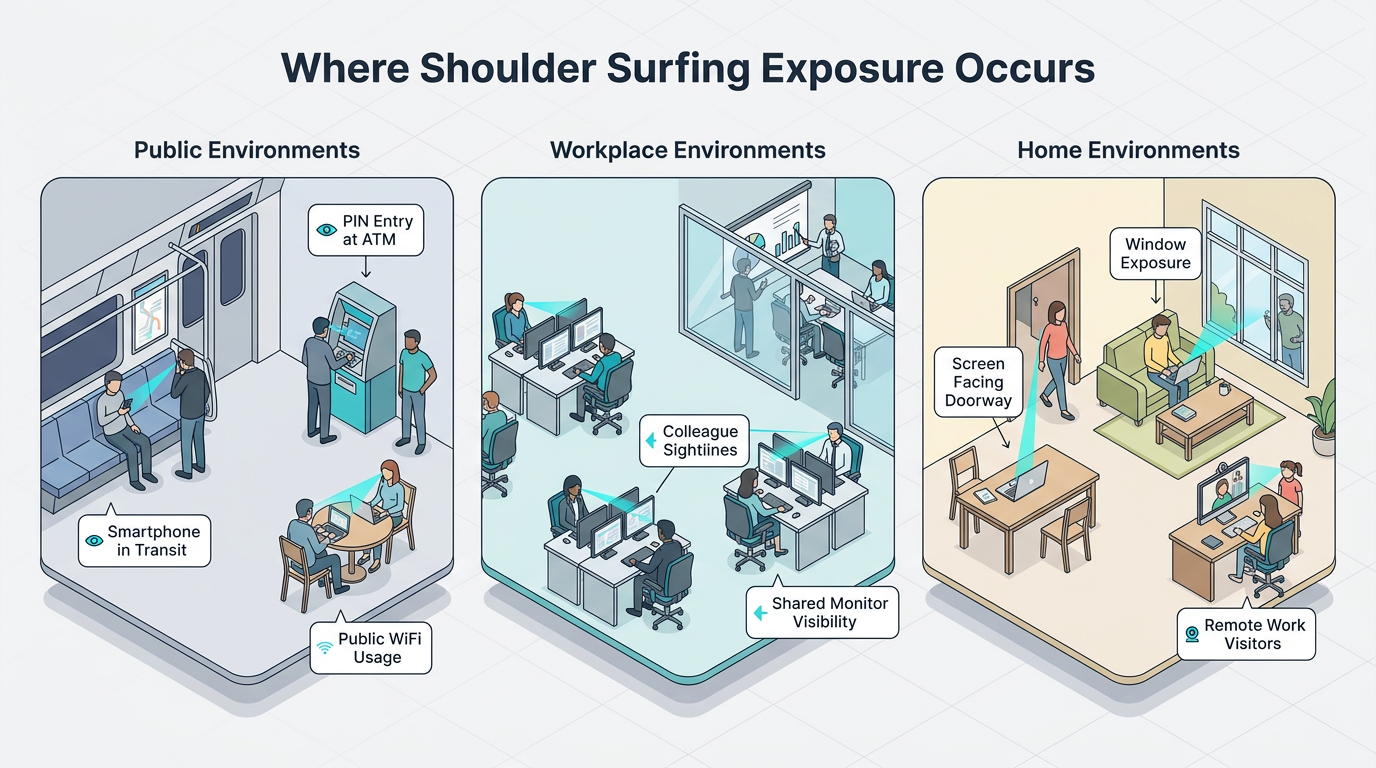
Video Calls and Real Incidents Show That Exposure Extends Beyond One Screen
Screen sharing turns one desktop into an audience's desktop. Other open windows, browser tabs, chat popups, and notification previews all travel with the shared view and can expose information outside the intended presentation. Careful camera framing also matters even when participants are not sharing desktop content because the visible surroundings may contain sensitive screens or documents. Meeting participants can also retain details from a shared notification or a background document even when the presenter quickly hides it.
ATM risks can also involve cameras positioned to capture PIN entry. Hidden cameras on or near ATMs can record PIN entry from above, beside, or within a false attachment near the keypad. The user may never notice the observer or recording device.
These examples show why exposure can extend beyond the people who are visibly present when information appears.
How to Prevent Shoulder Surfing Social Engineering
Prevention works best when physical positioning, safer device behavior, authentication design, and organizational rules reinforce one another.
Personal and Device Safeguards Reduce Visible Information
Several practical options can reduce what nearby observers see:
Screen Positioning: A seat with a wall behind it can reduce casual sightlines, although angling a display offers limited protection against a determined observer.
Body and Hand Shielding: Covering the keypad with a free hand during PIN entry can deter bystanders and overhead cameras.
Privacy Filters: A monitor filter helps control physical access to displayed information.
Auto-Lock and Hidden Previews: A short lock timeout and previews shown only when unlocked keep codes off an idle lock screen.
Careful Screen Sharing: Sharing a single window instead of the whole desktop keeps stray tabs and alerts out of meetings.
Unattended Devices: Locking before stepping away prevents hands-on snooping.
Positioning and filters reduce visibility during use. Shielding protects brief entries. Lock settings limit what remains visible when attention shifts away from the device.
PIN entry hides the value itself. Graphical patterns can reveal both the gesture and, when enabled, a feedback line. Multifactor authentication protections, including passkeys and hardware keys, remove the reusable password an observer could capture for account takeover fraud in the first place. Identity-based monitoring can still help catch the account anomalies that follow when a credential is compromised anyway. Tilting the screen away offers limited protection, so it works better as one layer than as the only safeguard.
Workplace Controls Turn Individual Caution into a Repeatable Practice
Organizations can convert those habits into auditable standards drawn from established requirements:
Clear-Desk and Clear-Screen Rules: The International Organization for Standardization (ISO) clear-screen control asks organizations to define and enforce rules for papers, removable media, and screens.
Session Locking and Output Placement: Device-lock controls require locking after inactivity, concealing previously visible content, and controlling output devices with measures such as monitor filters. The Center for Internet Security (CIS) session-locking control sets automatic lock limits for general-purpose systems and mobile devices.
Protected PIN Entry: Payment Card Industry (PCI) terminal standards require terminals to deter visual observation of PIN values through a physical shield or a design that allows body shielding.
Workstation Surroundings: Health Insurance Portability and Accountability Act (HIPAA) workstation rules require policies specifying the physical surroundings of any workstation that accesses protected health information.
Policy only works when people know it and can report lapses without penalty. Blame-free reporting practices allow users to report suspicious behavior without judgment or unjustified punishment. Exercises with a visible result help, such as photographing what a visitor can read from reception, alongside a blame-free channel for reporting a screen someone should not have seen.
The Expanding Reach of Technology-Assisted Observation
High-resolution cameras and machine-learning analysis can infer information that traditional shoulder surfing defenses were not designed to conceal.
Several technology-assisted methods extend observation beyond a direct view:
Video Analysis: Video analysis can infer ATM PINs from finger and hand movements even when users cover the keypad. This could enable payment fraud schemes.
Reflected Text: Machine-learning analysis may extract text reflected in eyeglasses during video calls when lens curvature, physical conditions, and camera resolution provide a clear enough image.
Thermal Imaging: Thermal imaging combined with artificial intelligence (AI) can analyze keyboard heat traces to recover short passwords when an observer captures images shortly after typing. This can create a path to account takeover fraud.
Acoustic Models: Acoustic keystroke models can classify keystrokes from a nearby phone or call audio.
Virtual-Reality Eye Tracking: A 2024 ACM CCS paper inferred keystrokes in virtual-reality headsets from the eye movements of a user's avatar.
Direct viewing requires attention in the moment. An observer can replay and analyze camera footage later. Controlled laboratory conditions differ from routine incidents, which still involve a person looking. The methods extend the same risk through movement, reflections, sound, or residual heat and remain part of the same shoulder surfing category.
Make Visual Privacy Part of Everyday Security
Visual exposure deserves the same routine attention as patching and phishing. Reducing what is visible, arranging workspaces so sightlines end at a wall, and practicing automatic locking and shielding can interrupt both casual glances and planned observation.
Frequently Asked Questions
Is Shoulder Surfing Illegal?
Legality depends on the jurisdiction and what the observer does with the information. Anyone concerned about a specific incident may wish to seek advice appropriate to the location and circumstances.
What Should Someone Do After Suspecting Shoulder Surfing?
A person who suspects shoulder surfing can move somewhere private and identify what was visible. Next, the person may need to change exposed passwords or PINs and revoke sessions. They can then review accounts. Financial exposure may warrant contacting the bank or card provider. Work information may need reporting to security, privacy, or management. Recording the time, place, observer, and displayed information can support later reviews.
Can Shoulder Surfing Expose Paper Records?
Yes. Handwritten intake forms at a clinic counter, printed customer lists, sticky notes with passwords, and staff badges showing names and roles are all readable without touching a device. Unlike a screen, paper cannot auto-lock or hide its contents after a period of inactivity. A nearby person may also capture a document in a photograph without physically removing it. This leaves little immediate evidence that the information was copied.