Key Insights
Phishing simulation best practices determine how effectively campaigns build measurable recognition skills and avoid awareness theater. As AI continues to lower the barrier for attackers, making social engineering attacks more convincing, security teams need a disciplined approach that builds genuine resilience and supports compliance.
The difference between a simulation program that changes behavior and one that produces click-rate reports comes down to how campaigns are designed, run, and followed up on. This guide explains how to set objectives tied to real risk, build scenarios that reflect current attacker tradecraft, coordinate internal teams so tests stay valid, deliver feedback that actually sticks, and measure outcomes that signal genuine resilience rather than compliance checkboxes.
In “Supercharged Deception: How AI is Accelerating Social Engineering,” cyberpsychologist Dr. Mary Aiken and Abnormal’s EJ Whaley explain how AI affects these tactics. Watch the full recording to hear more from these industry experts.
Key Takeaways
Clear objectives and success metrics establish a reliable foundation for each simulation campaign.
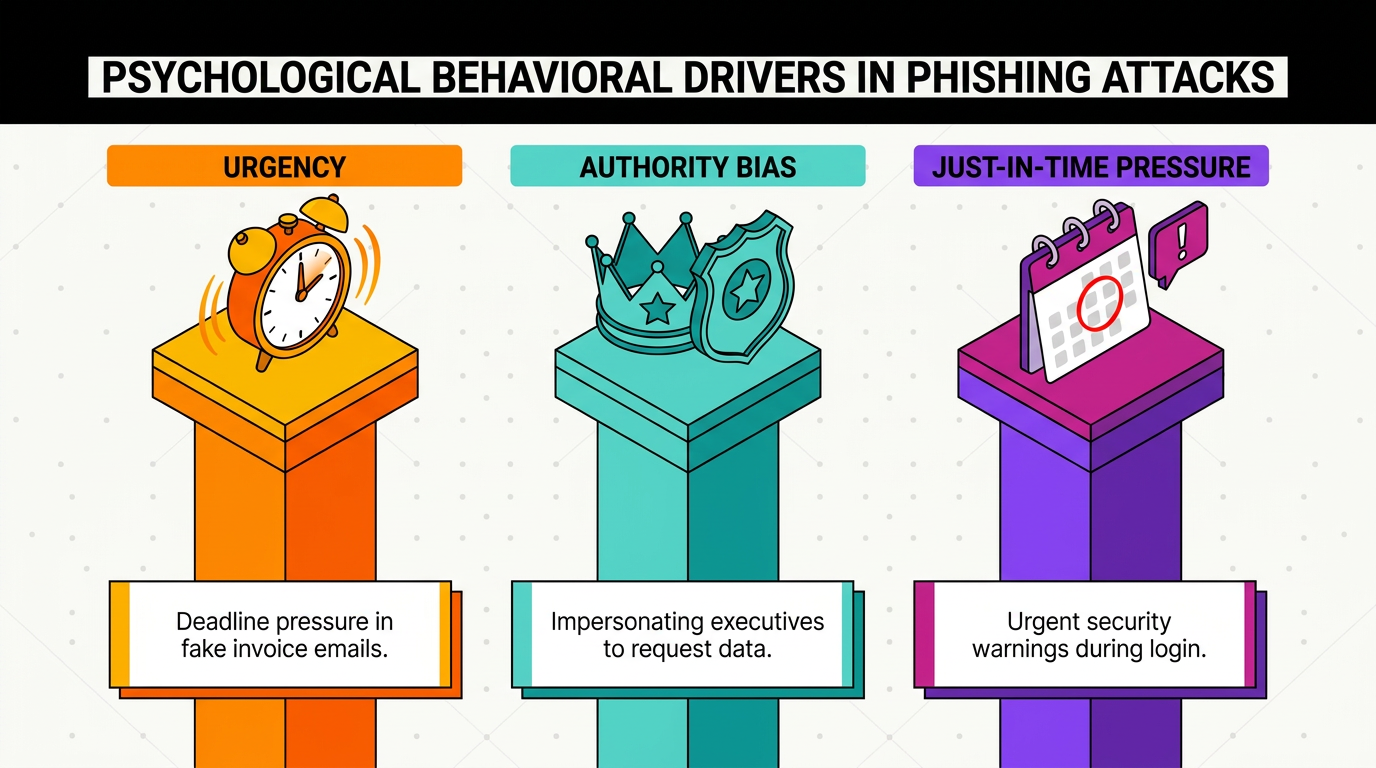
Realistic scenarios use behavioral drivers such as urgency, authority, and just-in-time pressure.
Coordination with IT, help desk, and HR prevents confusion during active tests.
Immediate, educational feedback turns employee mistakes into practical learning opportunities.
Reporting rates and click-rate trends reveal employee engagement without relying on punitive policies.
What Are Phishing Simulations?
Controlled phishing simulations are internal exercises that test and train employees to recognize social engineering attacks. Security teams orchestrate these campaigns to replicate real-world attack vectors, complete with realistic hooks, urgency tactics, and authority cues that mirror what employees might encounter from genuine threat actors.
These simulations replicate several techniques attackers use, such as:
Executive Impersonation: Attackers pose as organizational leaders to exploit authority cues.
Fake Vendor Invoices: Attackers mimic payment requests that employees may encounter during routine work.
IT Support Requests: Attackers imitate internal support teams to solicit credentials or other sensitive information.
Psychological Triggers: Attackers use urgency and pressure to weaken rational decision-making.
Together, these techniques create teachable moments that build recognition skills over time and help employees respond safely.
Simulations support a broader security awareness training strategy as one component of an ongoing program. Organizations that deploy them without proper context and follow-up often create frustration instead of building organizational resilience.
Why Phishing Simulation Best Practices Matter
Strong phishing simulation practices help organizations adapt employee training as AI makes social engineering easier to scale. Attackers once needed specialized skills to craft convincing messages. Large language models now enable users to generate polished, contextually appropriate content quickly. This wider access to attack capabilities increases the importance of employee resilience.
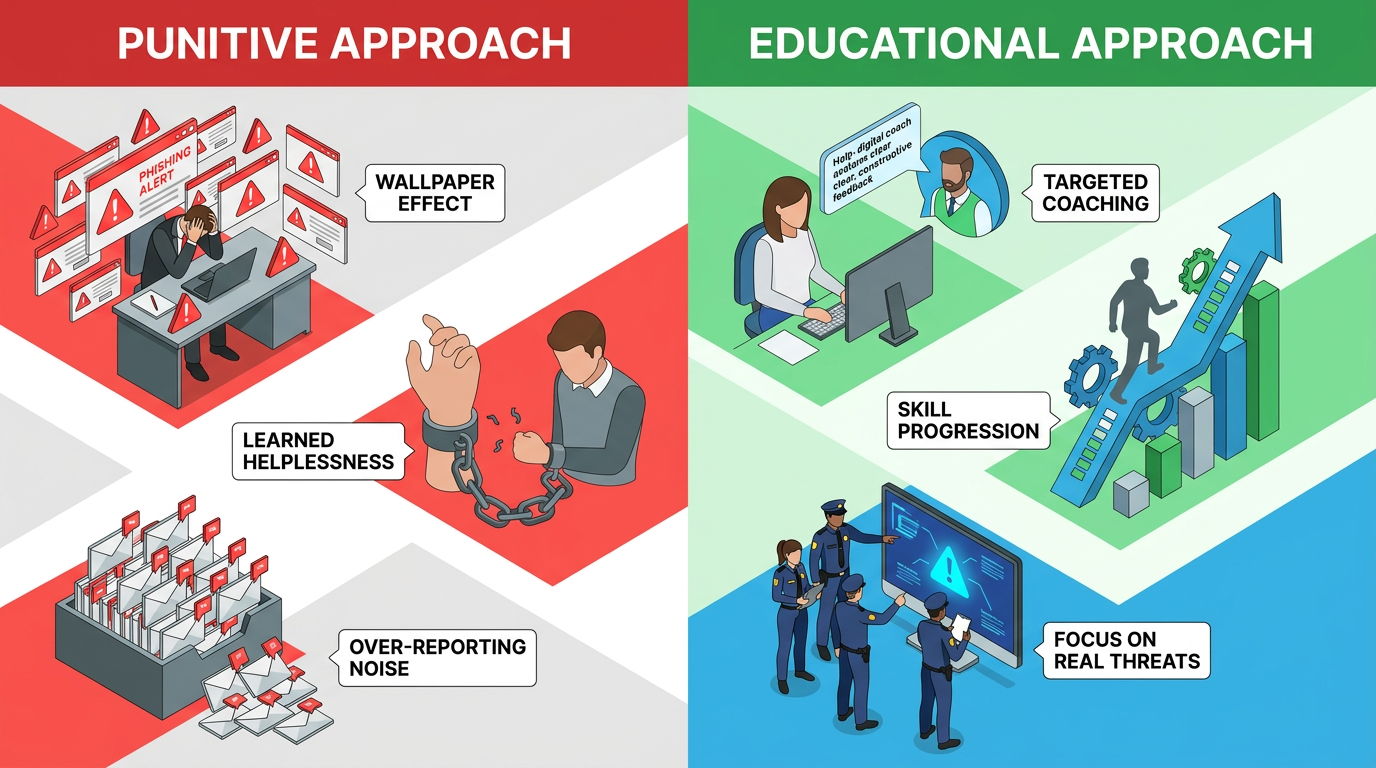
Poor execution commonly produces warning fatigue. Repetitive, unchanging messaging triggers what psychologists call the wallpaper effect. Employees stop noticing warnings because they have seen them so many times. Employees can also develop a learned helplessness response, becoming over-reliant on technology and giving up on their own ability to identify threats.
Effective practices help security teams avoid this outcome while connecting simulations to a broader security awareness training program.
Phishing Simulation Best Practices Before Running Campaigns
Preparation should connect each phishing simulation campaign to defined risks, realistic scenarios, and coordinated internal support.
Define Clear Objectives and Success Metrics
Before launching a campaign, security teams can establish what success looks like. Measuring baseline click and reporting rates provides a starting point for setting realistic improvement targets based on department risk profiles. A finance team handling wire transfers has different exposure than a marketing department, so objectives should reflect those differences.
Decision trees can also guide simulation difficulty. New employees might start with obvious phishing indicators, while seasoned staff face increasingly sophisticated scenarios. This graduated approach builds skills systematically through consistent difficulty levels. It also gives leaders a clearer way to connect campaign results with security awareness training goals. Documented objectives, audience criteria, and progression rules make results easier to compare across campaigns and explain to executive or compliance stakeholders.
Develop Realistic Scenarios
Effective simulations mirror threats the organization actually faces. Attackers use behavioral drivers such as urgency, authority bias, and just-in-time pressure to weaken critical thinking. Scenarios can incorporate these same elements through caps lock emphasis, executive impersonation, deadline pressure, and consequences for inaction.
Industry-specific hooks make the exercise more authentic. Examples include vendor invoice requests, HR policy updates, IT credential verification, and shipping notifications. Targeted scenarios build defenses against attacks employees may encounter in their roles. Security teams can vary the sender context, request type, and level of urgency while keeping the exercise aligned with plausible social engineering attack techniques. This balance makes the simulation challenging without relying on implausible details that employees would never see in routine work.
Prepare Internal Stakeholders
Coordination among help desk, IT teams, and internal chat channels requires careful planning that does not spoil active tests. Security leaders can brief executive leadership and HR on campaign timing and scope. Help desk scripts can prepare support staff to assist confused employees without confirming or denying simulation status.
This preparation prevents chaos that can undermine program credibility. It also helps employees who do the right thing by reporting suspicious emails receive consistent, appropriate responses. Campaign plans can define escalation paths for technical conflicts, employee concerns, and business events that affect timing. Clear ownership helps teams respond without exposing the exercise, while a record of roles and procedures supports repeatable execution. These controls keep the simulation aligned with the organization’s wider phishing simulation program.
Best Practices During Phishing Simulation Execution
During phishing simulation execution, teams should monitor campaign health while protecting test integrity and reinforcing vigilant behavior.
Monitor Campaign Performance in Real-Time
Security teams can track engagement metrics as campaigns progress instead of waiting for post-campaign analysis. Early monitoring can identify departments or roles showing concerning click patterns in time to inform follow-up training priorities. It also helps teams recognize campaign problems that may influence employee results.
Monitoring allows teams to pause campaigns when unexpected issues arise, such as system conflicts, major company announcements, or other factors that could skew results. Campaign owners can watch for sudden changes in click or reporting activity, confirm that landing pages and reporting workflows function correctly, and document disruptions that may affect interpretation.
This operational view helps preserve the quality of the data while reducing confusion. It also gives support teams a controlled way to respond if the simulated social engineering tactics interact with unrelated business events.
Manage Internal Communications Strategically
Even security professionals can struggle to identify well-crafted simulations. As EJ Whaley explained in the webinar, “I knew that we were going to be sending out phishing simulation emails... I got the email, I looked at the email, and I still had to really think about whether it was legitimate.”
Teams can develop protocols for employees who report simulations to IT or share warnings on Slack. The objective is to maintain test integrity while rewarding vigilant behavior. Employees who report suspicious emails are demonstrating the desired response, even when the message is a simulation.
Communication protocols can specify how support teams acknowledge reports, when security leaders should intervene, and how internal warnings affect campaign analysis. Recording those events also helps analysts distinguish individual recognition from results influenced by peer alerts. That context makes the active phishing simulation exercise fairer and the final analysis more useful.
Best Practices After Phishing Simulations
Post-campaign work should convert phishing simulation results into immediate learning, targeted improvements, and a healthier security culture.
Provide Immediate, Educational Feedback
Feedback should create teachable moments without punitive framing. Dr. Mary Aiken noted that an educational and empowering approach can build knowledge and skills while encouraging employees to view simulations positively.
When employees click, the campaign can immediately show them what they missed: a deceptive look-alike domain, urgency language, an unusual sender address, or a mismatched reply-to field. Explaining why the simulation was effective transforms a mistake into a learning opportunity. Feedback works best when it identifies the specific clue, explains its relevance, and offers a safer action the employee could take next time.
This contextual approach connects the simulated message to practical security awareness training and treats the click as part of an ongoing learning process.
Analyze Results and Refine Strategy
Teams can segment data by department, role, and simulation type to distinguish systemic vulnerabilities from individual training needs. A single employee clicking repeatedly may suggest a need for targeted coaching. An entire department falling for vendor impersonation may reveal a process gap that training alone will not fix.
Results can inform the next campaign’s targeting and difficulty level. Progressive difficulty based on performance data creates meaningful skill development through consistent testing. Analysts can also compare which behavioral cues generated clicks, which scenarios prompted reports, and whether certain workflows created recurring exposure.
Those patterns help leaders decide when to adjust training, review a business process, or change the scenario design. A documented review process makes phishing simulation analysis more consistent and gives stakeholders a clearer account of how findings influence future campaigns.
Avoid Creating Counterproductive Policies
Organizations can avoid “three strikes and you're out” policies. These approaches create anxiety that weakens security awareness. Employees may become paranoid instead of vigilant, flooding security teams with reports about routine messages.
This over-reporting creates operational overhead. Security teams spend time reviewing legitimate emails, reducing the time available for actual threats. The noise obscures the signal, and the program undermines its own effectiveness. A more constructive policy can distinguish between accidental clicks, repeated risky behavior, and deliberate policy violations.
Targeted coaching, role-specific exercises, and manager support provide ways to address recurring problems without turning the simulation into a disciplinary trap. This approach keeps employees engaged with the security awareness program while giving security teams room to focus on reports that warrant investigation.
How to Measure Phishing Simulation Success
Phishing simulation success depends on sustained behavioral change, which teams can evaluate through several complementary metrics:
Click-Rate Trends: Tracking how quickly click rates decline across successive campaigns can show whether employees are learning and provide context for isolated results.
Reporting Rates: When employees trust the process and feel engaged, they report suspicious emails, including simulations and real threats. Rising reporting rates can indicate a healthy security culture, while declining rates may suggest disengagement or fear of punishment.
Report Quality: Teams can assess whether employees identify plausible signs of a potential spear phishing attack and provide a specific concern when flagging a message.
Combining click trends, reporting behavior, and scenario difficulty provides a more useful view of program performance. These measures also connect simulation outcomes with the broader work of building security awareness programs.
Implement Phishing Simulation Best Practices Today
Effective phishing simulations require thoughtful planning, careful execution, and constructive follow-up. The goal extends beyond reducing click rates. Strong programs build psychological resilience alongside the organization’s security posture.
As AI makes attacks more sophisticated through AI-generated deep fake content, convincing large language model-generated messages, and increasingly targeted approaches, simulation programs can evolve from awareness theater to genuine behavior change. The Before, During, and After framework provides the structure, while consistent execution provides the results.
Pairing that discipline with the right technology closes the loop between simulation and real-world defense. Abnormal's AI Phishing Coach turns the actual attacks Abnormal stops into personalized simulations and just-in-time coaching tailored to each employee's risk profile, so training stays grounded in current attacker tradecraft rather than generic templates. That human-focused layer sits alongside Abnormal's behavioral AI for inbound email protection, named a Customers' Choice in the 2026 Gartner® Peer Insights™ Voice of the Customer for Email Security.
Are you ready to strengthen your team's defenses against AI-accelerated, email-borne social engineering? Request a demo to see how Abnormal’s behavioral AI supports email threat detection alongside human-focused security programs.
Frequently Asked Questions
How Often Should Organizations Run Phishing Simulations?
Monthly simulations can provide consistent reinforcement without causing fatigue. Varying the timing, scenarios, and targeting can prevent predictability while maintaining regular touchpoints within the broader phishing simulation program.
What's an Acceptable Click Rate for Phishing Simulations?
An acceptable click rate depends on the organization's baseline, scenario difficulty, audience risk, and campaign maturity. Reporting rates and improvement trends matter more than a universal benchmark.
Should Organizations Inform Employees That Simulations Will Occur?
Organizations can communicate that simulations are part of the security awareness training program without revealing specific timing or scenarios. Transparency about the program's existence builds trust, while confidentiality around individual tests maintains validity.
How Do You Handle Repeat Clickers Without Being Punitive?
Teams can identify whether repeat clicks stem from awareness gaps, attention, or workload pressure. Each factor calls for a different intervention, allowing security leaders to match support to the underlying cause.
Can Simulations Replace Traditional Security Awareness Training?
No. Simulations complement training by providing practical application opportunities. Effective programs combine educational content with hands-on testing and immediate feedback.