Key Insights
A phishing investigation process breaks down when inconsistent decisions leave teams unsure whether they examined the right evidence or fully contained the threat. With the FBI IC3 2025 Annual Report recording 191,561 phishing and spoofing complaints in 2025 — more than any other cybercrime category — even well-staffed teams face steady volume that magnifies any inconsistency. Organizations may run capable reporting and analysis operations, but without a documented process, leadership, auditors, and affected employees cannot reliably trace how the team handled each report.
Investigations therefore must extend across messaging, identity, and access controls, not stop at the inbox. This article walks through how to build that process end to end: intake and triage, message and artifact analysis, scoping and impact, containment and recovery, and the communication and metrics loop that closes each case. A repeatable structure is what keeps decisions defensible when regulators, auditors, or executives ask how a specific report was handled.
Key Takeaways
A documented decision model helps analysts classify similar reports consistently and leave a traceable record.
Original artifacts and correlated evidence across mail, identity, endpoint, and authorization systems reveal the scope of an attack.
Evidence from recipients, clicks, sign-ins, and account activity distinguishes exposure from compromise.
Every closed case should feed indicators, timing metrics, and a blameless review back into detection rules and the playbook.
What Is a Phishing Investigation Process?
A phishing investigation process is the documented sequence an organization uses to decide whether a reported message is malicious, which recipients received it, whether attackers bypassed multi-factor authentication (MFA) protections, what the attacker gained, and which actions remove that access.
Once an analyst confirms malicious intent, the report becomes a phishing incident with a named owner, a severity rating, and a clock. Recipient interaction and post-click activity then determine whether the incident remains limited to exposure, includes an account compromise with business email compromise (BEC) intent, or has expanded into a broader intrusion.
The process helps two analysts facing the same report reach the same conclusion and leaves a record that survives questions from legal and auditors. It also supports responses to regulators.
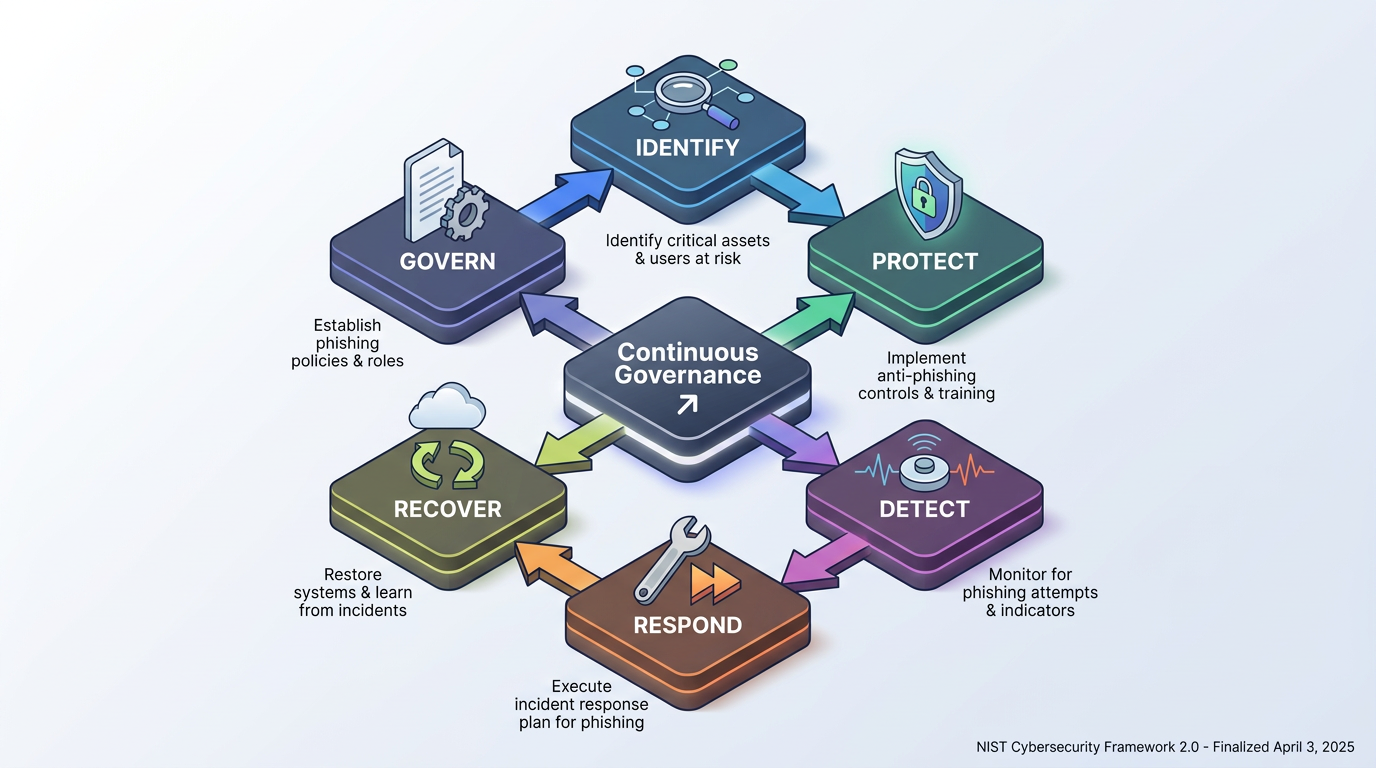
The April 2025 NIST incident response framework replaces the 2012 four-phase incident lifecycle with the six Cybersecurity Framework 2.0 functions, mapping to the phishing investigation as follows:
Govern, Identify, and Protect: Cover preparation, including the documented playbook, ownership model, and preventive controls that shape how reports get handled.
Detect and Identify: Cover the investigation itself, from initial report through confirmation of malice and scoping of affected recipients and accounts.
Respond: Covers containment and eradication, including message purge, session revocation, credential and MFA reset, and removal of attacker persistence.
Recover: Covers restoration of normal access and the monitoring window that confirms no new rules, consents, or sign-ins appear.
Improvement (within Identify): Captures lessons learned that feed back into detection rules and playbook steps.
The updated framework treats incident response as a continuous governance function rather than a linear checklist. This helps you tie every phishing case back to the same controls that shape your organization's broader security posture. This approach also gives auditors and executives a common language for evaluating whether the team's process actually holds up under pressure.
How to Build a Phishing Investigation Process
Building the process means deciding in advance what question each stage must answer before the next one begins. The scenario follows an accounts-payable clerk who reports a supplier-portal lure after submitting credentials.
Intake and Triage Set Severity and Escalation
Reports reach the team through a mail-client report button, help desk tickets, gateway alerts, and occasionally a manager's phone call. Analysts collapse duplicates by grouping reports by subject, sending domain, embedded URL, or attachment hash. This grouping turns a campaign that hit hundreds of mailboxes into one case. They then assign an initial label of clean, spam, suspicious, or phishing that reflects current confidence rather than a final verdict.
The case record preserves the original report, the initial classification, and the evidence behind the triage decision. When the evidence confirms malicious intent, the analyst hands the case to a named incident lead. The incident lead owns the case through closure, including escalation and stakeholder updates.
Severity weighs confidence in malice, the recipient's interaction tier, asset criticality, functional impact, information impact, and recoverability. Interaction tiers distinguish received-only messages from messages a recipient opened, clicked, replied to, or used to submit credentials. Asset criticality accounts for capabilities such as payment approval, domain administration, and executive mail access.
Escalation thresholds follow that model. Any credential submission or reply from a finance or privileged account escalates at once, while a received-only report with low confidence can wait. The clerk's case scores high on interaction and asset criticality because her account approves wire transfers, so it moves ahead of older reports nobody had clicked.
Message and Artifact Analysis Confirm Malice
Analysis starts from the original message exported with full headers, never from a forwarded copy, because forwarding can break authentication results and rewrite trace fields. Reading the email Received header chain from bottom to top shows the relay path. A mismatch among the visible From address, the Reply-To, and the Return-Path provides an early signal.
Authentication results describe specific parts of delivery. Overall safety requires separate analysis:
Sender Policy Framework (SPF): A pass means the sending server was authorized for the envelope sender domain, not the visible From address.
DomainKeys Identified Mail (DKIM): A pass means the signed portions arrived unaltered and identifies a signing domain, which may differ from the From domain.
Domain-Based Message Authentication, Reporting, and Conformance (DMARC): A pass means SPF or DKIM aligned with the From domain. It proves the domain sent the message but says nothing about intent, and forwarding can cause legitimate failures. Analysts should trust only Authentication-Results headers inserted by their border mail server.
Analysts also run a set of manual checks:
Pretext Review: Inspect urgency, payment, and re-authentication pretexts used to pressure the recipient.
URL Decoding: Decode shortened or obfuscated links to see the true destination.
Look-Alike DomainIndicators: Check for trusted names used as subdomains, character swaps such as "rn" for "m," or the Punycode xn-- prefix.
QR-Code Extraction: Pull the payload URL out of any embedded QR code.
Attachment Handling: Hash attachments and detonate files in a secure attachment sandbox.
In the scenario, DMARC passed because the attacker owned a freshly registered lookalike domain with valid SPF and DKIM; the display name did the impersonating.
Recipient Exposure, Scoping, and Impact Define the Incident
Confirming malice answers one question; scoping determines who else received the message and whether business email compromise activity followed. A message trace by sender, subject, and URL finds every recipient, even those who never reported. Analysts assign each recipient an interaction tier. Click telemetry from the gateway or web proxy shows who followed the link where the organization enables click tracking. Analysts then correlate identity provider sign-in logs with click times to determine whether someone used captured credentials.
Post-click account review looks for signals that the attacker used the credential after capturing it:
Unfamiliar Locations or Devices: Sign-ins from locations or devices the account has not used before.
Inbox Rule Changes: New rules that forward or hide mail, often used to hide fraud from the account owner.
New MFA Methods: Authentication methods the attacker added to keep access after a password change.
Unusual File Downloads: File access inconsistent with the account's normal activity.
New Application Consents: Third-party application permissions the user did not knowingly grant.
These signals separate three levels of incident severity:
Classification | What It Means |
|---|---|
Exposure | Recipients only received or opened the message. |
Account Compromise | Post-click account activity followed the click. |
Broader Intrusion | The attacker moved into other systems or took administrative actions. |
In the scenario, the trace finds a dozen recipients, two clicks, and one credential submission. The clerk's account shows a successful sign-in from an unfamiliar country within minutes, plus a new rule moving messages containing "invoice" into an obscure system folder. That makes the case an account compromise and widens scope to the other two clickers.
Containment, Eradication, and Recovery Remove Access and Persistence
Order matters because several attacker footholds survive a password reset. CISA's Gunra ransomware security advisory documents attackers reusing stolen session cookies to impersonate authenticated users, so revoking active sessions before rotating credentials is what actually ends that access. A reliable sequence runs as follows:
Message Purge: Administrators remove the message from every mailbox to stop further clicks.
Session Revocation: Administrators invalidate refresh tokens and active sessions before changing the password.
Credential and MFA Reset: Administrators force a password change, require MFA re-registration, and remove attacker-added authenticators.
Inbox Rule and Forwarding Removal: Administrators clear hidden rules, external forwarding addresses, mailbox delegations, and transport rules.
Open Authorization Grant Review: Administrators revoke Open Authorization (OAuth) application consents because a consented app can retain access after a password change.
Indicator Blocking: Administrators block the sending domain, URLs, file hashes, and attacker forwarding domains. They also add these indicators of compromise to Domain Name System (DNS) blocklists.
Lateral Sweep: Analysts find other accounts touched by the same Internet Protocol (IP) address or rule pattern and apply the same treatment.
Recovery restores normal access and monitors for clean sign-ins over a defined window. Monitoring also confirms that no new rules or consents appear. The incident lead classifies each control as emergency or temporary. Permanent controls receive a separate classification. The lead assigns each control a review date so temporary blocks do not linger.
Communication, Metrics, and Lessons Learned Close the Loop
An incident lead owns the case from confirmation to closure, and stakeholders receive updates until the team restores access. Notification deadlines vary by law, sector, and materiality determination. Communication and documentation follow the technical decisions. Each update states the current classification, affected accounts, containment status, business impact, and decisions awaiting approval. The incident lead also maintains:
Delivery Record: The incident lead records who received each update and when. That record creates a communication timeline. Records of the data the account touched support notification decisions.
Case Metrics: The written record covers the timeline, evidence, actions, and decisions. Case metrics include report-to-triage time, confirmation-to-containment time, false-positive rates, and the ratio of reporters to clickers.
The incident lead closes the case only after administrators restore normal access. During the defined window, monitoring must show clean sign-ins and no new rules or consents. The lead also assigns each metric and playbook change to an owner, records approval and review dates, and tracks the update through completion.
A blameless review within two weeks examines missed detections and triage delays. It also records missing playbook steps, while every indicator feeds back into detection rules.
How Phishing Variants Change the Investigation Process
Each phishing vector leaves its evidence in a different system, so the investigation plan starts from the channel the lure used rather than from an email header. An analyst who reaches for header analysis on a phone call has nothing to analyze.
CISA's joint phishing security guidance warns that the constrained interfaces on phones and messaging apps make malicious links in SMS and chat-based phishing harder for users to spot, and those channels sit outside email-based scanning entirely. This is why the investigation must follow the medium rather than default to email tooling.
Email and QR Phishing Require Message, Image, and Device Evidence
Quick response code phishing, sometimes called quishing, uses email delivery but moves the payload into an image. The headers may authenticate cleanly and the body may contain nothing beyond a polite request to scan a code, so a gateway that does not scan images can treat the message as benign. The analyst must extract the URL from the quick response (QR) image and analyze it like any other link. Because the victim followed that link with a phone camera, often on a personal device, the click may never cross the corporate web proxy or leave a gateway click record.
For campaign scoping, analysts can search for the sending domain, subject, image hash, or decoded URL to find recipients who did not report the message. They can then compare delivery times with identity sign-ins and mobile user agents to distinguish received-only exposure from likely interaction. The identity layer may still show a sign-in from a mobile user agent or unfamiliar network shortly after delivery. The post-incident review should record the visibility gap as a control weakness. The absence of a gateway click does not prove that no interaction occurred.
Voice, Session-Theft, and Consent Phishing Shift Evidence Beyond Email
Some types of phishing push evidence collection outside the mail flow to a different system of record. Investigators should know where to look before the ticket lands. Here are some common examples:
Voice Phishing (Vishing): Voice phishing attack methods and help desk impersonation remove the message entirely. Attackers may pose as employees to convince help desk staff to reset passwords and move MFA to a device the attacker controls. The evidence is in call logs and recordings, ticketing records, telephony data, and identity audit logs that show MFA registration changes, device enrollments, and password resets that help desk accounts performed. Caller ID provides little assurance because Voice over Internet Protocol (VoIP) makes it easy to spoof.
AiTM Phishing:Adversary-in-the-middle (AiTM) phishing uses an email and a link, but the link leads to a proxy that relays the real login page and captures the session cookie after the user completes MFA. Email authentication can pass, so sign-in logs decide the case by revealing session cookie reuse and tokens that the identity provider issued to unfamiliar devices. Post-click account activity then establishes the resulting scope.
Consent Phishing:Consent phishing attack methods ask the user to grant an application permission. They do not ask the user to type a password. The evidence includes the consent audit event. This event identifies the user, application, and permissions. The evidence also includes a full export of grants across the tenant.
These variants require investigators to follow identity, authorization, help desk, and telephony evidence beyond the original lure.
Roles, Evidence Preservation, and Automation
A process survives scrutiny when each role knows which decisions it owns, whether evidence comes from quick response code phishing or adversary-in-the-middle (AiTM) phishing:
Leadership: Leadership funds the capability and approves high-impact moves such as disconnecting a system or disabling an executive's account.
Analysts: Analysts verify reports, collect evidence, define scope, and prioritize cases.
IT and System Owners: Information technology (IT) teams and system owners execute resets, remove rules, restore access, and confirm business impact.
Legal, Communications, and Human Resources (HR): Legal owns notification decisions and privilege, communications owns external statements, and HR participates only when an employee's conduct is in question.
Evidence handling follows a few habits worth documenting:
Logs and Timestamps: Analysts export audit, sign-in, and consent records with original timestamps and a noted time zone rather than copying them by hand.
Custody Trail: Analysts log every action, the account that took it, the storage location, and each person who accessed the evidence. They do not use a system that may itself hold evidence to record other evidence.
Automation is appropriate for the repetitive parts of the process: deduplication, header parsing, domain and hash reputation lookups, recipient enumeration, and enrichment with asset criticality. Tenant-wide purges, account disablement, session revocation for privileged users, and DNS blocks that could affect legitimate services stay behind human approval.
Build a Process That Learns
A closed investigation might expose a missing domain-age rule or an unsafe help desk MFA script. It may also identify an untracked metric. Lessons from business email compromise (BEC) and adversary-in-the-middle (AiTM) phishing should shape future cases. Teams that fold each finding into detection rules, playbook steps, and the way they thank reporters give the next investigation a better starting point.
Frequently Asked Questions
How Long Should Teams Retain Phishing Investigation Evidence?
No single retention period fits every organization. Organizations can tie retention to the longest applicable obligation, including regulatory record-keeping rules that apply to the data, any active legal hold or one they reasonably expect, insurance requirements, and internal policy. Indicators such as domains and hashes can remain in detection tooling indefinitely, separate from the case file.
How Should Teams Preserve SMS Phishing Evidence?
Teams can ask the recipient to capture screenshots that show the sender, message text, timestamp, and full destination URL without opening the link again. Investigators should also preserve relevant mobile-device, identity, and network logs when available. If the message arrived on a personal device, the organization should coordinate evidence collection with the employee and follow its privacy and legal policies.
When Should an Organization Contact Law Enforcement About Phishing?
When an attacker has moved money, the organization should contact its financial institution first so the institution can contact the receiving bank. The organization should then report the fraud through the appropriate law enforcement and cybercrime channels regardless of the dollar amount. Beyond fraud, legal counsel typically decides on law enforcement involvement once investigators confirm data theft or a broader intrusion.
How Often Should Teams Test a Phishing Investigation Playbook?
A quarterly review, plus a review after every incident or near miss, keeps the document accurate. Teams should schedule tabletop exercises that walk through the full lifecycle from report to recovery and repeat them after major changes such as a new identity provider or mail platform. The exercise should include finance, help desk, HR, and communications because escalation delays often start outside the security team.