AI has made phishing emails harder to catch. Realistic phishing templates close that gap in security awareness training by giving employees hands-on practice against the tactics real attackers use: polished language, spoofed branding, and messages timed to match a company's own workflows.
A training program built on generic, easy-to-spot lures teaches employees to recognize outdated attacks, not the ones reaching their inbox today. Employees remain an important layer of defense when attackers use AI-generated templates to evade some automated security controls, which is why security awareness training needs to reflect current tactics rather than a fixed library of old ones.
The templates below reflect both common email tactics and the adjacent-channel techniques, such as QR codes and callback numbers, that attackers increasingly pair with email.
Key Takeaways
AI-generated phishing templates can closely mimic internal writing styles, timing, and branding, making them difficult to distinguish from legitimate email.
Employee vigilance remains an important defense layer, since AI-generated phishing can evade some automated security controls.
Effective simulations reflect both email and adjacent-channel tactics.
Teams should evaluate simulation performance through both proactive reporting and risky engagement behavior.
What Are Phishing Templates?
Phishing templates are customizable or pre-built emails that simulate real attack tactics for email security training and testing purposes.
Modern phishing templates use polished language, emotional triggers, personalized details, and branded formatting to create credible simulations. These scenarios allow employees to safely practice against realistic attempts and turn mistakes into learning opportunities without the risk of real compromise.
Well-designed templates target known behavioral gaps, provide feedback, and help track improvement over time. As threats evolve, phishing templates should reflect emerging tactics like AI-generated messages, QR code phishing, voice phishing, and deepfake impersonation.
Effective phishing templates should:
Mirror Real Attack Techniques: The template should reflect methods used by modern threat actors.
Trigger Human Responses: The scenario should use emotional or contextual cues that prompt employees to pause and evaluate the request.
Adapt to Organizational Behavior: The template should account for specific workflows, departments, or vulnerabilities.
Stay Current With Tactics: The template library should account for AI-generated content and multichannel attacks.
When templates meet these criteria, simulations produce the kind of realistic practice that transfers to live inboxes rather than teaching employees to recognize a training exercise. Programs that skip these fundamentals tend to overstate readiness, because employees pass simulations built on cues real attackers no longer use.
Top 5 Characteristics of High-Impact Phishing Templates
High-impact phishing templates combine emotional pressure, personalization, timing, visual credibility, and technical complexity.
1. Emotionally Compelling
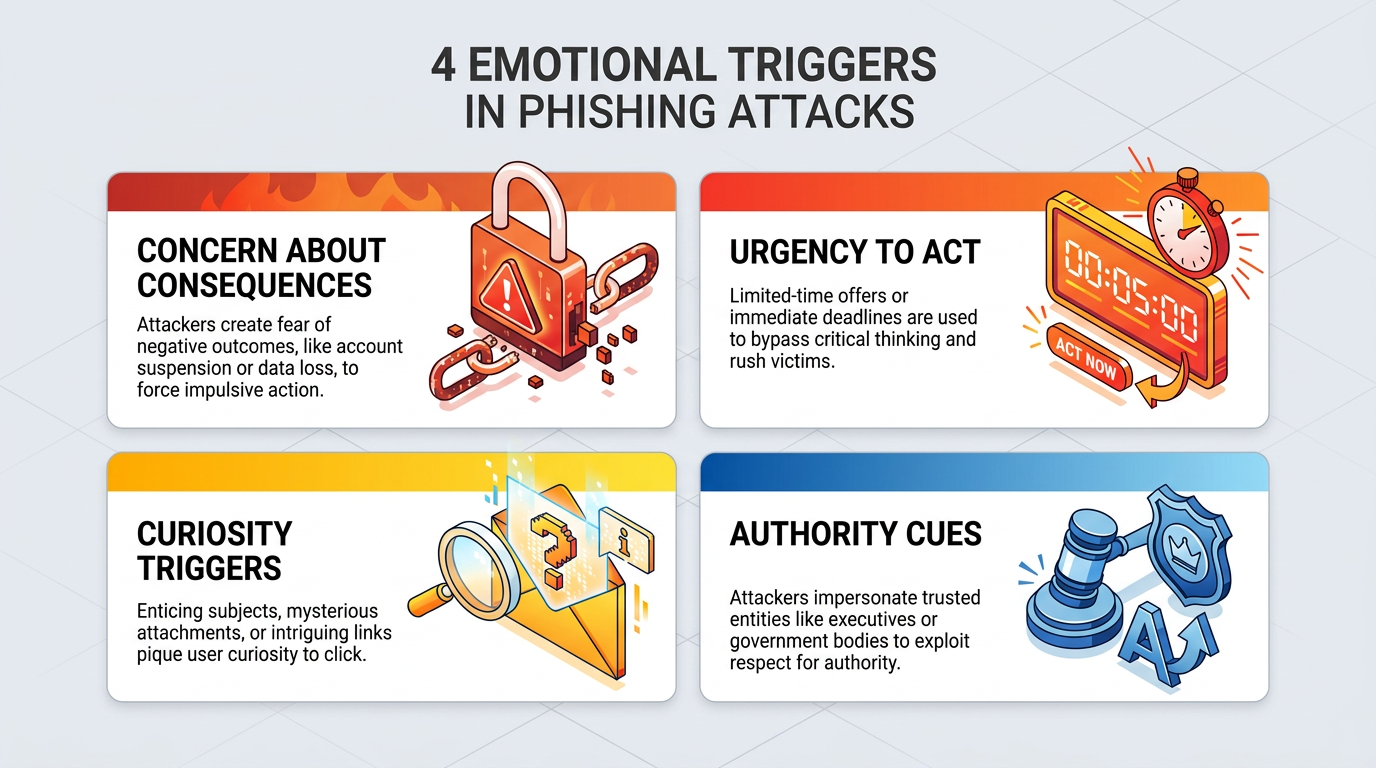
Effective templates exploit common emotional responses to prompt quick action. By triggering fear, urgency, curiosity, or trust, attackers reduce the likelihood of recipients pausing to think critically. Would an employee stop to verify a message that claims their account is about to be locked, or would they click first and ask questions later?
Common emotional levers include:
Concern About Consequences: Claims of account lockouts or security breaches.
Urgency To Act: Warnings about tight deadlines or immediate penalties.
Curiosity Triggers: Promises of financial rewards or confidential content.
Authority Cues: Messages that spoof executives, HR, or trusted external brands.
Emotional triggers can encourage quick decisions, making them important elements of high-impact phishing templates.
2. Highly Personalized
Templates that feel relevant to the individual are more believable and harder to dismiss. Personalization increases trust and makes messages appear as part of normal workflows.
Effective personalization often weaves in employee names and titles within greetings or message bodies, alongside internal references to tools, projects, or departments. Credible messages also mimic internal email styles and signatures down to the formatting. Personalized templates simulate the specificity seen in real-world attacks, which often draw on publicly available data.
3. Contextually Relevant
Attackers may time their messages to coincide with current events or internal company activity. Recipients tend to trust templates that mirror this timing, which shows up in three recurring categories:
Seasonal References: End-of-year reviews, payroll updates, or tax notices.
Timely Events: Health alerts, regulatory changes, or software upgrades.
Organizational Context: New vendors, leadership transitions, or M&A news.
Security teams can align training scenarios with the workflows employees expect during these periods, then vary the sender, format, and requested action. This approach tests whether recipients evaluate the request itself rather than trusting a message because its timing feels familiar. Embedding phishing messages in realistic timing increases believability and response rates.
4. Visually Authentic
Visual credibility can reduce suspicion. The closer a phishing email looks to legitimate communications, the more likely users are to engage with it. Credible templates typically combine:
Professional Grammar And Tone: Correct spelling, structure, and business language.
Consistent Branding: Logos, colors, and design elements mirrored accurately.
Platform-Mimicking Layouts: Formatting that echoes common business platforms and document workflows.
High-fidelity visual design helps phishing emails blend into users' daily communication streams. Training built on misspelled, badly formatted lures no longer reflects current email security trends.
5. Technically Sophisticated
Modern phishing attacks increasingly use advanced techniques to evade detection. Training templates should reflect this level of complexity.
AI-Generated Content: Messages use human-like language generated at scale.
Multichannel Elements: Messages use QR codes for quishing or fake callback numbers for vishing attacks.
Thread Hijacking Techniques: Messages appear inside existing conversations or reply chains.
Polymorphic Features: Messages include subtle changes across emails to evade detection systems.
Security teams can introduce these techniques gradually and tie each one to a recognizable workflow. AI-generated content can mirror professional grammar, tone, and internal formatting. Multichannel simulations can pair an email with a QR code or callback number, while organizations use controlled training destinations and complementary controls for mobile and voice channels. Thread-hijacking scenarios can place suspicious requests inside realistic reply chains. Polymorphic template sets can vary the sender, format, timing, and requested action while preserving the same learning objective. Teams can then use feedback and performance data to adjust difficulty and avoid overexposure. Simulating these tactics helps employees recognize the techniques real adversaries deploy.
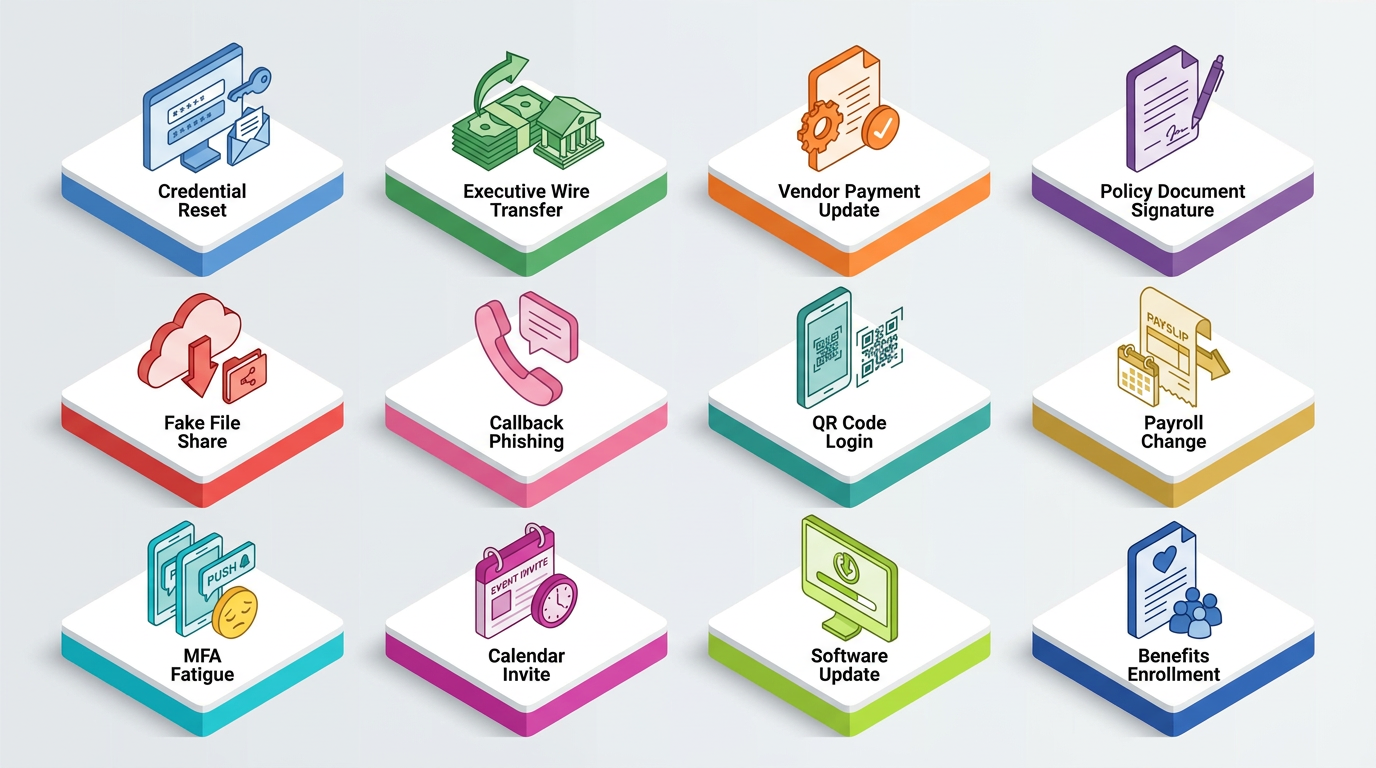
12 Phishing Templates to Use in Employee Training
A strong phishing simulation training program uses phishing templates that map to specific emotional triggers, business workflows, and attacker techniques. Each template should replicate a believable scenario with specific emotional or contextual triggers. Below are twelve foundational phishing templates to include in your awareness training efforts.
1. Credential Reset Notification
This template mimics a password expiration alert from a trusted service, such as a cloud email or productivity platform. It targets employees' concern about losing access to essential tools and uses urgent language and links to a spoofed login page.
Sample Template
Subject: Action Required: Password Expiration for [Service Name]
Body: Your [Service Name] password will expire in 24 hours. To avoid disruption, reset your password now using the secure link below.
CTA Button: Reset Password
2. Executive Wire Transfer Request
This template uses business email compromise (BEC) tactics to impersonate a senior leader requesting immediate financial action, often timed during busy periods or travel. It relies on authority, urgency, and disrupted approval chains to succeed. According to the FBI's Internet Crime Complaint Center (IC3), BEC losses reached $3.05 billion in 2025, ranking as the second-highest loss category overall.
Sample Template
Subject: Urgent Request: Wire Transfer Needed for [Project Name]
Body: Please process a wire transfer of $[Amount] to [Vendor Name] today to finalize the [Project Name] contract. I'm in meetings and can't call, so confirm once done.
Signature: [Executive Name], CEO
3. Vendor Payment Update
This template impersonates a known vendor requesting a change in banking details, often referencing an upcoming invoice or scheduled payment.
The familiarity of the sender and the routine nature of the request make this template especially deceptive, which makes this scenario a priority for finance and accounts payable teams.
Sample Template
Subject: Updated Banking Instructions for Invoice #[Invoice Number]
Body: Please note our new remittance details for Invoice #[Invoice Number], due on [Due Date]. Let us know once payment is sent.
Attachment: New_Bank_Details.pdf
4. Policy Document Signature Request
This malware delivery template uses a fake internal HR or compliance message and includes a malicious attachment disguised as a policy document.
Curiosity and urgency combine to drive attachment opens, a common behavior attackers exploit.
Sample Template
Subject: Please Review: Updated [Policy Type] Policy
Body: All employees are required to review and sign the updated [Policy Type] policy. Download the document, review, and sign by [Deadline].
Attachment: [PolicyType]_Policy_[Year].docx
5. Fake File Share Notification
This template impersonates a file-sharing service, encouraging recipients to click through to a malicious site.
Because these emails mimic legitimate formatting and familiar workflows, they can be effective at reducing suspicion.
Sample Template
Subject: [External] [Sender Name] Shared a Document with You
Body: [Sender Name] has sent you a secure file via [File Service]. Click below to access the document.
CTA Button: View Document
6. Callback Phishing Request
This voice phishing template urges the recipient to call a fake support line or billing number to resolve an urgent issue.
This simulation exposes employees to hybrid attacks that move outside the email channel and trains them to verify unexpected callback requests. These campaigns blend email with voice calls. Abnormal's coverage starts at the inbox, so organizations should pair email defenses with additional controls for voice channels.
Sample Template
Subject: Payment Issue: Immediate Attention Required
Body: We were unable to process your recent payment to [Vendor Name]. Please call our billing department at [Phone Number] to avoid service disruption.
Phone Number: (888) [Random-Number]
7. QR Code Login Verification
This QR code phishing template simulates a message prompting users to scan a QR code to access a secure document, verify account activity, or confirm identity. It shifts the interaction to a mobile device.
The QR code directs users to a credential-harvesting site. Because users often scan codes on personal devices outside managed environments, these attacks can evade some traditional email security controls.
Sample Template
Subject: Suspicious Login Attempt Detected: Action Required
Body: We detected a login attempt from an unrecognized device. Scan the QR code below to verify your identity and secure your account.
Image: [Embedded QR Code]
8. Payroll Change Request
This template impersonates HR or payroll, asking employees to confirm or update direct deposit information. It can be highly effective when targeted at HR or finance departments and relies on urgency and internal trust.
Sample Template
Subject: Confirm Your Direct Deposit Details
Body: Ahead of our upcoming payroll cycle, please confirm your direct deposit information to avoid delays. Use the secure form linked below.
CTA Button: Confirm Details
9. MFA Fatigue Bypass Email
This template exploits a common attacker tactic that tricks users into approving a fraudulent MFA bypass request. Attackers exploit MFA fatigue to get users to approve login attempts without realizing they're malicious. The simulated message poses as IT support preparing the employee to accept the prompt.
Sample Template
Subject: Action Required: MFA System Update
Body: We've made changes to our MFA system. You may receive a verification prompt. Please approve it to finalize setup.
Signature: [IT Support Name], IT Security Team
10. Calendar Invite from Unknown Contact
This template mimics a calendar event invite with a malicious link in the meeting description. Calendar-based simulations help train employees to examine links and attachments outside the traditional email body.
Sample Template
Subject: [Invite] Strategy Planning Session with [Fake Host Name]
Body: Please review the meeting agenda in advance: [Malicious Link]. Let me know if you have any questions before we meet.
Add to Calendar: [ICS file or embedded calendar link]
11. Software Update Prompt
This impersonates IT or a known SaaS provider, requesting that users download a security update or enable a new feature. It blends familiarity, urgency, and concern about losing functionality, which are common attacker tactics.
Sample Template
Subject: Required: Security Update
Body: Install the attached update to continue using [Application Name] with the latest compliance settings.
Attachment: Security_Update_Installer.pkg
12. Fake Benefits Enrollment Notification
Attackers send this template around open enrollment periods to create urgency and concern about missing out. Employees may treat seasonal and HR-themed emails as routine, which makes this a useful phishing lure for training.
Sample Template
Subject: Final Reminder: Benefits Enrollment Ends Tomorrow
Body: Click below to finalize your [Year] elections before the window closes.
CTA Button: Review Benefits
6 Best Practices for Keeping Templates Effective
Effective phishing template management requires variety, relevance, rotation, and measurement.
1. Use a Variety of Template Categories
Attackers adapt constantly, and phishing simulations should evolve with them. A well-rounded program incorporates templates that reflect emerging threats, common tactics, and multichannel lures.
Here are some examples of template categories:
AI-Driven Email Simulations: These templates mimic the tone, structure, and personalization of AI-generated phishing messages.
QR Code Simulations: These templates use QR codes to train employees to pause before scanning unfamiliar sources.
Callback Phishing Scenarios: These templates ask users to call a phone number, simulating voice-based lures.
Deepfake Impersonation Examples: These templates demonstrate how attackers may use deepfakes to impersonate executives or trusted figures.
Social Networking Templates: These templates reflect phishing campaigns that originate from social media platforms or impersonate professional outreach.
Including a diverse range of template types helps training stay current with real-world tactics.
2. Extend Fake Email Templates to Collaboration Channels
Phishing lures now arrive through the same chat tools employees use throughout the day. The Cybersecurity and Infrastructure Security Agency (CISA) states that attackers send messages "in platforms such as Slack, Teams, Signal, WhatsApp, or Facebook Messenger to lure users into divulging their login credentials," and adds that people working in hybrid environments are more likely to be deceived by social engineering tailored to the platforms they use every day.
Organizations can adapt existing fake email templates to these surfaces rather than building from scratch. A credential reset lure becomes a Teams message from "IT Support" with a link to re-authenticate; a file share notification becomes a Slack post from a colleague's compromised account pointing to a shared document. The emotional lever stays the same, but the shortened format and the absence of a sender address remove several cues employees rely on in email.
Abnormal's behavioral detection runs through native API integration with Microsoft 365 and Google Workspace, and AI Phishing Coach delivers its simulations to employee email inboxes. Organizations can use complementary Slack threat detection controls where deployed.
3. Rate Template Difficulty Before Sending
A difficulty rating turns template selection from guesswork into a maturity ladder. The Phish Scale, developed by the National Institute of Standards and Technology (NIST), rates an email's human detection difficulty on two components:
Observable Cues: The number of cues in the message itself, such as spelling and grammar.
Premise Alignment: How closely the message matches the recipient's workplace responsibilities, business practices, and current events.
Fewer cues and stronger premise alignment produce a harder phish.
Teams can tier their libraries accordingly, starting new hires and low-baseline groups on many-cue templates while finance, HR, and executive assistants progress toward few-cue scenarios. Recording the rating alongside each result lets teams compare click and reporting rates across groups fairly.
4. Keep Templates Updated Regularly
Organizations can keep phishing templates updated to prepare employees for current tactics. Teams can maintain a fresh and relevant library by scheduling a quarterly review to check that templates reflect the latest tactics seen in real-world attacks and by leaning on threat intelligence sources to monitor active phishing campaigns and adapt templates accordingly. Where possible, teams can automate template selection with tools that dynamically serve templates based on threat trends and employee behavior.
Teams can also build a seasonal rotation into those reviews:
April: Seasonal tax-themed lures ahead of the filing deadline.
Fall: Benefits enrollment lures for the open enrollment window.
December And January: Bonus or performance review pretexts.
Abnormal's Attack Library documents a fake year-end bonus review that harvested Microsoft credentials, which is exactly the kind of dated pretext a calendar-driven library should mirror when the season arrives.
Regular updates help keep simulations effective and credible. Updating phishing templates based on the latest FBI IC3 report, which recorded phishing and spoofing as the most reported crime type by volume in 2025, helps training keep pace with the tactics employees are most likely to see.
5. Personalize Templates by Role and Risk Level
A one-size approach does not reflect how attackers operate, and it may weaken training outcomes. Organizations can tailor simulations to match employee roles and risk profiles. Department-specific templates work especially well, since finance employees might receive invoice fraud scenarios while HR employees might receive resume malware scenarios. Abnormal's 2026 Attack Landscape Report found that billing account update requests led to vendor account compromise in 26.5% of cases, which is why the finance lure set should lead with banking-change scenarios.
A simple role-to-lure matrix keeps this consistent:
Role | Common Lure Themes
|
|---|---|
Finance and Accounts Payable | Vendor banking changes, executive wire requests, invoice inquiries |
HR and Payroll | Direct deposit updates, benefits enrollment reminders, resume attachments |
IT and Help Desk | MFA prompts, software update installers, password reset requests |
Executives and Assistants | Board document shares, calendar invites, travel-timed approvals |
It also gives security teams a clearer way to compare risk across groups, because each department receives scenarios that resemble the requests, documents, approvals, and workflows they already handle. Teams can match difficulty to awareness level as well, so new hires might receive simpler lures while seasoned users face advanced techniques like polymorphic phishing or thread hijacking.
6. Avoid Fatigue With Template Exclusion and Rotation
Teams can reduce overreliance on repetition by rotating topics and selectively excluding overused content.
Exclude Recognized Templates: Teams can remove templates that employees widely recognize or repeatedly flag.
Apply Smart Filters: Teams can exclude templates by topic, technique, or signal type to maintain variety.
Rotate Topics Over Time: Teams can cycle through attack themes like credential theft, BEC, and malware to broaden exposure.
Thoughtful rotation keeps simulations fresh and employees engaged. Teams can record exclusions and rotation dates during regular template reviews, then use program results to identify topics that employees recognize too easily or techniques that remain underrepresented. This process helps prevent repeated exposure to one obvious lure from creating false confidence while other realistic scenarios receive too little attention.
How Abnormal Strengthens Phishing Simulation Design
Abnormal uses behavioral AI to understand workflow cadences, vendor interaction patterns, recipient behavior, timing, and engagement flows within an organization, helping security teams turn observed email-borne threats into more targeted phishing template simulations.
This same intelligence powers the AI Phishing Coach, a native security awareness training solution that automatically generates and delivers phishing simulations based on real attacks detected in the organization. Simulations replicate internal writing styles, formatting, and tone, and match current business workflows and relationships to mirror how attackers exploit familiarity and timing. AI Phishing Coach delivers these simulations directly into employee inboxes using realistic lookalike domains, so the training message arrives through the same path a real attack would take.
When an employee engages with a simulation, AI Phishing Coach redirects them to a simulation coaching page that breaks down what they missed, including impersonation tactics, red flags, and subtle visual cues. This approach helps employees prepare for likely attacks and supports long-term improvements in awareness, reporting behavior, and organizational resilience.
Bring Realism to Your Phishing Defense
Realistic phishing templates help employees practice the decisions they need to make when suspicious messages reach the inbox.
Email remains a primary entry point for cyberattacks, and security teams need training programs that reflect the messages employees actually encounter. Abnormal combines behavioral AI detection with context-aware simulations to prepare employees for the tactics threat actors use, from AI-written credential lures to QR codes and callback requests.
Gartner named Abnormal a Customers' Choice in the 2026 Gartner® Peer Insights™ Voice of the Customer for Email Security. Book a demo to see how Abnormal helps your team detect, respond to, and train against the phishing attacks that matter most.
Frequently Asked Questions
How Many Phishing Templates Should a Training Program Include?
Most programs work best with a rotating library of 10 to 15 core templates covering the emotional triggers and channels most relevant to the organization, rather than a single fixed set. A smaller, well-tiered library that varies by role and difficulty tends to hold up better over time than a large one that repeats the same few tactics.
How Often Should Organizations Run Phishing Simulations?
Cadence depends on risk profile and employee performance, but many programs start with a monthly or quarterly simulation and adjust from there. Teams with a higher click rate or a recent incident may increase frequency temporarily, then taper off once reporting behavior improves.
Can Employees Face Consequences for Failing a Phishing Simulation?
Security teams should treat a failed simulation as a coaching opportunity rather than grounds for discipline. Punitive consequences can discourage employees from reporting real phishing attempts out of fear, which works against the program's goal of building a culture where people flag suspicious messages quickly.
What Makes a Phishing Template Difficult to Detect?
A template becomes harder to detect as it carries fewer observable cues, such as spelling or formatting errors, and aligns more closely with the recipient's actual job responsibilities and current business context. Templates that combine strong premise alignment with polished, error-free writing are consistently the hardest for employees to catch.