Key Insights
In 2024, 11,000 e-commerce sites fell victim to e-skimmer software, a three-fold increase from 2023, according to Recorded Future research reported by BankInfoSecurity. The attackers rarely needed a server-side exploit to get there. A single injected script on the page where customers typed their details was enough to turn a working form into a live data leak.
Email form security covers every step a submission takes after someone clicks send: the browser that packages the fields, the endpoint that receives them, the application that processes them, and the database or inbox where they land. A contact form looks like the simplest component on a website, yet it is also the one place where strangers get to hand your systems arbitrary text and expect a response, usually as an email. A badly built form can relay spam and phishing messages or leak the very data it was meant to collect.
Knowing where each risk enters the path, and which control belongs there, separates a form that quietly does its job from one that turns into an incident report.
Key Takeaways
No single control stops form abuse: validation, bot defenses, delivery hardening, and storage protections each cover a different point on the path.
Anything the browser enforces can be bypassed, so the server has to validate input, hold recipient addresses, and issue anti-forgery tokens.
Submitted data keeps creating risk long after the form works, making retention limits, access restrictions, and careful logging as important as the intake code.
Monitoring submission volume and validation failures turns a form into a sensor that reveals abuse early enough to respond.
What Is Email Form Security?
Email form security is the set of controls that protect a submission from the moment a visitor types into a field until the last copy of that data is deleted, including the notification email the form generates along the way.
The Form-to-Email Data Flow Creates Multiple Trust Boundaries
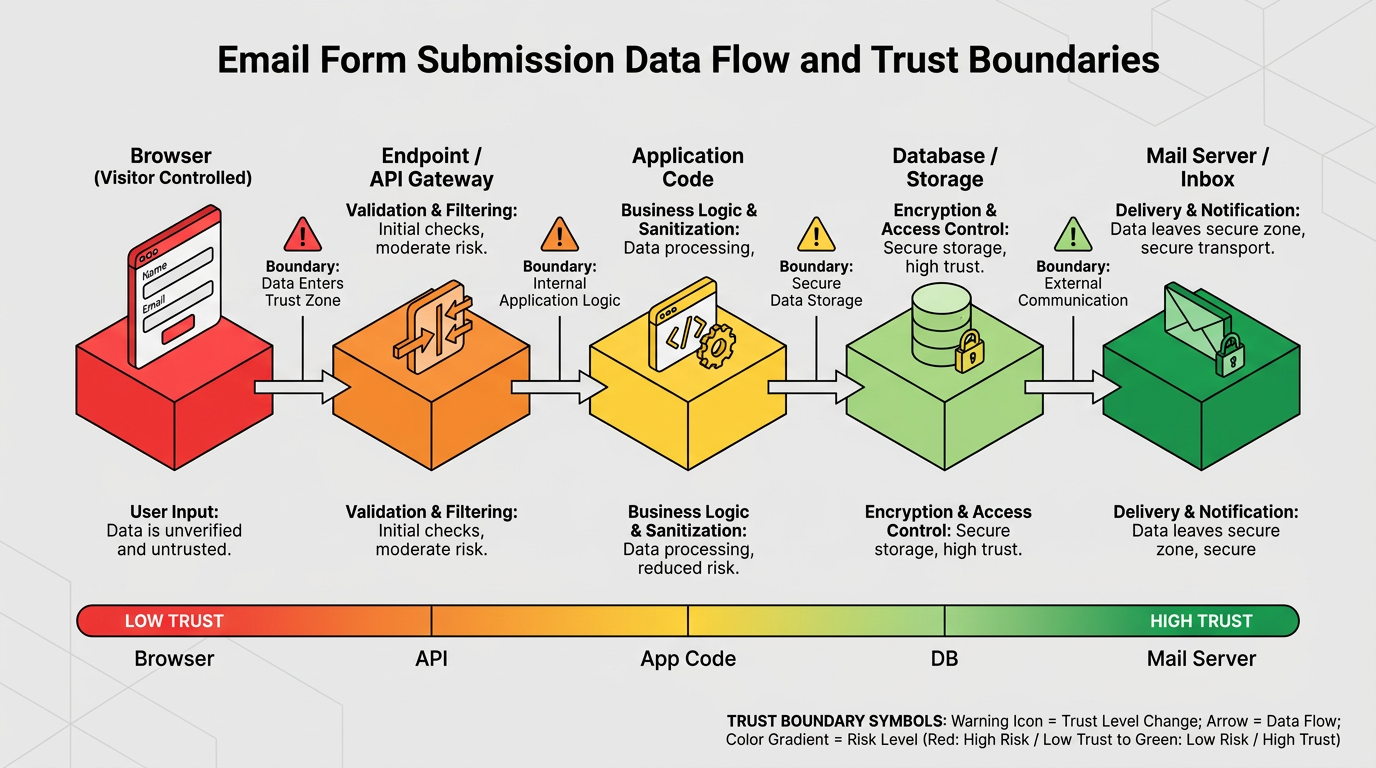
A form submission moves through several hand-offs, and each one is a place where data can be read, altered, or misused: the browser assembles the fields, an endpoint passes them to application code, the application writes them to a database and composes a notification, and a mail server relays it to a human inbox. Trust changes at every hop: the browser is entirely under the visitor's control, so nothing it sends can be believed without checking, and whatever a page's own scripts enforce can be bypassed by a request posted directly at the endpoint.
Common Form Use Cases Carry Different Data Risks
A newsletter signup and an insurance claim form share the same HTML elements but sit at opposite ends of the risk scale:
Contact and Support Forms: Spam-relay abuse and the phishing risk free text carries into a shared inbox.
Account and Registration Forms: Attract automated account creation and credential stuffing and need email ownership verification.
Health and Legal Intake Forms: Handle protected health information, which tightens transmission and access rules.
Payment and Checkout Forms: Carry card data through the browser, putting every page script under card-industry rules.
Matching the controls to the category keeps a low-risk signup from carrying checkout-grade overhead and keeps an intake form from being treated like a newsletter.
How Email Form Security Threats Exploit the Data Flow
Each major form threat targets a specific point on the submission path: bots and header injection hit the endpoint and the mail step, injection and forgery hit processing and sessions, and uploads, cleartext traffic, and trackers expose the data itself.
Bots and Header Injection Turn Form Handlers Into Spam and Mail-Abuse Tools
Attackers automate submissions to unprotected forms, which OWASP catalogs as spamming and bulk account creation. If the form emails the content to whoever appears in the email field, the attacker has found a free mail relay, and the server ends up sending the spam under its own domain, which gets that domain blocklisted.
Header injection is the sharper version of the same flaw: when application code drops a field value straight into a mail header without stripping the carriage-return/line-feed sequence, the visitor can end that header early and write new ones, adding a Bcc list or a recipient of their own choosing. MITRE classifies this as improper neutralization of CRLF sequences.
Injection, Forgery, and Data-Exposure Threats Target Processing and Storage
Forms carry untrusted text into application code, exposing it to the injection-family flaws the OWASP Top 10 for 2025 ranks among the most prevalent weaknesses in tested applications. SQL injection concatenates a field value into a database query, letting an attacker read or delete records while bypassing a login, a defect CISA and the FBI have flagged in a joint alert because it keeps shipping despite decades of documentation.
Cross-site scripting stores injected text that later renders into a page without encoding, running as script in another user's browser. Cross-site request forgery injects nothing: a hidden, pre-filled copy of the form on an attacker's page rides a logged-in visitor's cookies to the real server. An unchecked upload lets an attacker run a malicious file by requesting it directly by URL, cleartext HTTP exposes every field on the network path, and third-party trackers can read field values before the visitor ever clicks submit.
Email Form Security Best Practices at the Endpoint
Untrusted text becomes trusted data at the endpoint, so its controls decide whether injection, forgery, and malicious uploads ever reach the rest of the system.
Server-Side Validation and Parameterized Queries Contain Injection Risk
Validating input on the server against an allowlist, rather than a denylist of dangerous characters, closes the gap client-side checks leave open; OWASP's guidance calls denylisting "a common mistake" because attackers find the combination the list forgot. Email fields need their own allowlist, since a CRLF sequence that fails it also can't be used for header injection.
On the database side, parameterized queries fix the query structure and bind field values as data instead of concatenating them in, the standard mitigation named in the CISA/FBI alert above. For anything the application later displays, context-specific output encoding, not one universal escape, closes the matching gap for cross-site scripting.
CSRF Tokens, Secure Cookies, and File Validation Guard State-Changing Requests
Every form that changes something should prove the request came from a page the server actually served, which is what an anti-forgery token does: a random value the server generates, embeds, and checks on return, so an attacker's hidden copy of the form can't include one. The SameSite cookie attribute adds a browser-enforced layer, since a session cookie marked Strict or Lax won't travel with a forged cross-site submission.
File uploads need the same discipline: an allowlist enforced by inspecting the file's actual content, storage outside the web root under a server-generated name, and a scan through an antivirus engine or sandbox before anyone opens it.
Email Form Security Against Bots and Spam
Effective bot defense layers several controls that fail differently: throttling, challenges, hidden traps, and volume monitoring.
Rate Limits, CAPTCHA, and Risk-Based Challenges Slow Automated Submission
Rate limiting caps how many submissions a source can make in a window, with path-specific thresholds since no human repeatedly submits a contact form in rapid succession. Keying limits purely on IP address still misses attacks that route through proxy networks.
CAPTCHA raises the cost of automation, but a 2023 USENIX Security study found automated solvers reaching 85 to 100 percent accuracy, beating human participants on nearly every scheme tested. Risk-based challenges, which score each interaction from environment and behavior signals and interrupt only the ones that look automated, shift the burden to tuning a threshold rather than showing every visitor a puzzle.
Honeypots and Volume Monitoring Catch What Other Controls Miss
A honeypot is a field real visitors never see and bots almost always fill, at no friction cost, though a bot that parses stylesheets will notice and skip it. These controls are strongest layered together, since each fails differently:
Control | What It Stops Well | Where It Fails | Cost to Legitimate Users |
|---|---|---|---|
Rate limiting | Floods from a small number of sources | Distributed proxy networks; shared IPs cause false blocks | None until a limit is hit |
CAPTCHA | Unsophisticated scripts | Solver services and vision models; accessibility barriers | Every visitor solves a puzzle |
Risk-based challenge | Automation with weak browser signals | Bots in full browser environments; needs threshold tuning | Only flagged visitors see a challenge |
Honeypot field | Scripts that fill every field | Bots that parse CSS or use real browsers | None |
Server-side validation | Payloads with URLs, odd lengths, or bad characters | Well-formed spam that mimics real input | None |
Watching the number of notification emails a form generates over time catches whatever slips past these layers: a sustained surge over a form's normal baseline signals abuse, and tagging each notification with the form and submitting IP speeds up tracing a complaint back to its source.
Protecting Form Data After Submission
Once a submission is accepted and delivered, the risk shifts from what an attacker can send to what an attacker can take, which calls for separate controls on delivery and on storage.
Fixed Recipient Logic and Authenticated Delivery Prevent Relay and Spoofing
The recipient of a form notification belongs in server-side configuration, never in the form or a hidden field, both of which an attacker can edit; user-supplied content should appear only in the message body, with the visitor's address usable only as a reply-to after it passes the validation rules above. SMTP credentials need the same restriction, since OWASP maps hard-coded passwords to cryptographic failures: keep them outside application code, scoped to send-only, from one address, with a separate credential per environment.
Delivery needs TLS on both hops, plus Sender Policy Framework (SPF), DomainKeys Identified Mail (DKIM), and Domain-based Message Authentication, Reporting, and Conformance (DMARC), so the notification doesn't fail authentication as a web server nobody registered to send mail. The common mistake is putting the visitor's address in the From header, which breaks SPF/DKIM alignment and gets the message junked under the visitor's own DMARC policy; send from the form's own domain and use reply-to for the visitor instead.
Minimization, Encryption, and Retention Limit Long-Term Exposure
The cheapest data to protect is data never collected: a quote request doesn't need a date of birth, and GDPR requires separate, specific consent for each purpose a form serves. Submissions at rest need two protections against different attackers: encryption against anyone who obtains the storage, and least-privilege access against anyone with a login but no legitimate need for that field.
Logs deserve the same discipline, since logging the full request body for debugging creates a second, looser-access copy. OWASP's guidance recommends recording the event and masking the content instead. None of this holds without a retention schedule reaching every copy, including the notification in a shared inbox, since an old submission with no remaining business value still carries breach liability under principles like GDPR's storage limitation rule.
Compliance Requirements for Sensitive Form Data
Several regulations translate directly into form design choices, and reading them as engineering requirements rather than legal text makes them easier to meet.
GDPR and CCPA/CPRA Shape Consent, Minimization, and Breach Response
Beyond the consent rules above, GDPR's security article requires pseudonymization and encryption of personal data, and the controller must notify the supervisory authority within 72 hours of becoming aware of a breach. California's CCPA, as amended by the CPRA, requires "reasonable security procedures and practices," and its private right of action lets consumers sue when unencrypted personal information, or an email address combined with a password, is exposed through a failure to meet that duty. Regulations effective January 1, 2026 add cybersecurity audit obligations with phased deadlines beginning in 2027.
HIPAA, PCI DSS, and FTC Rules Add Sector-Specific Safeguards
A form collecting protected health information on behalf of a covered entity falls under the HIPAA Security Rule, which pushes toward TLS on the page and a hard look at whether PHI should travel by email at all; breach notification for 500 or more affected individuals runs on a 60-day clock. Payment forms answer to PCI DSS v4.0.1: Requirement 6.4.3 requires an authorized, integrity-checked inventory of every payment-page script, and Requirement 11.6.1 requires tamper detection on the page content the shopper's browser receives, both mandatory since March 31, 2025.
Financial institutions under the Gramm-Leach-Bliley Act answer to the FTC's Safeguards Rule, whose 2024 amendment requires reporting the unauthorized acquisition of 500 or more consumers' unencrypted information within 30 days of discovery.
Secure Architecture, Monitoring, and Incident Response
Architecture decides how many of the earlier controls are possible at all, and monitoring plus a rehearsed response decide how quickly a failure of any one of them is noticed and contained.
Server-Side Handlers, WAF Controls, and Secret Management Narrow the Attack Surface
A server-side handler, whether an application route or a serverless function behind an API gateway, is where untrusted input first becomes application logic, and everything in front of it exists to reduce what that handler has to trust: a web application firewall filters for injection patterns, and the gateway can reject requests missing required fields first. The handler's own secrets need the same narrowing: one send-only credential per environment, so compromising the handler never exposes an unrelated one.
Security Logs and Response Plans Turn Detection Into Action
A form endpoint should record security events, such as validation failures and failed authentication attempts, without copying sensitive field content itself; OWASP's logging guidance treats a spike in failures as a signal worth watching, since someone failing hundreds a second is, in OWASP's words, "up to no good."
Containment and notification clocks differ by regime, from 72 hours to a European authority to 60 days to HHS, so NIST's revised incident response guidance, finalized in April 2025, puts planning first: deciding in advance who owns the form and what the first containment step is.
Security Across the Entire Form Journey
A form is safest when someone owns the whole path it creates, from the tracker-laden page to the shared inbox to the backup that still holds old submissions. Layering validation, throttling, delivery authentication, and access limits means no single bypass becomes a breach, and walking through one live form, listing every place its data lands, and confirming a control sits at each hand-off turns a one-time audit into a habit.
The inbox at the end of that path is where most form-driven risk materializes, from crafted invoices to hijacked reply threads. Abnormal applies behavioral AI to that layer, modeling how employees and vendors normally communicate so socially-engineered messages, BEC, and account takeovers stand out as deviations. That approach is why Abnormal was named a Customers' Choice in the 2026 Gartner® Peer Insights™ Voice of the Customer for Email Security, the only vendor to earn the distinction three consecutive times.
Book a demo to see how Abnormal protects the inbox where form notifications land.
Frequently Asked Questions
Can a Contact Form Be Secure Without CAPTCHA?
Yes. A honeypot field, path-specific rate limiting, strict validation, a fixed recipient address, and volume monitoring together stop most automated abuse without a puzzle.
Should Form Submissions Be Sent Directly to a Shared Inbox?
For low-sensitivity contact forms, yes, if the sender domain is authenticated and the inbox has multi-factor authentication and is covered by the retention schedule. Forms collecting health or financial data should instead notify staff that a submission is waiting in an access-controlled system.
How Long Should Organizations Retain Contact Form Data?
Long enough to complete the purpose the visitor submitted it for, and no longer: a support inquiry for the life of the ticket plus a short review window, a one-time event registration shortly after the event, a sales lead on whatever expiry the sales team defines. The schedule should be automated and reach every copy, including the notification email, attachments, backups, and logs.