Key Insights
Business email compromise caused the second-largest reported losses of any crime type in 2025, roughly $3 billion, according to the Internet Crime Complaint Center's IC3 2025 Internet Crime Report.
Email attachment security is a set of controls that decide whether an inbox file gets a chance to run. Ordinary business depends on moving invoices, resumes, contracts, spreadsheets, and scanned documents by email. That familiarity creates risk: a routine-looking file can compromise an account or device. It can also compromise the network.
Effective email attachment security depends on knowing where an attack can be stopped: at delivery, during inspection, at the moment a user decides to open a file, or when the operating system executes it. This guide walks through each of those control points, the ways attackers slip past them, and the layered defenses, policy, and response work that keep one opened file from turning into a broader compromise.
Key Takeaways
Attachment risk runs as a chain: delivery, inspection, user action, and execution each offer a place to stop or miss an attack.
Every inspection and execution control has a documented bypass, which is why layered defenses outperform any single tool.
A written attachment policy turns scattered technical settings into consistent, auditable practice across each mail path.
Prepared response work, from user reporting through eradication and indicator sharing, determines how much damage one opened file causes.
What Email Attachment Security Must Protect
Email attachment security must prevent untrusted files from turning routine email interaction into credential theft, malware code execution, data loss, or network compromise. A malicious attachment is any emailed file that attackers use to compromise the recipient's system or extract information from it, whether it uses an exploit or embedded script or persuades the user to run a payload. Most incidents begin when the recipient opens, enables, extracts, or executes the contents, not when the email arrives.
Exploit-driven execution is one main risk. A malformed document that triggers a zero-day parser vulnerability needs no cooperation beyond opening and executes with no Enable Content step, which is why patching sits inside attachment defense.
Other main risks include:
Persistence and Spread: A payload that survives reboot keeps an attacker inside after a user deletes the message. Attackers can then use stolen credentials and reachable file shares to spread ransomware beyond one machine. CISA's Akira ransomware advisory notes that threat actors use phishing emails with malicious attachments to gain initial access to victim networks before moving laterally.
Payment Fraud: Some attachments carry no payload and exist only to make a fraudulent payment request look routine. According to the Anti-Phishing Working Group's APWG Phishing Activity Trends Report, wire transfer BEC attacks rose 27% quarter over quarter in Q2 2025, driven by executive coaching scam messages that carried two PDF attachments and nothing else.
These risks also challenge the misconception that only executables are dangerous. PDFs, documents, spreadsheets, and ZIP archives can carry active content or encapsulate other files, and adversaries count on users opening .doc, .pdf, .xls, .rtf, .lnk, and .iso files.
How Malicious Attachments Evade Inspection and Reach Execution
Malware hidden in attachments evades inspection by hiding active content inside trusted formats or concealing payloads in containers scanners cannot open. It can also reconstruct the file after email gateway (SEG) checks finish. Each technique targets a specific control, so knowing the technique tells you which layer needs backup.
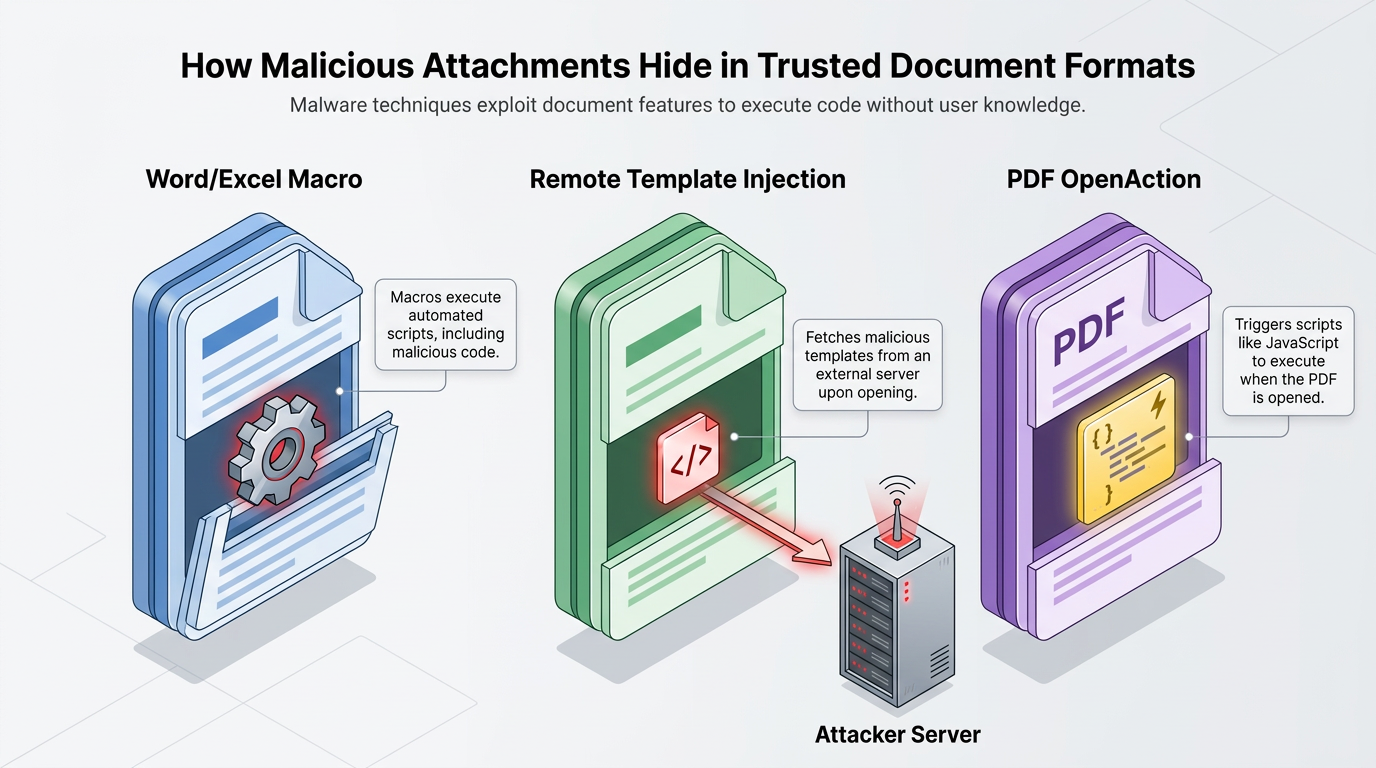
Trusted Documents Hide Active Execution Paths
Macro code is one execution path concealed inside trusted document formats. It sits inside a word processing or spreadsheet file and downloads a second payload once the user clicks through the security prompt.
Other execution paths include:
Remote Templates: Remote template injection removes malicious code from the attachment. The document carries only an Extensible Markup Language (XML) reference to an attacker-controlled server and fetches its malicious template when opened. At delivery, the secure email gateway (SEG) finds nothing because the active component arrives over the network after the SEG has made its decision.
PDF Actions: PDF readers can execute embedded JavaScript. OpenAction fires when the file opens, while Launch actions invoke operating system commands. Neither appears as a standalone script, and filters that block executables let PDFs through because business runs on them.
Outbound filtering can stop those delayed connections. As a result, trusted document formats require controls that inspect active content and monitor what the file does after opening. The document reaches the inbox while the action that causes harm remains embedded or arrives only after the recipient opens it.
Archives and Containers Conceal the Real Payload
Encrypted archives can hide payloads or prevent gateways from inspecting their contents unless the scanner can obtain the password. Placing the password in the message body slows analysis without slowing the recipient. The recipient becomes the first party to expose the contents.
Other containers can strip away protections in several ways:
Disk Images: Most desktop operating systems auto-mount .iso files on a double-click. The mounted files then behave like ZIP files with malware inside. The Mark-of-the-Web zone identifier rides on a filesystem metadata stream, and many container formats do not support that stream. The operating system may therefore treat mounted or extracted files as local and run them without those protections. Extracting a macro-enabled document from an ISO can sidestep the internet-macro block that would otherwise stop it.
Shortcut and Notebook Files: LNK shortcuts execute arbitrary commands on a double-click, and digital notebook container files (.one) embed arbitrary objects that the operating system runs when clicked.
Inspecting the outer container alone cannot establish whether the files inside are safe.
Browser and Filename Tricks Shift Execution Past the Gateway
HTML smuggling assembles the payload after inspection is over. The attached HTML file contains encoded text and standard JavaScript. The browser's JavaScript engine builds the binary on the target machine, then a data uniform resource identifier (URI) or JavaScript blob triggers its download behind the firewall. Attackers have used this approach in spear phishing email attachments. This shifts the decisive activity from the mail system to the endpoint.
Filename tricks are cruder and still effective. Evil.txt.exe can display as Evil.txt to a user, since desktop file managers hide known extensions by default. Attackers also rename files so the extension does not match the actual format, which is why defenders confirm that the extension matches the file header. The displayed name shapes the user's decision, while the true file type determines what the operating system executes.
One plausible chain begins with a resume inside a password-protected ZIP. The recruiter extracts and mounts an ISO, then opens a shortcut that runs a scripting shell and pulls a loader from an attacker-controlled host. With no Mark-of-the-Web protection, the loader establishes persistence and begins collecting credentials before a signature matches.
How Layered Email Attachment Security Blocks Malicious Files
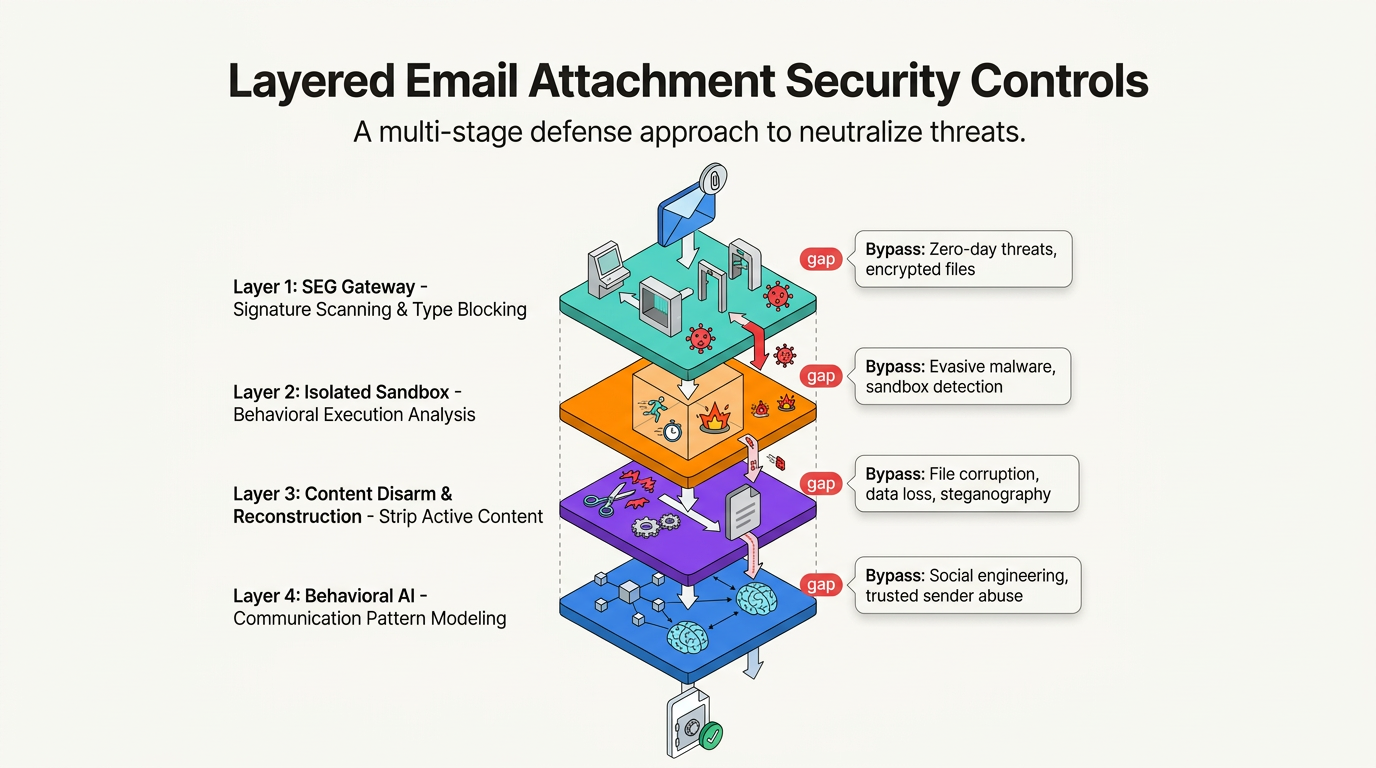
Effective attachment security uses multiple controls because each layer has known blind spots, and later layers contain what earlier ones miss.
Gateway Inspection Reduces What Reaches the Mailbox
Filtering at the SEG reduces exposure before anyone clicks. Blocking unnecessary file types is the baseline: .scr, .exe, .pif, .cpl, .jar, and .vbs, alongside message size limits. Real-time scanning checks external files, while an allowlist permits only needed formats and quarantines the rest.
Attackers defeat extension-only blocking by renaming files. True-type inspection closes that gap by reading file bytes rather than trusting names; archive recursion limits handle nested containers, and active-content stripping removes macros and embedded scripts.
Signature Scanning: Matches attachments against known malware families and reputation data. Polymorphic samples and container-based delivery slip past these engines.
Isolated Malware Sandbox: Runs the attachment in an isolated sandbox environment and watches its behavior. Malware defeats it by sleeping on a timer or demanding mouse clicks across spreadsheet cells first.
Content Disarm and Reconstruction: Parses a document to its specification, strips every active component, and rebuilds a clean file. It breaks legitimate active code and misses vectors it does not know.
Each of these methods still leaves a gap: signature scanning misses novel payloads, sandboxing misses delayed triggers, and reconstruction misses what it doesn't recognize as active content. Behavioral AI platforms such as Abnormal are designed to complement these controls by modeling how each employee, vendor, and application typically communicates, helping flag attachment-carrying messages that break that pattern even when the file itself clears inspection.
The policy can quarantine or reject encrypted archives unless an approved workflow supplies the password. Organizations also block executables from unapproved external sources. This removes a path inspection cannot reliably clear.
User and Endpoint Controls Contain What Inspection Misses
Whatever reaches the mailbox meets a person, who should ask whether the attachment was expected from that sender. Unexpected urgency or a password in the message body justify a pause. So does an archive where a document would do. Employees reduce risk when they leave an unexpected file unopened and report it instead of deleting it. A recognizable extension is not evidence of safety, and polished grammar no longer reliably identifies spear phishing lures. Education works best when organizations encourage employees to report phishing rather than punish them for clicking.
Endpoint controls catch the clicks that happen anyway. Macro blocking by default shows no enable option for internet-sourced files, while protected view opens those files behind a warning. Disabling auto-mount for ISO, IMG, Virtual Hard Disk (VHD), and VHDX files closes the disk-image path. Application allowlisting under a deny-all, permit-by-exception policy stops loaders that shortcut files try to run. Least privilege limits a payload's reach, prompt patching removes exploit classes that need no user cooperation, and endpoint detection plus outbound network restrictions cut the callback. Allowlists and scanning exclusions only hold up if someone reviews them on a schedule.
Organizational Attachment Policy Turns Controls Into Consistent Practice
A written attachment policy makes defense in depth layers consistent by defining which files the policy permits, what inspection they receive, who owns exceptions, and when the rules get reviewed. A content filtering program needs a written security policy behind it with a monitoring statement and disciplinary actions. Employees must also acknowledge the policy.
A workable policy settles these questions in writing:
Permitted File Types: An allowlist names the formats permitted inbound, with document, archive, and container types decided deliberately.
Active Content Rules: The policy states which macros, scripts, and embedded objects the mail system strips.
Size and Archive Thresholds: The policy sets the maximum attachment size and recursion depth, along with the decision on encrypted archives.
Quarantine Versus Rejection: The policy specifies whether the mail team blocks detected messages outright or holds them for review.
Secure Transfer Alternatives: The organization provides an approved path for files the mail system will not carry.
Temporary Restrictions: Someone holds authority to block additional file types during an active threat.
Exceptions need named owners and review dates so teams can retire them, since blocking attachments also stops some legitimate files. Measurement keeps the policy honest. The percentage of mail gateways configured to the policy shows adoption, and a semi-annual filter-list review keeps blocked types current.
What to Do After a Malicious Attachment Is Opened
A prepared response limits damage through reporting, scoping, containment, eradication, recovery, and lessons learned. After the loader establishes persistence and starts collecting credentials, the response proceeds through five phases.
Report and Scope the Incident: Detection often begins when the recruiter stops interacting with the file, preserves the message, and reports it. Analysts search mail server logs for the sender, subject, and attachments to find other recipients and possible infected systems.
Contain the Affected Systems: Responders disconnect affected systems, block known indicators at the SEG, web proxy, firewall, and Domain Name System (DNS) layers, and remove malicious emails from targeted mailboxes.
Eradicate the Threat: Responders delete the malware, patch the vulnerabilities involved, revoke unauthorized access, rebuild compromised hosts, and reset credentials for every account the payload could have touched.
Restore Operations in Phases: Teams restore clean backups in phases. They begin with quick, high-value changes.
Capture Lessons and Update Policy: The last phase changes the policy. Teams document what happened, share indicators of compromise with CISA or a sector Information Sharing and Analysis Center (ISAC), and turn the finding into a rule. Here, the rule blocks encrypted archives and disables ISO auto-mount. These changes stop the same ransomware attack chain from working twice.
Together, these phases turn one reported attachment into broader protection across mailboxes, endpoints, and future policy decisions.
Emerging Attachment Techniques Require Continuous Review
Attackers shift among formats and delivery services faster than defenders can maintain any blocklist. Increasingly polished lures add to the pressure, so attachment defenses require continuous review. QR code phishing and ClickFix-style scams are techniques gaining momentum.
Several developments challenge existing inspection:
HTML-Table QR Codes: A 2D matrix can hide a payload from email filters built to detect plain-text malicious URLs. Attackers have moved past image-based detection by rendering QR codes as HTML tables built from black and white cells.
Off-Mail Delivery: Attackers use direct-download URLs that point to malicious files on free file-sharing services. These URLs keep the payload out of the mail stream entirely.
SVG Attachments: Scalable Vector Graphics (SVG) attachments can carry embedded scripts that render payloads on the endpoint. This extends smuggling techniques to another file format.
AI-Driven Lures: Artificial intelligence (AI)-driven social engineering attacks add to threats such as ransomware and extortion.
These shifts show why policy reviews that track new formats and delivery methods hold up better than a fixed blocklist.
Stronger Attachment Security Starts with the Next Layer
SEG inspection reduces volume, endpoint controls stop what gets through, written policy keeps both consistent across each mail path, and rehearsed response decides how far a single click travels. Trace one attachment from delivery to execution, identify the stage that rests on a single control, and name the layer meant to catch it when that control fails.
Behavioral AI adds a layer that complements those controls rather than replacing them: Abnormal models how each employee, vendor, and application typically communicates, then helps flag attachment-carrying messages that break that pattern even when the file itself doesn't trip a known signature.
Abnormal was named a Customers' Choice in the 2026 Gartner® Peer Insights™ Voice of the Customer for Email Security. Book a demo to see how it fits your existing mail stack.
Frequently Asked Questions
How Do Attachment Previews Differ from Downloads?
Saving and opening passes a file to its application with macros, scripts, and embedded objects intact. Preview is lower risk, not risk-free: a vulnerable webmail platform may execute a payload while rendering a message. Mail clients also differ in whether they render a file inline or hand it off to a full application.
Does Forwarding an Attachment Change Its Risk?
Forwarding changes who receives a file and what context surrounds it, but it does nothing to sanitize the file itself. Depending on the mail architecture, gateways may rescan a forwarded attachment, but forwarding does not inherently remove malicious content. A forwarded malicious attachment carries a familiar internal sender's name. This removes one of the cues recipients rely on most.
Do Digital Signatures Prove an Attachment Is Safe?
A valid digital signature tells you who signed the file and that the contents have not changed since signing. Neither fact says anything about behavior. A signed document can still contain macros, embedded scripts, or a remote template reference, and an attacker may compromise or simply own the signing key used to sign it. Signatures answer questions about identity and integrity, not intent.
Can Email Authentication Prove an Attachment Is Safe?
Sender Policy Framework (SPF), DomainKeys Identified Mail (DKIM), and Domain-based Message Authentication, Reporting and Conformance (DMARC) verify the sending domain, which cuts down on spoofing. They evaluate the sending domain, never the attached file. When an attacker sends from a compromised legitimate account, the message passes all three checks while carrying a malicious payload, which is why attachment inspection and endpoint controls sit behind authentication rather than beside it.