Key Insights
ClickFix attacks surged 517% in the first half of 2025, becoming the second most common vector behind only phishing and accounting for roughly 8% of blocked attacks. A ClickFix attack is a social engineering trick in which a webpage presents a fake error or verification prompt and talks the visitor into pasting an attacker-supplied command into a trusted system tool, so the person infects their own device without any software vulnerability being exploited.
This guide explains the mechanics of a ClickFix chain from lure to clipboard write to native-tool execution and catalogs the named variants that have appeared since 2024. It also maps the campaigns that have adopted it from commodity crime to ransomware and state-linked activity and lays out detection and response steps that hold up as attackers swap the surface.
Shortcut-specific advice ages out the moment attackers swap Windows+R for File Explorer or Terminal, so the practical through-line here is a defense built on the one stable signal: a webpage asking someone to paste text into a system tool.
Key Takeaways
ClickFix tricks people into running webpage-supplied commands in trusted system tools.
Attackers rotate lures and paste targets, so shortcut-specific advice goes stale.
Defense combines pasting rules, native-tool limits, and browser-to-shell logging.
Fast reporting, credential changes, and payload investigation limit damage after a paste.
What Is a ClickFix Attack?
A ClickFix attack is a social engineering technique in which a webpage shows a fake problem or verification step and convinces the visitor to run a malicious command on their own computer. This attack does not directly rely on malware and does not exploit a software vulnerability.
The joint CISA advisory describes how attackers trick victims into executing a malicious payload under the guise of fixing an issue on the victim's system. Separate malware arrives afterward. This could include infostealers such as Lumma and Vidar, loaders such as DarkGate, and remote access trojans. The name comes from the original lure style, "Click to fix!"
Browsers stop webpages from running code directly on the operating system. But ClickFix persuades the user to cross that boundary: the page supplies the text, and the person runs it in a system tool.
ClickFix evolved directly from fake browser-update campaigns that pushed disguised installer files. One financially motivated cluster ran fake update overlays from September 2023, moved to a JavaScript downloader, and switched to ClickFix landing pages around mid-2024. The earliest documented ClickFix campaigns ran from March to June 2024 and delivered DarkGate through HTML email attachments.
How ClickFix Attacks Work
A ClickFix chain runs from lure to clipboard write to a paste into a native tool that fetches the payload. Each stage leaves traces.
Delivery Through Phishing, Malicious Ads, and Compromised Sites
Attackers lead victims to ClickFix lure pages through phishing email messages, malicious ads, search poisoning, or compromised legitimate websites. For instance, a June 2025 campaign impersonating the Social Security Administration used an ad redirect, which defeats hover-to-check habits.
At this stage, email gateway records, proxy or Domain Name System (DNS) logs showing the ad click and redirect chain, and browser history pointing to the lure domain are the traces defenders can pull.
Deceptive Errors and Verification Prompts
The landing page invents a problem, such as a browser crash, a missing document extension, a video-call audio problem, or a "Verify you are human" checkbox. Interlock's fake verification prompt sent visitors to the Run dialog, and North Korea-linked operators have shown fake errors during staged job interviews. Traces include injected scripts or iframes and requests to the server supplying the command.
Silent Clipboard Writing and User-Initiated Execution
Clicking the checkbox triggers a page script that quietly writes a command to the clipboard, and the script sometimes fetches that command from an attacker server. Classic instructions say to press Windows+R, paste with Ctrl+V, and press Enter. The RunMRU registry key logs successful commands.
Native Tools, Payload Delivery, and Follow-On Access
The pasted line usually calls PowerShell, mshta, curl, or rundll32 to download the next stage. Attackers often encode the command in Base64 or split it into concatenated strings, so the visible text hides what it does. Attackers often run payloads filelessly by injecting them into legitimate processes such as msbuild.exe or regasm.exe.
They then use infostealers to take credentials and browser data, install remote access tools, or sell the access, sometimes to ransomware operators. Traces include process-creation command lines, script block logs, outbound connections, and new scheduled tasks.
Why ClickFix Attacks Convince Users
ClickFix convinces users because it disguises itself as a routine prompt and hands the dangerous step to a tool the operating system already trusts.
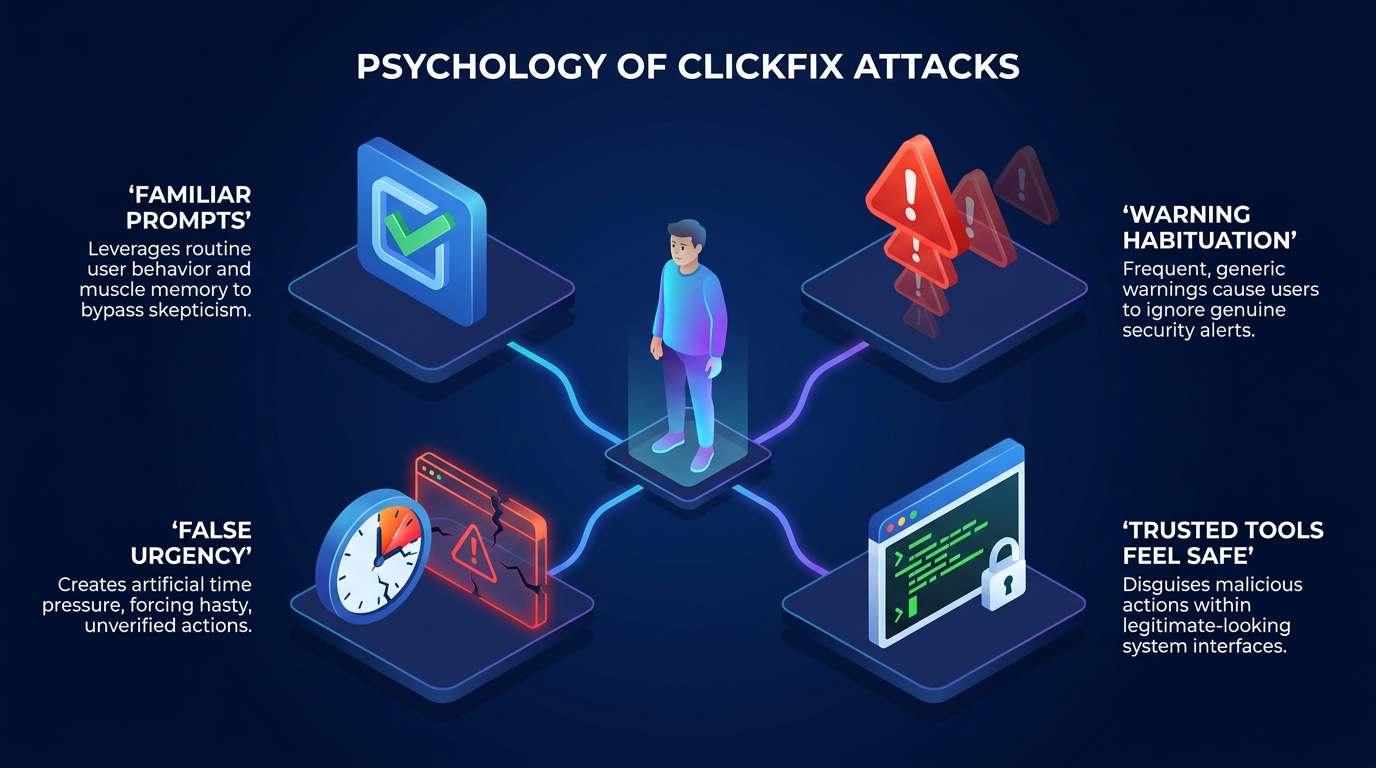
Familiar Prompts and the Problem-Solving Instinct
CAPTCHAs and "something went wrong" messages appear constantly, so a new one rarely gets scrutiny. ClickFix frames compliance as self-service, so users feel they are fixing their own problem. Brand impersonation adds credibility: one campaign against hotels styled its fake CAPTCHA after a travel booking platform, which gave targets a false sense of security.
Warning Habituation and Decision Fatigue
Repeated warnings make routine prompts easier to dismiss, and decision fatigue pushes people toward whichever option resolves the interruption fastest. MIS Quarterly research found that habituation to security warnings produces repetition suppression, or a decreased neuronal response to the same stimulus, which can generalize from routine notifications to warnings a user has never seen before.
False Sense of Urgency
One later variant, CrashFix, deliberately crashes the browser, so the restore prompt arrives while the victim is disrupted. A fake audio problem or "Verify you are human" box blocks something the visitor wants right now. That blockage adds time pressure and leaves less room to ask why a webpage needs a system tool.
Trusted System Tools That Make Unsafe Actions Look Safe
A downloaded file triggers warnings; a typed command usually does not. On macOS, a command pasted into Terminal can avoid quarantine, code-signing, and notarization checks. Early lures sent people to PowerShell or Terminal, where multi-line paste warnings may have deterred victims. Attackers then switched to the quieter Run box.
ClickFix Variants Follow a Surface-Swap Pattern
Each variant keeps the paste-and-run move. Only the lure or the execution surface changes.
Classic ClickFix and Fake CAPTCHA Overlays
Many classic lures inject a spoofed CAPTCHA checkbox into a compromised legitimate site, so the overlay appears on a page the visitor already trusts. The overlay then points visitors to the Run dialog, Terminal, or PowerShell. Russian state-backed COLDRIVER built a custom "not a robot" check that had victims run a single dynamic-link library (DLL) through rundll32 instead of a multi-stage PowerShell chain.
FileFix, TerminalFix, CrashFix, and ConsentFix
Later ClickFix variants keep the same user-mediated execution but move it to new surfaces:
Variant | Lure | Execution Surface | What Changed |
|---|---|---|---|
FileFix (June 2025) | "A file has been shared with you" | File Explorer address bar | Attackers disguise the command as a file path, outside Run-focused monitoring |
CrashFix (January 2026) | Attacker deliberately crashes the browser, then shows a "restore" prompt | Windows dialog using a renamed finger.exe | Real disruption makes the fix feel urgent |
ConsentFix (January 2026) | Fake CAPTCHA | Browser Open Authorization (OAuth) sign-in flow | Victims paste web addresses containing credentials instead of shell commands |
TerminalFix (August 2026) | Fake verification overlay | Windows Terminal or PowerShell | Return to Terminal allows long multi-line scripts |
For instance, ConsentFix victims paste Open Authorization (OAuth) web addresses containing credentials, which shifts the target from the device to the account. OAuth account access lets one service grant another access to an account.
macOS Terminal Lures and the Limits of Windows-Only Guidance
ClickFix also targets macOS, so Windows-only guidance leaves a gap. An HHS ClickFix sector alert documented a fake CAPTCHA delivering Atomic macOS Stealer, and a later campaign added cloaking that showed scanners a decoy. macOS 26.4 and later warn users with a "Paste blocked" message.
Real-World ClickFix Campaigns and Evidence
ClickFix spread from a handful of 2024 email campaigns to commodity crime, ransomware, and state operations.
The Timeline from Early 2024 Through 2026
Other groups adopted the lure within months of the first DarkGate campaigns. By August 2024, campaigns had expanded to fake meeting pages and cracked-software CAPTCHA infrastructure. The next phase brought FileFix in June 2025 and the Interlock advisory in July, followed by a late-2025 dip. CrashFix and ConsentFix appeared in January 2026, the Australian Vidar advisory followed in May, and TerminalFix arrived in August.
The Range from Commodity Malware to Ransomware and State-Linked Activity
ClickFix supports activity ranging from commodity malware distribution to ransomware and state-linked operations. As mentioned earlier, commodity crews use ClickFix to spread infostealer malware like Lumma, Vidar, NetSupport, and Remcos. Russian state-linked users include COLDRIVER and a cluster that planted ClickFix pages on compromised hotel Wi-Fi portals. North Korean fake-interview operations and Kimsuky have used it too. COLDRIVER has kept refining its ClickFix lure rather than abandoning it, and its use by commodity crews and state-linked groups alike means the technique identifies no single actor.
How to Prevent, Detect, and Respond to ClickFix Attacks
ClickFix defense works in layers aimed at the behavior.
User Rules That Generalize Beyond Windows+R
Australia's cyber agency advises people not to copy, paste, or execute commands from websites or pop-ups. Its Australian ClickFix advisory also recommends browser-level controls. For users, the rule extends into three habits:
Every Paste Target Counts: The same caution applies to the File Explorer address bar and to pasting URLs into a verification box.
The Clipboard Can Lie: A button click can load text the user never saw, so pasted content may differ from what appeared on screen.
System Tools Are a Red Flag: ClickFix lures direct visitors to Run, Terminal, PowerShell, or File Explorer, so any webpage asking for one deserves suspicion.
Each habit applies the same test: a webpage has no reason to hand text to a system tool.
Browser, Script, Application, and Privilege Controls
Effective prevention combines browser restrictions with application and privilege controls. Removing the Run menu through Group Policy helps but leaves Terminal and File Explorer open. Application control and attack surface reduction rules can stop PowerShell, mshta, and rundll32 from launching internet-delivered content, and PowerShell Constrained Language Mode limits what scripts can do.
In the browser, teams can restrict clipboard writes and scripts from untrusted sites, enforce enhanced reputation protection, and block newly observed domains.
Clipboard-to-Shell, Process, Logging, and Run-History Signals
Effective detection correlates browser activity with process activity. PowerShell script block logging records executed code, and command-line capture in process-creation events shows what launched.
Strong signals include:
Explorer.exe Spawning Shells: Explorer.exe, which hosts the Run dialog, spawning PowerShell or mshta.
Clipboard-to-Shell Sequences: Clipboard activity before cmd.exe launches.
Suspicious RunMRU Entries: RunMRU entries naming powershell, mshta, curl, or download cmdlets. FileFix sidesteps Run-only telemetry, so RunMRU-only rules miss newer variants.
The same detection approach covers bash, zsh, and macOS Terminal paste-to-shell chains, so Mac fleets need browser-to-shell correlation too.
First Steps After Someone Pastes and Runs a Command
Infostealers target credentials and session material, so a prompt response limits exposure. A sensible order for the affected person includes these steps:
The affected person should report the event to IT or security right away.
They should change reused passwords first, enable two-factor authentication, use a separate clean device, and sign out of active sessions to limit what a running infostealer can capture.
They should ask IT or security to scan the device with updated security software and should avoid sensitive logins on it until IT or security completes the scan.
Anyone with exposed financial accounts can contact their bank, and US residents can also use IdentityTheft.gov. Responders can then review RunMRU, PowerShell logs, new scheduled tasks, registry changes, and contacted hosts. Organizations can follow their incident response plan for investigation and reporting.
Abnormal's behavioral AI can help surface the account-side symptoms of that exposure, such as an unfamiliar sign-in location or a new mailbox forwarding rule, often before a stolen credential turns into a larger compromise.
ClickFix Frameworks and Common Misconceptions
Security frameworks now describe the copy-and-paste behavior behind ClickFix, and some assumptions about catching it need correcting.
Malicious Copy-and-Paste Execution in Security Frameworks
MITRE and NIST classify ClickFix behavior and map it to practical defenses. The MITRE ATT&CK framework lists this as Malicious Copy and Paste and notes that such commands may bypass email filtering, browser sandboxing, and download protections. This entry includes a detection strategy for the browser-or-email-to-shell chain.
The NIST Cybersecurity Framework 2.0 does not name ClickFix, but teams can map its outcomes for security awareness training, blocking unauthorized software, logging, and event correlation onto the browser, script, and logging controls described earlier.
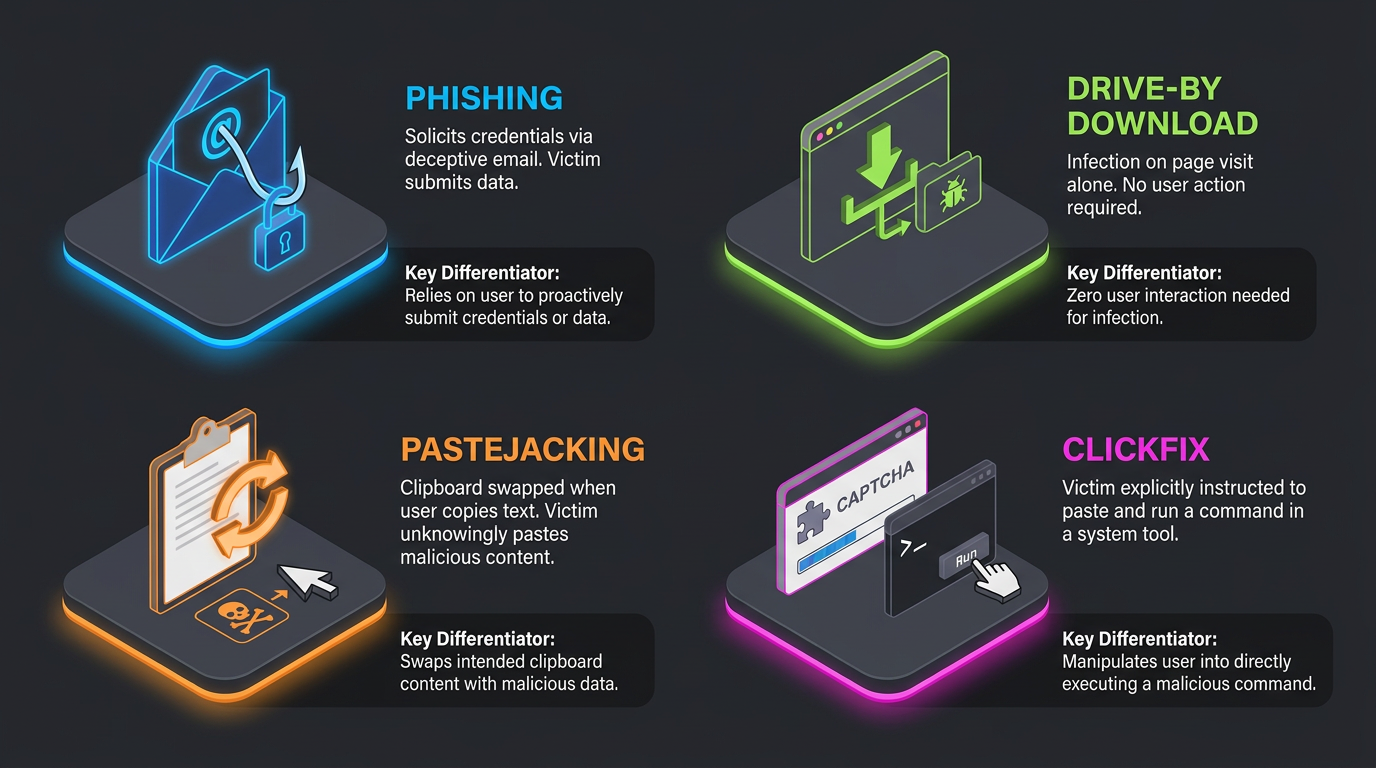
ClickFix Compared with Phishing, Drive-By Downloads, and Pastejacking
The distinctions depend on what triggers the compromise and what action the victim takes:
Phishing: Phishing solicits data such as passwords and often delivers ClickFix lures.
Drive-By Downloads: Infection happens just by visiting a page. ClickFix requires the victim to run the command.
Pastejacking: The clipboard is swapped when someone copies text, whereas ClickFix explicitly tells the victim to paste and execute.
These boundaries matter because each technique leaves different user and system signals for defenders to investigate.
Antivirus, Browser Protections, and Training as Layers Rather Than Guarantees
HHS warned that ClickFix can bypass browser reputation protections, and fileless payloads give file scanners little to examine. Training works best as one layer alongside the technical controls above.
Defense Has to Target the Behavior, Not the Shortcut
The stable warning sign is a webpage asking someone to move text into a trusted tool and run it. Teams that teach the rule, restrict native tools, and link browser events to shell activity are ready for the next variant before it has a name.
The paste itself happens outside what any email tool can see, inside a Run dialog or Terminal window. Abnormal's behavioral AI is designed to catch the stages on either side of that gap: the phishing email or malicious ad that first delivers the lure, and the account anomalies, such as an unfamiliar sign-in or a new forwarding rule, that often follow a successful paste. Book a demo to see how it fits into a broader defense.
Frequently Asked Questions
Is ClickFix a Virus?
No. It is a persuasion trick; the damage comes from the program the pasted command installs, such as the Vidar infostealer.
Can ClickFix Affect Mac or Linux Devices?
Yes for Mac: active campaigns use Terminal commands to install password stealers. Researchers have not documented Linux-specific campaigns well, though security frameworks list Linux as affected.
Are All ClickFix Attacks Fake CAPTCHAs?
No. Lures have included fake meeting pages, cracked software and game downloads, portable document format (PDF) reader searches, fake blue screens, and social media tutorial videos with fake activation steps.
Can ClickFix Work Without Automatically Changing the Clipboard?
Yes. Some pages never touch the clipboard and instead talk the victim into copying the command. Detection limited to page-driven clipboard writes misses these cases, so the paste-and-run rule still applies.