Browser phishing protection is the reason a red warning screen sometimes appears between you and a link you just clicked. Most people have seen that screen, backed out or pushed through it, and never thought about what triggered it. Behind it sits a decision the browser made in a fraction of a second. Understanding what that warning can and cannot tell you changes how you respond when one appears and how you evaluate a page when it does not.
The browser is often the last checkpoint standing between a convincing fake and a stolen credential, and a warning that never fires is not the same as a page that is safe. Attackers have learned to work in the gap between when a phishing site goes live and when reputation systems catch up, which means the difference between a compromised account and an intact one increasingly comes down to what happens after the address bar looks clean.
This guide breaks down how browser phishing protection makes its decisions, where it fits alongside email filters, DNS services, and endpoint tools, and which attacker techniques routinely slip past it. It also covers the misconceptions that lead people to trust a padlock or a missing warning more than either deserves, and the authentication choices that hold up even when every other layer fails.
Key Takeaways
Browser phishing protection checks web destinations and downloads for known threats, while newer client-side protections can also analyze page content and behavior.
Traditional blocklists are strongest after a phishing page has been observed and classified, although some reputation systems also use predictive signals.
The presence of an encrypted connection does not establish that a site is legitimate.
Phishing-resistant authentication such as passkeys can protect an account even when the browser raises no warning, so it covers cases that reputation checks miss.
What Is Browser Phishing Protection?
Browser phishing protection is a set of checks the browser runs when you visit a web address or download a file to stop a fraudulent page or dangerous download before you interact with it.
Phishing attacks use email, text messages, websites, and other channels to impersonate a trusted business or person and steal credentials or account access. Browser phishing protection checks the web page. When you type an address or click a link, the browser can evaluate the destination and show a full-page warning when it matches a known phishing or other malicious site. These checks can also inspect downloaded files.
That intervention point matters because the browser is the last stop before you see the fake login form. An email filter may have missed the message, a text message never passed through one, and a quick response (QR) code on a flyer had no filter at all. The volume is large: according to the Federal Bureau of Investigation's Internet Crime Complaint Center (FBI IC3), phishing and spoofing generated 191,561 complaints in 2025, more than any other crime type reported that year.
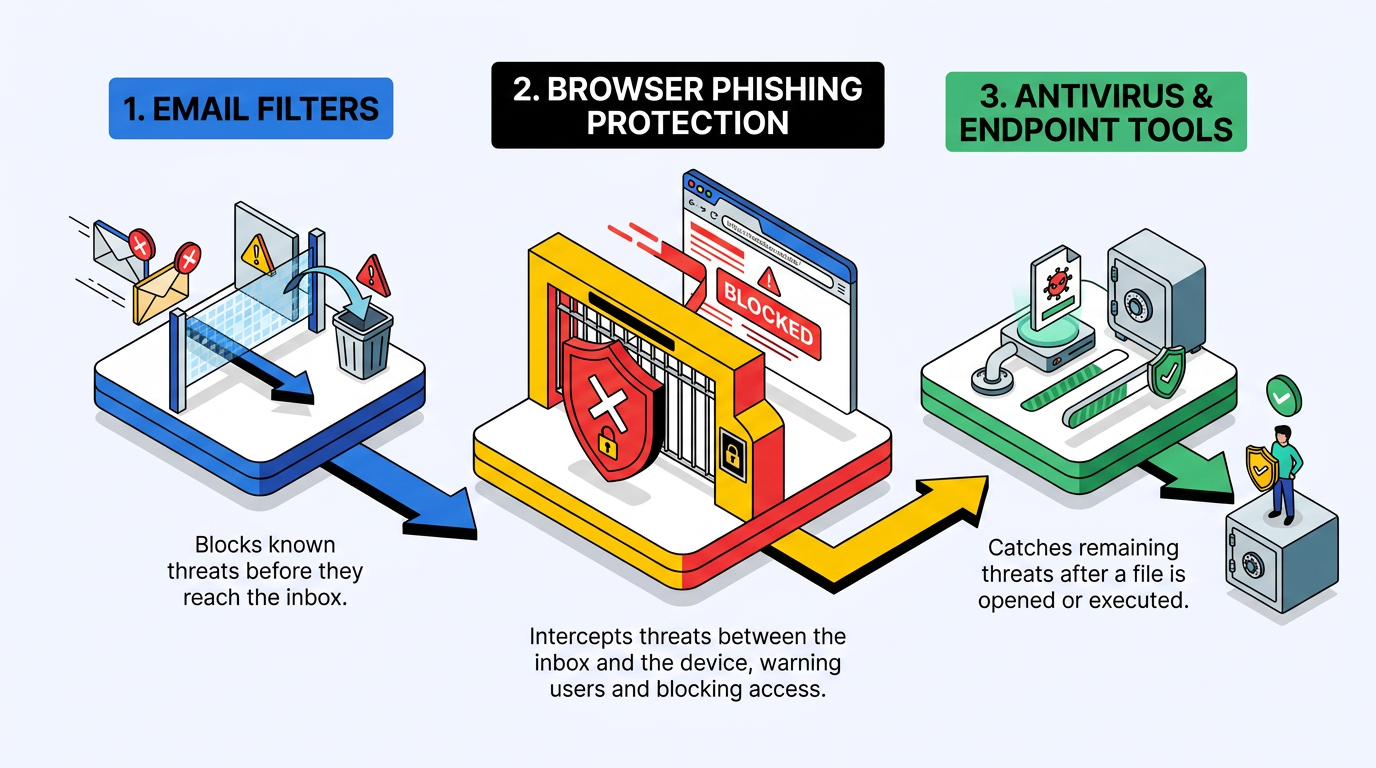
Browser phishing protection does not replace email filtering or endpoint defenses such as antivirus: each control operates at a different moment.
Email Filters: Inspect messages before they reach the inbox.
Browser Phishing Protection: Sits between the inbox and the device, examining the link followed or the file fetched.
Antivirus and Endpoint Tools: Watch what runs on the device after someone downloads and opens a file.
Because these controls operate at different moments, they work best as complementary checkpoints rather than as a complete security system.
How Does Browser Phishing Protection Work?
Browser phishing protection primarily compares destinations against reputation data, while some client-side systems also judge page content and behavior when no list has an answer.
If a destination matches those records, the browser can interrupt page loading with a warning. If it finds no match, the page may load normally. Traditional blocklists work best against threats that providers, researchers, crawlers, or victims have already observed, verified, and catalogued, although broader reputation systems may also use inferred or predictive signals.
A phishing page may go live before reputation services classify it. A real-time lookup can consult fresher reputation data than an older local copy, while local checks provide quick answers from information already available to the browser. A traditional lookup cannot return a known match for a destination that has not yet been catalogued. A page may therefore be dangerous even when the lookup returns no known threat.
Attackers can also withdraw or conceal phishing content before reputation services classify it, so newer client-side protections analyze the page itself. These heuristic systems examine URLs, page structure, visual elements, and other phishing signals. The browser can flag a page that imitates a familiar company on a domain the company does not own, even when the address is brand new.
The two approaches differ in precision. Blocklists typically prioritize precise classifications, though false positives remain possible. Heuristics can catch newer pages but rely on less conclusive evidence because legitimate pages may share individual characteristics with fraudulent ones. Together, the two approaches cover more of the attack timeline than either can cover alone.
Types of Phishing Protection Inside and Beyond the Browser
Browser phishing protection is one part of a layered phishing defense, and each layer sees something the others cannot.
Browser Controls Inspect Navigation and Page Signals
Built-in browser checks operate when a page loads or a file downloads, where they can compare a URL with reputation data and evaluate available page signals. This location lets the browser interrupt an interaction immediately before a person reaches a fraudulent form or opens a suspicious download. Pages that are too new for reputation services remain a major blind spot.
Browser extensions perform similar checks but add client-side software to inspect URLs and page content or structure. Their visibility depends on the permissions a user grants, and their effectiveness and trustworthiness vary by extension. Unlike network controls, both built-in checks and extensions work directly within the browser, close to the page and the user's decision.
These browser tools are particularly important for personal accounts because individuals do not usually control organization-wide DNS and gateway filters or isolation systems. Built-in checks and extensions cannot determine whether every convincing page is honest, especially when attackers use fresh infrastructure or content hosted on legitimate services. Extensions also introduce a separate trust decision because broad permissions may give an add-on visibility into browsing activity or page content. Built-in controls avoid that added software layer, but both approaches still depend on the quality and timeliness of the signals available to them.
Network and Isolation Controls Intervene Beyond the Browser
Further out, protective Domain Name System (DNS) services block a domain at the resolver before a device makes a connection. A secure web gateway operates later as a proxy. It reads full URL paths and, when an organization configures Transport Layer Security (TLS) inspection, the content of encrypted sessions. Remote browser isolation goes furthest by executing the page in a sandboxed remote environment so malicious code does not run on the local device.
Layer | Where It Sits | What It Can See | Main Blind Spot |
|---|---|---|---|
Built-In Browser Checks | Inside the browser, when a page loads or a file downloads | URL and available reputation or page signals | Pages too new to be listed |
Browser Extensions | Inside the browser as add-on software | URL and page content or structure, depending on permissions | Effectiveness and trust vary by extension |
Protective DNS | At the resolver, before any connection | Domain names | Phishing hosted on legitimate domains; encrypted DNS can route around network monitoring |
Secure Web Gateway | As a proxy between device and internet | Full URL path; encrypted content when TLS inspection is on | The browser may assemble client-side content after gateway inspection |
Remote Browser Isolation | In a remote environment that runs the page | Web content executed away from the device | Cannot stop a user from typing credentials into a convincing page |
DNS filtering can stop a connection early but sees domains rather than every page path. A gateway gains more context, while isolation limits what web code can do to the local device without deciding whether every page is honest. Organizations therefore use browser isolation alongside email and web gateways equipped with content filtering and data loss prevention rather than as a replacement.
Phishing Techniques That Slip Past Browser Protection
Techniques that beat reputation-based browser phishing protection commonly exploit the delay between a phishing page going live and a reputation system recording it.
Reverse-Proxy Phishing That Relays the Real Login Page
Adversary-in-the-middle (AiTM) phishing, a man-in-the-middle attack, relays communication between a victim and a real service. The attacker's server sits between them. It forwards requests and responses while capturing credentials or an authenticated session. The victim may see authentic branding and real error messages. The page may also display a real multi-factor authentication (MFA) prompt. When the victim completes the login, the relay can capture the authenticated session cookie and let the attacker use the logged-in session without entering the password again.
Unlike a static imitation, the proxy forwards information to and from the real service. The page can react like the genuine login flow while the attacker remains in the middle. The browser still sees the attacker-controlled domain, but browser phishing protection may have little data to use when that domain is fresh.
AiTM campaigns can also use filtering to keep malicious pages away from automated analysis, allowing a domain to remain unlisted during a short campaign. Modified AiTM toolkits can combine relayed login pages with visitor screening and credential interception. They can also steal session cookies. These capabilities make the page appear more authentic because much of the interaction comes from the real service rather than from a static copy. The browser can still act on a known malicious domain or suspicious page signals, but it cannot assume that realistic behavior proves the destination is legitimate.
Fresh Domains, Trusted Hosts, and CAPTCHA Gates That Delay Detection
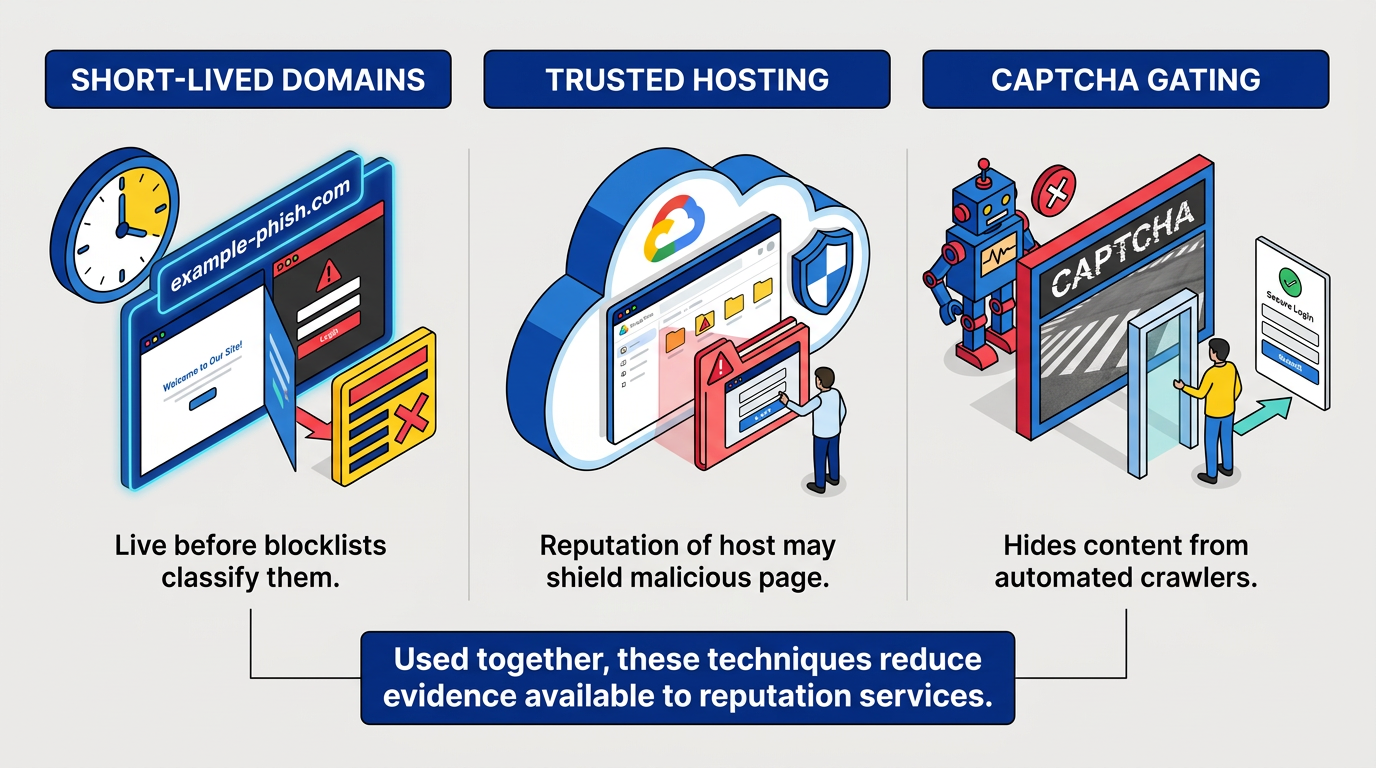
Short-lived domains evade traditional blocklists by appearing before the lists classify them. An attacker can register a domain, run a campaign, and then take it offline or replace the phishing page with harmless content before crawlers catalog it. Real-time lookups shorten the window created by stale local data, but a newly observed domain may still lack enough evidence for a confident classification.
Trusted hosting inverts the problem. A reputation system may recognize the hosting platform as legitimate, so phishing pages on developer hosting platforms and cloud-based file-sharing services can avoid domain-level blocks. The safe-browsing service must identify the malicious page or path instead. This creates detection challenges because the surrounding service may host large amounts of legitimate content.
Completely Automated Public Turing test to tell Computers and Humans Apart (CAPTCHA) gating adds another barrier. Client-side cloaking can put a human-verification check in front of phishing content, so automated crawlers see nothing while selected visitors reach the page. By hiding content from systems that feed reputation lists, a CAPTCHA gate can help an attack remain unlisted long enough to reach targeted victims.
These methods can also work together. A short-lived page on a trusted platform may hide the phishing form from automated systems and reveal it only after a selected visitor passes a CAPTCHA. Each layer reduces the evidence available to reputation services during the campaign's most active period.
Common Misconceptions About Browsing Phishing Protection
An encrypted connection does not mean a site is legitimate, and the browser's warning system is not enough on its own.
The Padlock Icon as Proof of Legitimacy
Would you notice if that padlock secured a connection to a look-alike domain instead of the real one? An encrypted connection protects data in transit but does not establish that the site belongs to the organization a user intended to visit. A phishing site can present an encrypted connection, and a typo in the address can connect you securely to the wrong party. The encryption still performs its technical job, but it protects the connection to the phishing site rather than confirming the site's identity or intentions.
People can interpret the browser's lock icon as a broad signal that a site is safe, even though it provides a narrower assurance about the connection. A convincing design and familiar logo can appear on a fraudulent page, which may also use an encrypted session. The connection may prevent another party from reading data while it travels, yet the site receiving that data can still be malicious.
Reading the domain name carefully helps, but it also has limits. Internationalized domain names can use characters from other alphabets that look identical to Latin letters. Browsers mitigate many homograph attacks by displaying suspicious names in an encoded form, but attackers can also use visually similar names and ordinary misspellings. Subdomains can create further confusion by placing a familiar brand name before the actual registered domain. The padlock therefore provides useful connection information, not proof that the party at the other end is legitimate.
Browser Warnings as a Complete Defense
Warnings work only when people obey them, and some users proceed through phishing and malware warnings. Repeated exposure can also create desensitization, particularly when security prompts resemble workplace warnings people have learned to dismiss. Active full-page interstitials perform far better than passive toolbar indicators because they interrupt page loading and demand a decision. Attacks can avoid triggering a warning in the first place.
Phishing also arrives where browser protection is thinnest. The Verizon 2026 DBIR reports that the median successful click rate for mobile-centric vectors such as voice and text messaging is 40% higher than for email. A QR code scanned from a PDF or poster can also open in a mobile browser that never encountered an email filter.
Phishing-resistant authentication provides another layer when both the browser and the user are fooled. The Cybersecurity and Infrastructure Security Agency's (CISA) MFA guidance states that Fast Identity Online (FIDO) and Web Authentication (WebAuthn) provide a widely available phishing-resistant method because "when a malicious cyber actor tricks a user into logging into a fake website, the FIDO protocol will block the attempt." Correctly implemented syncable authenticators, including passkeys, resist phishing, while attackers can capture or relay codes sent by text or generated by an app.
A missing warning is not a clean bill of health. Built-in browser checks and careful review of the destination address different failure points. Phishing-resistant authentication covers another, so combining these defenses provides stronger protection than relying on any one signal.
Where the Browser Ends and Your Judgment Begins
Browser phishing protection deserves attention every time it fires because blocklist-based warnings generally prioritize precision, though mistakes remain possible. Fresh pages remain a blind spot, including those hosted on trusted platforms or relayed through real login flows. Passkeys and other phishing-resistant authenticators close part of those gaps at the authentication step. Pairing the two turns a clean address bar into a useful starting point rather than a final verdict.
Frequently Asked Questions
What Should I Do if I Think a Phishing Warning Is a False Positive?
False positives are possible, but the safer assumption is that the warning may reflect a real risk. Reaching the organization through a phone number or address you already know, rather than through the link that triggered the warning, resolves most doubts.
Do I Still Need Antivirus if My Browser Has Phishing Protection?
Yes. Browser protection can stop you from reaching known fraudulent pages and warn about dangerous destinations, but it does not replace software that watches what runs on your device after you open a file, and it does not filter your email. A sensible setup uses both, along with the anti-phishing features in your email client, since no single tool catches every attempt.
Can a Phishing Site Use an Encrypted Connection?
Yes. Encryption protects information while it travels between the browser and the site, but it does not prove that the site belongs to the intended organization. A fraudulent site can use encryption while collecting credentials or other sensitive information.
Can Multi-Factor Authentication Stop Every Phishing Attack?
Not every MFA method stops every phishing technique. Attackers can capture or relay codes sent by text or generated by an app during an AiTM attack. Phishing-resistant methods such as passkeys are designed to prevent authentication on an impersonating site.