Most email security controls focus on the inbox: detect the threat, remediate it, and move on. But for organizations that automatically route inbound mail into tools like Salesforce, Zendesk, or ServiceNow, that remediation can come too late.
By the time a malicious message is identified, it may already have been forwarded into a ticketing queue, CRM workflow, or shared support system outside the security team’s control. And the support rep opening that ticket has no reason to know the original email was ever flagged.
Third-Party Tools Are Now Part of the Email Attack Surface
Organizations depend on integrations that move email content into the CRMs, ticketing platforms, and helpdesks where work actually happens. They ingest and surface email content at scale, with no mechanism to evaluate whether a message was ever reviewed for threats.
Attackers are not targeting Salesforce or Zendesk directly. The problem is that a normal phishing or business email compromise (BEC) message can persist after inbox remediation if it has already been forwarded into a downstream system. As we saw in last year’s OAuth-based attacks, a compromise in one connected application can reach data across hundreds of organizations. Once a malicious message makes it into the mail flow, auto-forwarding rules and routing workflows can quietly move that content into the tools employees rely on every day.
The result: BEC, vendor fraud, and phishing that might be caught at the mailbox can still surface inside downstream tools, where end users have no reason or way to know whether that content was ever evaluated for threats.
Closing the Gap with Auto-Forwarding Mail Protection
Microsoft 365 and Google Workspace apply auto-forwarding rules before any native security inspection occurs — which means a malicious message that would eventually be caught in the inbox can reach Salesforce, Zendesk, or ServiceNow first.
Abnormal now offers Auto-Forwarding Mail Protection for Microsoft 365 and Google Workspace, extending protection earlier in the mail flow before risky messages reach the systems employees depend on every day.
For Microsoft 365 environments, Abnormal can evaluate messages before Microsoft applies auto-forwarding rules. Using Exchange connectors and a mail flow rule, with no MX record changes required, Exchange Online routes matching inbound messages to Abnormal for inspection before forwarding occurs.
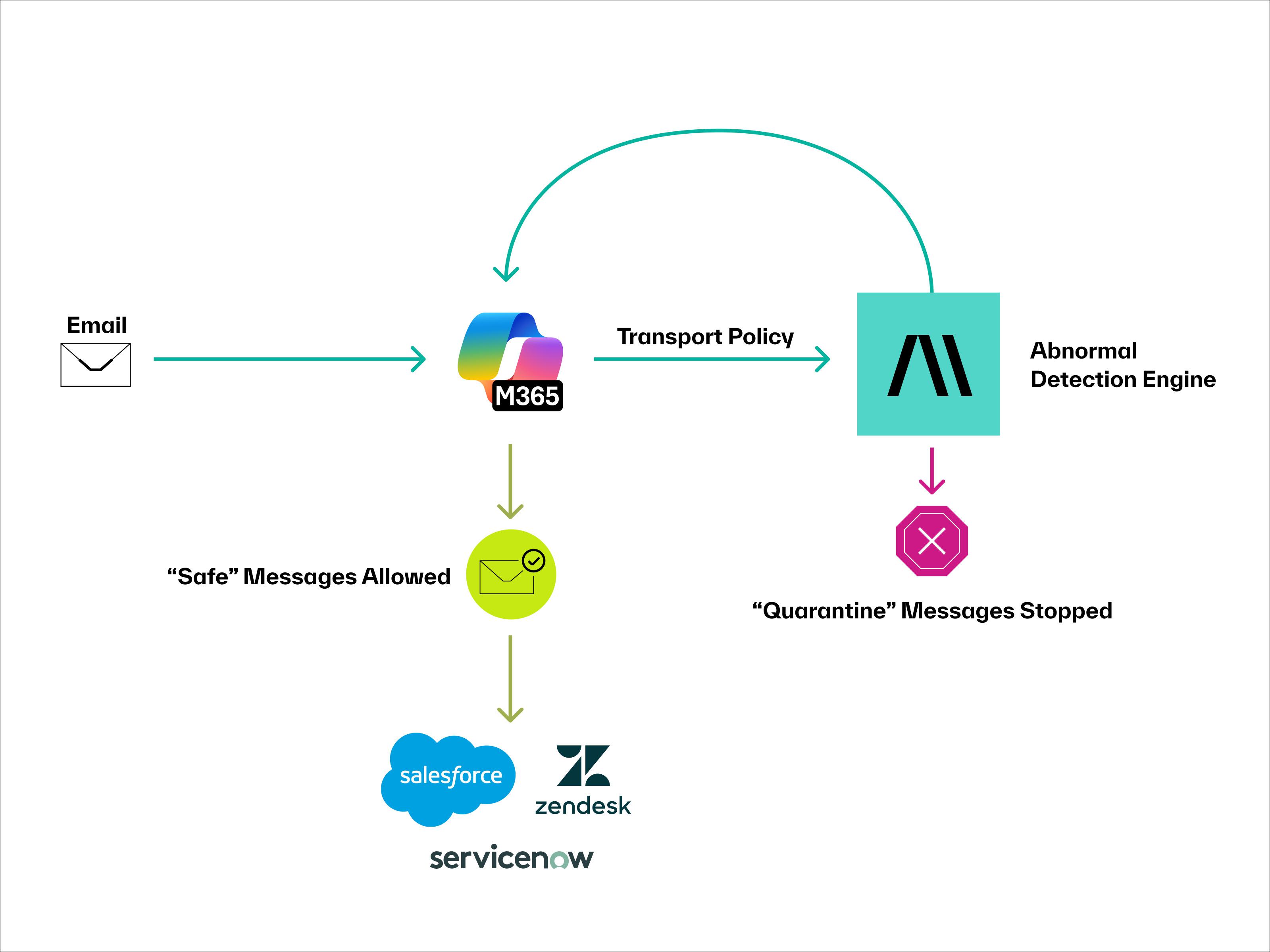
For Google Workspace environments, Abnormal applies the same pre-delivery protection model before Gmail forwarding rules are executed. Using configured Gmail content compliance routing policies, Google routes inbound messages for specified recipients to Abnormal for automated inspection before any auto-forwarding occurs.
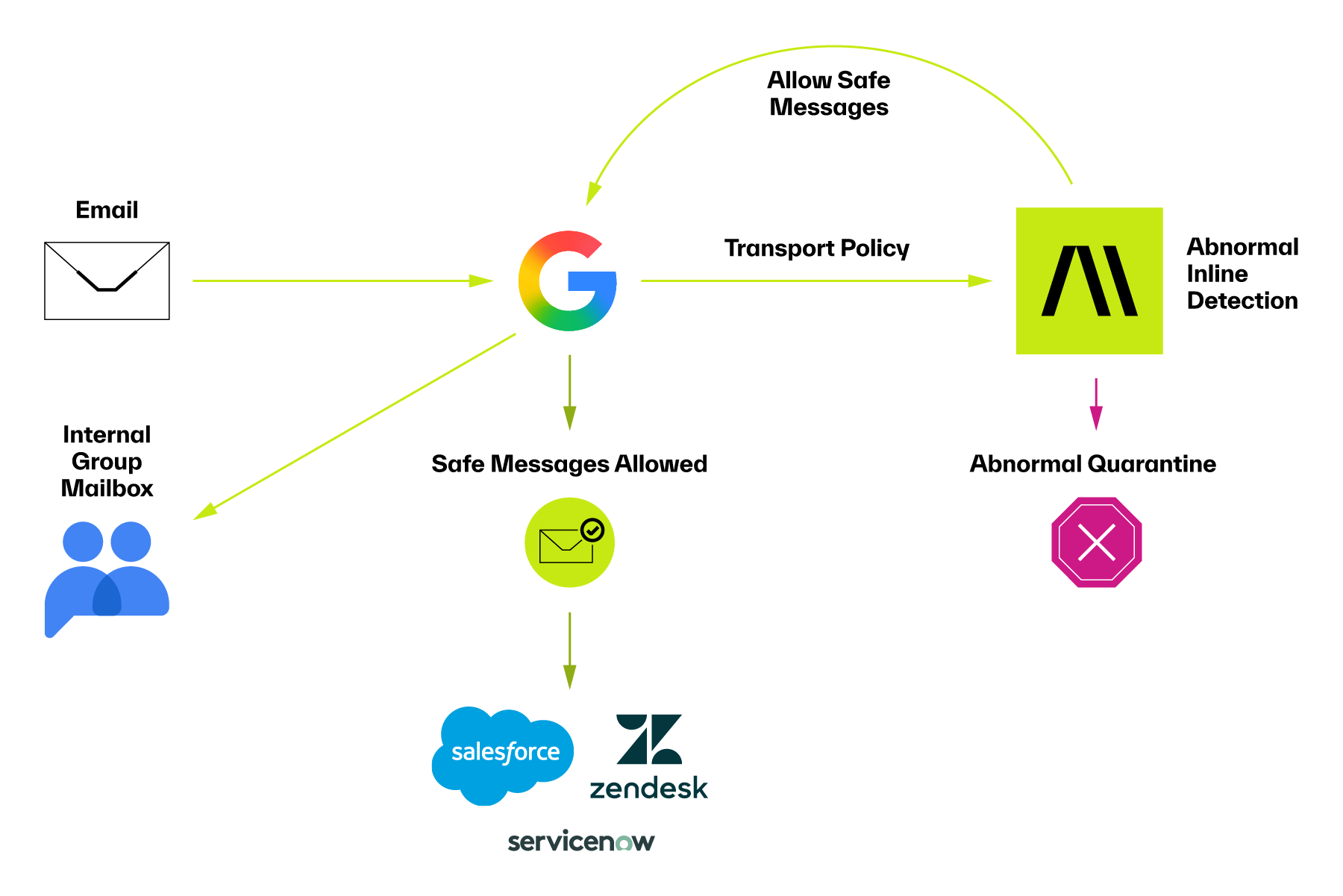
In both environments, the goal is the same: ensure emails routed to third-party tools receive the same scrutiny as emails delivered directly to user inboxes.
Here’s how it works:
Abnormal evaluates each message using the same behavioral AI engine that already protects your inboxes — analyzing more than 45,000 identity, communication, and contextual signals to detect threats that look like legitimate business email. That inspection happens before the forwarding decision is made. If the message is safe, it forwards. If it's malicious, it doesn't.
When a message that matches an auto-forwarding path arrives, the cloud email platform routes it to Abnormal prior to inbox delivery.
Abnormal evaluates the message for threats before any forwarding occurs.
If the message is safe, Abnormal returns it to the cloud email platform, which then forwards it to its intended recipient.
If the message is malicious, Abnormal quarantines it before it can reach any downstream system.
Protecting Google Groups Collaborative Inboxes
Teams rely on Collaborative Inboxes in Google Groups (such as support@, finance@, and security@) to manage some of their most sensitive external communications. But unlike individual user mailboxes, these Group mailboxes have no native API for post-delivery remediation.
For Google Workspace environments, Abnormal now provides pre-delivery protection for Collaborative Inboxes as well. Abnormal evaluates messages before they reach the Group mailbox and blocks malicious emails upstream, helping protect both Group members and the high-value workflows that depend on these shared queues.
Pre-Delivery Visibility for Security Teams
All mail flowing through Abnormal’s pre-delivery scanning is visible within the Abnormal platform, so security teams can investigate and act using the workflows they already know.
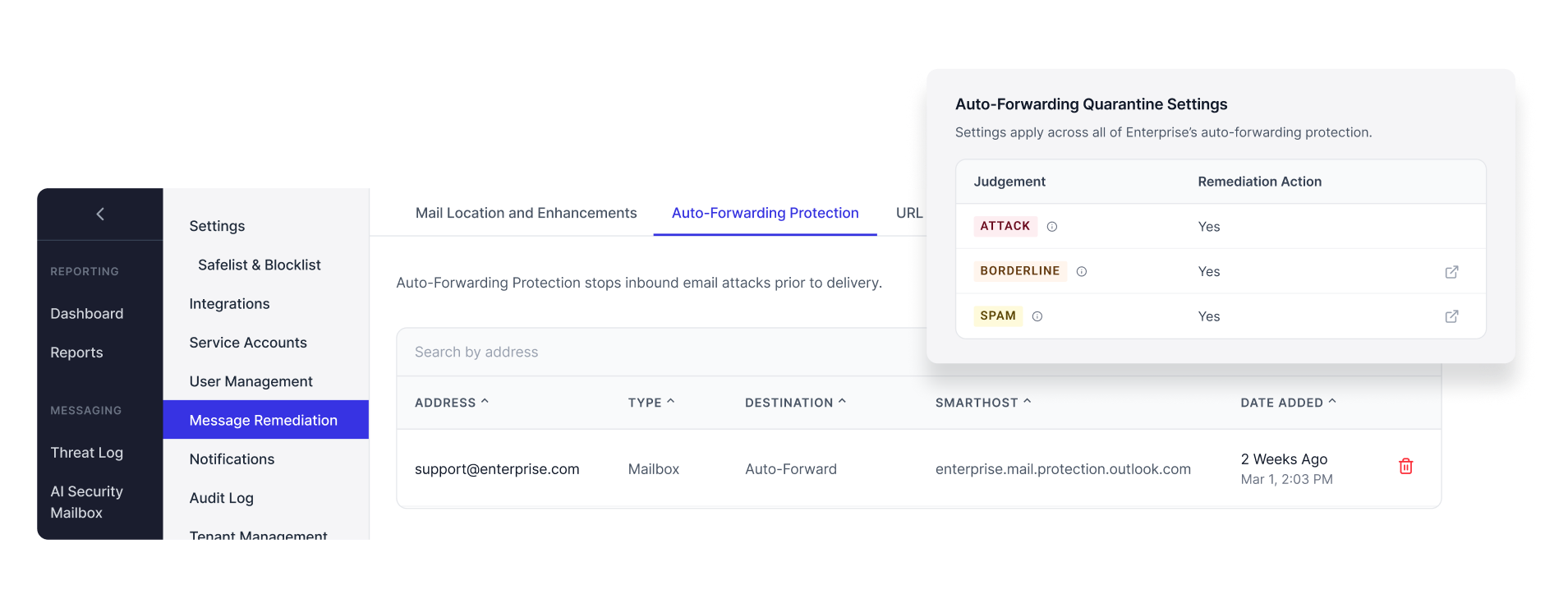
Teams can use Threat Log to filter and review every malicious email flagged by Abnormal’s detection engine, including messages that would otherwise have been auto-forwarded or delivered into a collaborative inbox. They can also use Search and Respond to investigate messages, release false positives from quarantine, and review flagged mail using the same workflows they rely on for broader email security operations.
Admins can further fine-tune coverage in Message Remediation Settings, choosing whether to focus only on clearly malicious attacks or to extend protection to spam and borderline messages as well.
Introducing the Pre-Delivery Mail Flow Dashboard
To help customers operationalize this protection at scale, Abnormal is also introducing the Pre-Delivery Mail Flow Dashboard.
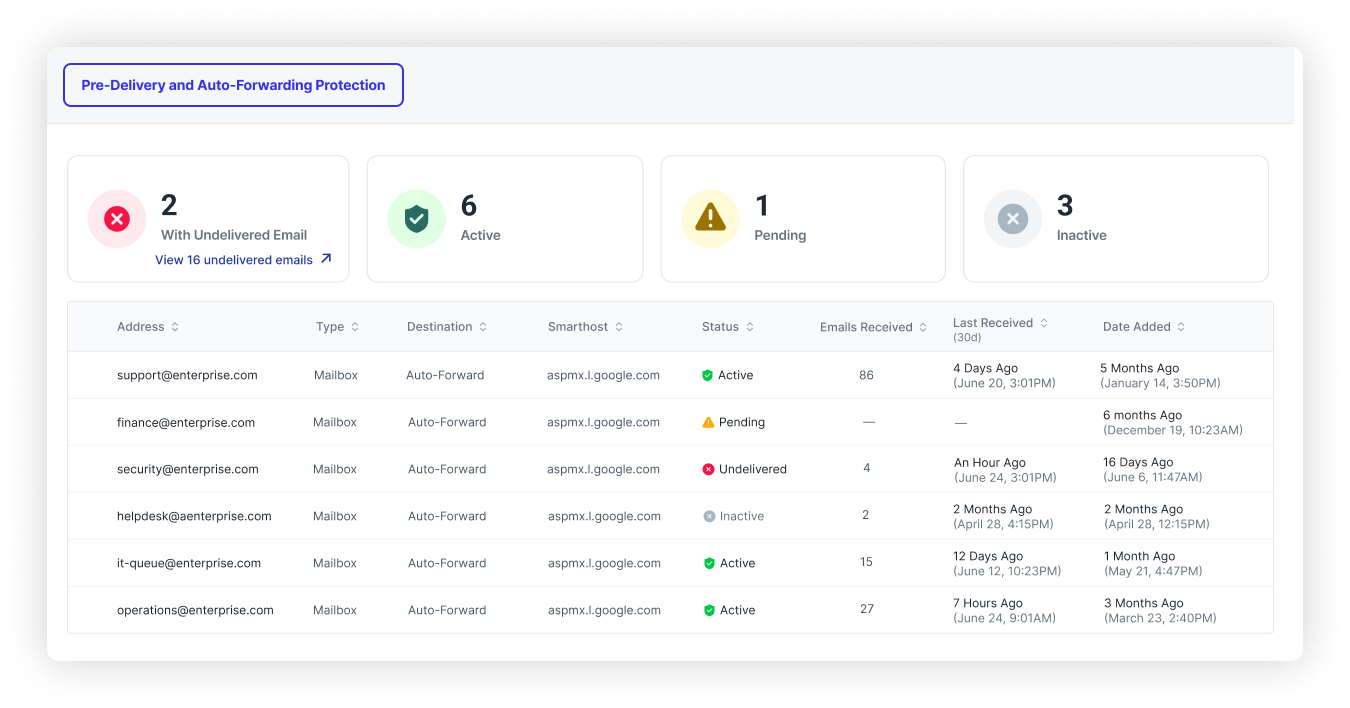
The dashboard gives customers a centralized, real-time view of the mailboxes configured for pre-delivery monitoring. It shows per-mailbox protection status, including visibility into the mail volume moving through pre-delivery scanning.
Customers can use filtering, search, and domain-level rollups to quickly understand which mailboxes are actively protected, confirm proper configuration, and proactively identify inactive or misconfigured mailboxes before they create gaps in coverage.
What's Next: Hybrid On-Prem Mailbox Protection for Microsoft 365
In hybrid environments where some employees use on-premises Exchange mailboxes, cloud APIs alone cannot reach every inbox in the tenant. In the coming months, Abnormal will extend pre-delivery protection coverage to on-premises mailboxes within Microsoft 365 hybrid deployments, helping ensure existing infrastructure does not become a blind spot.
That expansion will bring more email pathways up to the same protection standard as individual cloud mailboxes.
Protecting Your Full Mail Flow, Inbox to Downstream
Security teams have always been accountable for the inbox. What happens after forwarding has historically been harder to control. A support specialist opening a ticket in Zendesk or a rep reviewing a lead in Salesforce has no visibility into whether a message was ever evaluated for threats; they operate on trust in the systems around them.
Auto-Forwarding Mail Protection extends that accountability upstream. For the people working inside downstream tools, the change is intentionally invisible: legitimate emails still arrive, tickets still open, cases still populate, and workflows continue as usual. What changes is the security team’s confidence in what those users are seeing, along with their ability to investigate, in context, any message that never should have made it through.
Ready to see how Abnormal protects the email pathways your business depends on, from the inbox to downstream tools?
