Points clés
When Google's own Threat Intelligence Group disclosed that threat actors UNC6040 and UNC6395 were targeting enterprise cloud environments through voice phishing and compromised third-party integrations, it confirmed a pattern security leaders had been tracking: native platform controls have measurable gaps.
The campaign extended to Salesforce customer instances and, notably, to one of Google's own corporate Salesforce instances. Attacks like these don't fail because native controls catch them. They succeed by exploiting the seams between detection layers.
Understanding where Google Workspace's native Google threat detection capabilities fall short and how to close those gaps is the starting point for enterprise security teams. This article examines five critical practices that address the most pressing blind spots, delivering the visibility, speed, and precision needed to protect Google Workspace environments before a contained public breach becomes a full-scale crisis.
The Google Threat Landscape
Google Workspace represents one of the largest collaborative targets in enterprise security, with attackers systematically exploiting five primary vectors: phishing, ransomware, insider abuse, misconfigurations, and risky third-party applications. Threat actors pivot seamlessly through Gmail, Drive, Chat, and marketplace add-ons to maximize impact across organizations.
The scale of the problem is significant, and these stats confirm it:
- FBI's 2025 Report: Total U.S. cybercrime losses reached $20.877 billion in 2025, a 26% increase from 2024, with business email compromise losses alone exceeding $3 billion.
- Verizon 2025 DBIR: Covering more than 22,000 security incidents, found that 60% of all breaches involved the human element through phishing, social engineering, or credential misuse.
- APWG Q4 2025 Report: Documented a 136% quarter-over-quarter surge in BEC attacks in the final months of 2025 alone.
Phishing serves as the preferred entry point, while ransomware groups exploit shared-drive permissions to encrypt or exfiltrate critical data. Insider threats multiply when employees set files to "anyone with the link," and OAuth grants to unvetted marketplace tools expand the blast radius of any compromise.
Traditional email security tools miss socially engineered attacks that leverage Google Chat, Drive, and third-party add-ons, creating detection gaps modern SOCs cannot afford. This is not a niche concern: the Gartner Magic Quadrant explicitly states that "buyers must consider complementary or supplemental email security solutions to align with best practices for combating modern email threats", a direct analyst validation that native platform security alone is insufficient.
Google's own security guidance acknowledges that effective threat detection requires multiple telemetry sources across the cloud and endpoint layers, a challenge that native policy-violation alerts alone cannot address.
Behavioral analytics solves this problem by establishing baselines for normal login patterns, data movements, and sharing behaviors. This approach isolates genuine anomalies in real time while reducing the noise that overwhelms security teams. Treating identity and activity as primary risk signals, rather than just configuration violations, enables organizations to stay ahead of creative adversaries and fast-moving insider threats.
Below are five of the best threat-detection practices for closing Google security gaps.
1. Monitor User Behavior and Access Patterns
Baselining user behavior in Google Workspace identifies security threats while minimizing alert fatigue. Understanding normal activity patterns, including login locations, device types, and sharing frequencies, enables teams to distinguish legitimate activity from anomalies.
The cost of gaps in behavioral monitoring is measurable. In the 2025 Salesloft/Drift OAuth breach that directly impacted Google Workspace accounts, pre-breach reconnaissance went undetected for months, and once exploitation began, the breach persisted for more than 10 days before it was detected.
Behavioral baselining is the control that makes these extended dwell times visible, which is why security teams must focus on high-risk scenarios and monitor the indicators below that signal potential compromise or insider threats:
- Impossible Travel Logins: Geographic anomalies where users appear in distant locations within impossible timeframes.
- Unexpected Network Access: TOR exit nodes, anonymous VPNs, or unfamiliar proxy connections.
- Mass Data Movements: Sudden exports of large numbers of Drive files, especially outside business hours.
- After-Hours Activity: File sharing or administrative changes outside normal patterns.
- Unrecognized Devices: Logins from devices never previously associated with the user.
Behavioral analytics tools automatically flag such activities, enabling rapid detection and response while reducing mean time to detect.
2. Secure Integrations and Third-Party Applications
Third-party applications can create persistent backdoors into Google Workspace through overly broad OAuth scopes and unchecked integrations. Once a user clicks "Accept," the resulting tokens grant long-term access until explicitly revoked. This is now the dominant confirmed attack pattern against enterprise Workspace environments, surpassing direct Gmail phishing.
The March 2026 Vercel breach illustrates the gap precisely. A Vercel employee signed up for an AI productivity tool using their enterprise Google account and granted broad OAuth permissions. Attackers leveraged that access to take over the employee's Workspace account and reach environment variables containing API keys and database credentials.
Forrester analyst Alla Valente characterized the root cause not as a procurement failure but as a "definition gap": Google Workspace's native controls permitted the "Allow All" OAuth grant under existing configuration, with no mechanism to flag the downstream risk.
The Salesloft/Drift incident illustrates a related fourth-party risk. Drift's OAuth tokens, granting access to hundreds of enterprise Workspace environments, persisted through Salesloft's February 2024 acquisition without a post-acquisition revocation audit, leaving them exploitable until August 2025.
Native Workspace controls have no mechanism to detect inherited token vulnerabilities from M&A activity, which is why organizations should audit their OAuth footprint quarterly by following the steps below:
- Inventory Connected Applications: List every app granted Gmail, Drive, or Admin-API access; tag owners and document business justification.
- Evaluate Permission Scopes: Enforce the principle of least privilege; revoke excessive admin rights or full mailbox visibility.
- Automate Token Management: Use Admin SDK workflows to revoke tokens that have been inactive for 90 days.
- Monitor API Activity: Analyze audit logs for mass downloads or unusual IP addresses.
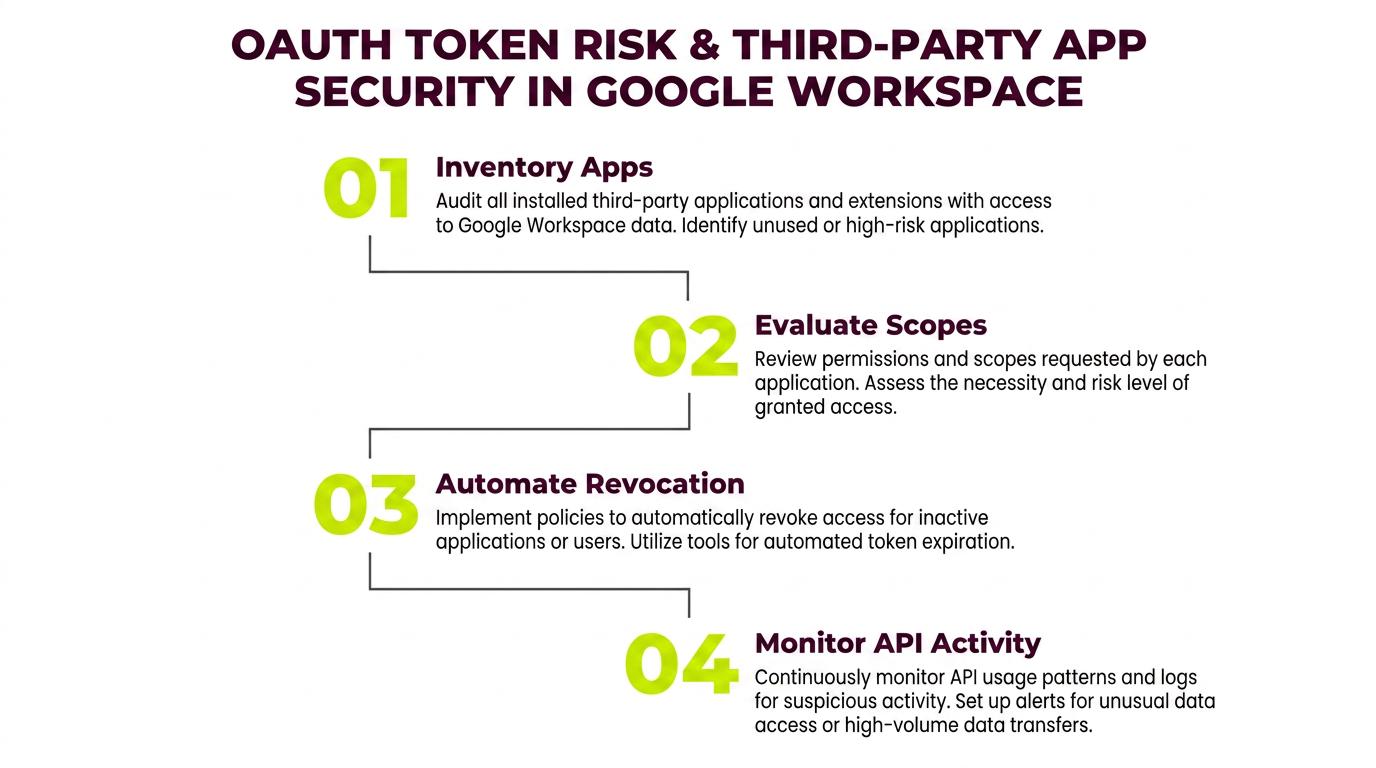
Running this four-step cycle on a fixed schedule turns OAuth governance from a reactive cleanup task into a continuous control that catches inherited and dormant tokens before attackers do.
3. Implement Real-Time Communication and Data Monitoring
Continuous inspection of Gmail, Chat, and Drive content, including message bodies, headers, and shared-link metadata, enables rapid anomaly identification. Pairing native tools with advanced behavioral AI reduces detection noise and stops Drive-link exfiltration attempts.
Two emerging attack patterns expose the limits of content-based filtering in Google Workspace environments. First, in Telephone-Oriented Attack Delivery (TOAD): an analysis of approximately 5,000 email-based threat detections that bypassed secure email gateways, TOAD attacks accounted for nearly 28% of all gateway-bypassing detections.
The same research found Google Workspace performed worse than average on attacks that spoofed legitimate, trusted notification sources. Because TOAD emails contain no malicious links or attachments, they evade all content-based filtering by design.
Second, Gemini prompt injection: a vulnerability disclosed in July 2025 through Mozilla's bug bounty program demonstrated that hidden directives can be embedded in email bodies using zero-size CSS text, invisible in Gmail's rendered view. This could cause Gemini's email summary feature to generate fabricated phishing content, including fraudulent phone numbers and URLs.
Because the attack requires no attachment or direct link, Gmail's attachment scanning and link-reputation checks provide no protection. Real-time monitoring must therefore extend to behavioral signals, not just content inspection.
Key automated-detection capabilities include:
- Mass Data Exports: Detects large or unusual file downloads.
- Unauthorized Sharing: Flags external sharing of sensitive documents.
- Suspicious Link Patterns: Identifies malicious URLs by analyzing link reputation and phishing cues.
- Anomalous Communication: Highlights unusual messaging behavior, such as sudden contact with competitors or wire-transfer discussions.
4. Establish Identity and Access Controls
Strong identity controls require enforced authentication and continuous behavioral monitoring to detect privilege abuse. The assumption that MFA closes identity risk has been directly tested and found wanting in recent Google Workspace campaigns.
In an active campaign running from April through June 2025, Russian state-linked threat actors (UNC6293, assessed as APT29-affiliated) bypassed Gmail two-factor authentication by exploiting Google's app-specific password feature.
The attackers impersonated officials over extended email exchanges, eventually instructing targets to generate a 16-character app-specific password and return it via email, thereby granting persistent, MFA-independent account access. App-specific passwords are not blocked by standard MFA enforcement policies and require explicit restriction via the Google Workspace Admin Console.
AI is compounding the social engineering challenge underpinning these attacks. According to the Verizon 2025 DBIR linked earlier, synthetically generated text in malicious emails has doubled over the past two years. The FBI's 2025 Report referenced earlier also attributed $893 million in losses to AI-enabled fraud, with businesses reporting more than $30 million in losses tied to BEC scams with a confirmed AI component.
Fortify Accounts with MFA, Context, and AI
Mandatory MFA bypass blocks most brute-force and credential-stuffing campaigns, while quarterly super-admin reviews minimize blast radius. Conditional access policies can deny sign-ins from unmanaged devices or unexpected geographies.
IAM Hardening Checklist
- Isolate break-glass super-admin accounts with multi-party approval.
- Restrict app-specific passwords for legacy IMAP/POP3 via the Admin Console; do not leave this as a default-permitted fallback.
- Allow-list trusted OAuth apps and auto-revoke unused tokens after 90 days.
- Review privileged roles quarterly; remove outdated privileges.
- Apply least privilege and use just-in-time provisioning wherever possible.
5. Enable Automated Threat Response and Remediation
Automated containment shrinks the gap between detection and resolution when large volumes of Workspace events occur every minute. The Salesloft/Drift breach referenced earlier illustrates exactly what that gap costs: over 1,000 organizations were ultimately impacted, with more than 1.5 billion records reportedly stolen. Manual review processes cannot compress response timelines enough to limit damage at that scale.
The threat environment driving this urgency continues to intensify. As noted in the APWG Q4 2025 Report cited earlier, threat group Scripted Sparrow is sending up to 6 million highly targeted emails monthly, and the Verizon 2025 DBIR also found ransomware present in 44% of all breaches. Automated response playbooks are not optional at this volume; they are the only mechanism capable of operating at machine speed against machine-scale attacks.
Automated Response Playbooks
To operate at the machine speed today's threats demand, security teams should codify a set of automated playbooks that trigger the moment suspicious activity is detected. The following four playbooks form the core containment layer for Google Workspace environments:
- Token Revocation: Instantly revoke suspicious OAuth tokens to block attacker access.
- Account Lockdown: Reset passwords and terminate sessions for compromised users.
- Data Quarantine: Unshare or quarantine Drive files exhibiting mass download or unauthorized sharing.
- Communication Blocking: Remove malicious emails or Chat messages and suspend compromised accounts when necessary.
Together, these playbooks compress response timelines from hours or days to seconds, ensuring that detection translates directly into containment before attackers can expand their foothold.
Close the Gaps Native Controls Leave Behind
Phishing, OAuth abuse, MFA bypasses, and AI-driven social engineering are outpacing what native Google Workspace controls were designed to catch.
Behavioral analytics, third-party app governance, real-time monitoring, hardened identity controls, and automated response playbooks aren't optional add-ons; they are the modern baseline for defending collaborative cloud environments at enterprise scale. Together, they close the detection gaps left by native controls and position security teams to respond before a contained incident becomes an enterprise-wide crisis.
Want to see what's slipping past your native Google Workspace controls? Request a demo with Abnormal to discover how behavioral AI can detect and stop the threats your existing tools miss.
